Tips to lessen NOISE in dark scene.

Zblock

Well-known member
I'm filming a scene in an almost completely dark shop. The plan is to fog it up pretty heavy, ad a few blue shaded lights and maybe a strobe and have my actor walking around with a powerful led flashlight so the beam cuts through the fog.

It's supposed to be very suspenseful. I'm going to have a lot of black around the edges of the screen and I'm afraid the noise will be unbearable. Especially with swirling fog just barely lighted.

I'm using the hvx200a and I've read enough about the detail settings and detail coring to get the best low light performance but I sure could use a little extra advice as far as how to shoot it and or YOUR preferences for camera settings.

Does anyone have any hints or tips to keep the noise down. I'd like to keep the pitch black background.

Thanks,

photo.php

*add
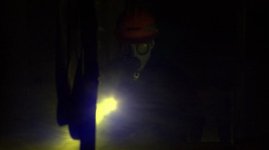
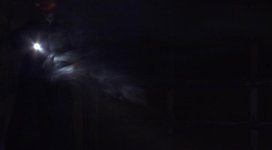
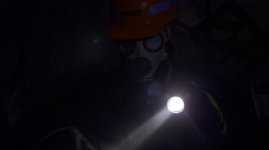
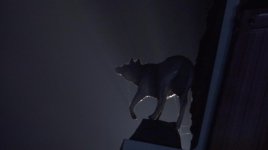
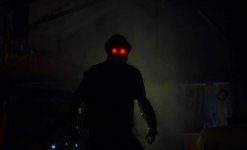
Here's what it turned out like Not color corrected yet. I have a few more nights of shooting so I'll try and lighten a little better and darken in post. Thanks for the advice guys.
photo.php


photo.php
 

Attachments

  • 1.jpg
    1.jpg
    30.5 KB · Views: 0
  • 5.jpg
    5.jpg
    26.2 KB · Views: 0
  • 6.jpg
    6.jpg
    25.3 KB · Views: 0
  • 4.jpg
    4.jpg
    30.6 KB · Views: 0
  • 3.jpg
    3.jpg
    31.9 KB · Views: 0
Last edited:
I would play with the master pedistal settings while looking at the shots with an pro monitor. then you will get exactly what you want.
 
I disagree with Barry. He's looking for blacks, your saying spend time to light the blacks? and then spend even more time in post to fix it?

In set lighting instances like yours - it's a noisey camera period. But right, as BGust says play with the master ped. Get out of the cinelike gammas if you are using them.
 
I disagree with Barry. He's looking for blacks, your saying spend time to light the blacks? and then spend even more time in post to fix it?

That's the way it's done everywhere, even on pro sets. The point is to pump just enough light to clear the camera's noise floor so that you get clean shadow areas to work with.
 
Huy Vuy, this may be a stupid question but how do you know what the camera's noise floor is? do you look on the hpx's graph or vectorscope , do you just judge with your eyes on an external monitor or...?

I'm still new at reading those things.
 
I have noticed with the hvx that it only gives noise issues if you do not give it enough initial exposure. If you are lighting and your meter is giving you an f 2. in the highlights than ****, that is just not enough exposure to use the camera. Sorry if this was already stated. You can always stop down with filters and ND.
 
There are a lot of people on this forum with many years of experience. Many of them have been doing professional video for years. When they offer advice, particularly when it's advice that has been used in Hollywood for over 75 years, it's probably wise to give that advice due weight.

However, when inexperienced users discount that advice, two things happen.

1. Pros are less apt to offer good advice in the future
2. Newbies are going to struggle needlessly

This is why footage from the VERY same camera looks so VASTLY different when pros shoot, than when inexperienced newbies shoot.

The HVX is not a noisy camera. It's a camera that needs quite a bit of light to make an image. Also known as a slow camera. I promise, if you give it 100FC of light on set, your images will be (or can be) sharp and noise free. But when you guys start playing down in the 10-15FC range like the original poster here, then you're going to be highly disappointed with the results from most cameras in this price range.

The answer is not master pedestal. The answer is to light the scene properly so hacking around with master pedestal, gain, and other foolishness is not required.

I disagree with Barry. He's looking for blacks, your saying spend time to light the blacks? and then spend even more time in post to fix it?

In set lighting instances like yours - it's a noisey camera period. But right, as BGust says play with the master ped. Get out of the cinelike gammas if you are using them.
 
So true...I would also add that you should experiment before the shoot especially if you are lighting(or not lighting) an unusual scene. I've been using my HVX200 (not a 200a) for about 3 years...however just last year I shot a short that was mostly low key lighting, really wanted a "dark" look, concerned with the lowlight/noise performance of the camera I had anticipated using some type of noise removal software. However, just with lighting and minimal post work, I was surprised at how good it looked. And I'm sure it could have been done even better! here is a frame from the short:


The HVX is not a noisy camera. It's a camera that needs quite a bit of light to make an image. Also known as a slow camera. I promise, if you give it 100FC of light on set, your images will be (or can be) sharp and noise free. But when you guys start playing down in the 10-15FC range like the original poster here, then you're going to be highly disappointed with the results from most cameras in this price range.

The answer is not master pedestal. The answer is to light the scene properly so hacking around with master pedestal, gain, and other foolishness is not required.
 
It's actually fascinating, over the lifespan of this message board, how questions have gone from wanting to learn more general, fundamental filmmaking skills, to many more questions about electronic solutions, be they on the cameras themselves or in computer software. It's funny how rarely it now seems to occur to people that what they see on the screen is the result of what happened on the set, rather than what happens in scene files or After Effects.

And, as Perrone said, the answers being posted have been more reflexively "electronic tricks," rather than sound, fundamental filmmaking technique. I suppose that feeds the general idea that most visual appearance is achieved through button-pushing.

Do it right on set, and what you need to do in post is minimal. Work with a tool the way it's meant to be worked, and you'll like the results.
 
Huy Vuy, this may be a stupid question but how do you know what the camera's noise floor is? do you look on the hpx's graph or vectorscope , do you just judge with your eyes on an external monitor or...?

I'm still new at reading those things.

You want to keep most of your (non-shadow) picture in the upper half of the waveform graph. The noise lives at the bottom.

Caucasian faces should normally be in the 60-70 range, with the brightest spots on the face hitting around 70. If it's 80, it's most likely too hot. Other elements which would normally be around the same brightness as a Caucasian face should be in the same range. Darker or brighter elements would be (not surprisingly) lower or higher.

Shadows, dark elements, etc., would be in the lower half. The lowest part of the graph is where the noise is, so if you want your shadows to be less noisy, keep them above it. If you want them to be black, that's where you'd do it in post.

Generally speaking, whether the scene is daylight, roomlight, or night, a face should be at about the same level of exposure.

Of course, that's all baseline; artistic needs may vary considerably. (This is why you need to learn the fundamentals! :) )
 
I was hoping that my character would mostly be a silhouette against a light behind him but on shoot day, the character was not really seen. So I put a florescent in front of him and went that route.

My only doubt about lighting onset and darkening in post would be that without proper lighting on the character I'd have to darken so much to lose the background that I'd probably lose my character as well.

Maybe I should have turned the shop lights on and then added light to the character kinda a 2 to 1 ratio or something.
 
The next shot turned out better but still noisy.
 

Attachments

  • Untitled4 (2).jpg
    Untitled4 (2).jpg
    57.8 KB · Views: 0
I was hoping that my character would mostly be a silhouette against a light behind him but on shoot day, the character was not really seen. So I put a florescent in front of him and went that route.

My only doubt about lighting onset and darkening in post would be that without proper lighting on the character I'd have to darken so much to lose the background that I'd probably lose my character as well.

Maybe I should have turned the shop lights on and then added light to the character kinda a 2 to 1 ratio or something.

You'd want a good, bright light behind him. If you want to see any detail on him, yes, you'd need to shine some light on him. If you want the same kind of detail seen in the rest of the dark elements, you'll need to bring those up, too.

It's better to go brighter and darken later. It's really no different from recording sound -- if you have a loud, clear voice which overpowers the ambient noise in the environment, if it's too loud (without distorting), then you can lower the volume -- and when you do, the ambient noise disappears. But you're only able to do that because the voice is so much louder than the noise. If you record the voice more quietly, and you raise the volume in post, you raise the volume of the noise, too.
 
Adding some ambient lighting might help, indeed. Be careful, though - by lighting your 'blacks' way above camera noise floor you will further reduce the (already small) dynamic range. If you wanna get pronounced (high contrast) silhouette effect this shouldn't be a problem, though.
I don't agree it's matter of pure power, like somebody said. 100FC on set won't help - you will need to adjust the exposure by closing down the iris or throwing-in some NDs. It's a matter of lighting ratios. I had noise problems with my HMC151 even in daylight (when not using fill or bounce).

One practical advice - try turning your detail down - it makes the noise less 'digital', much more acceptable for my eyes. Also, you might try to use B-Press or Cinelike-V gamma.
If you plan to crush the blacks in post the noise will become less visible.

By the way - I'm not sure reducing the contrast on set (by adjusting lighting ratio) and stretching it in post is the way the pros do it. Recently I had the opportunity of seeing Dante Spinotti at work and was surprised by the extensive amount of tweaking he did on set to F35 - crushing the blacks and adjusting gamma, checking the contrast on big Logic LCD just to get the look he's after directly on set. Sure, F35 is the different beast ;)
 
I don't think anyone's saying to reduce the contrast ratio, but to get the whole picture up out of the bottom (at the same ratio).
 
I don't think anyone's saying to reduce the contrast ratio, but to get the whole picture up out of the bottom (at the same ratio).

How are you gonna achieve this. You have to either underexpose first (before bringing it up) or clip the highlights (which will reduce the contrast)
 
By making everything brighter to the same degree. The backlighting in that silhouette shot is still pretty dim. There's lots of room.

I will backpedal a little bit, though -- there are times when you do need to reduce the contrast ratio if you want detail in both the brights and darks -- of course.
 
How are you gonna achieve this. You have to either underexpose first (before bringing it up) or clip the highlights (which will reduce the contrast)

By adding as much light to the shadow area as the mids and high. This is why this is harder to execute then done. Your need to bring in some bigger fixture overall so that the brightness level in the entire scene go up and then you can preserve your contrast ratio.
 
Back
Top