Timelapse question

ToddWayne_AZ

Active member
It rained here in Phoenix yesterday, so I grabbed my camera and tried to get a few shots of my kids playing in the backyard. I cut a few of the shots together and decided to add a little timelapse shot I'd done of the gathering rain clouds.

The timelapse shot looks really "jittery" to me. Not at all smooth and flowing like some of the timelapse stuff I've seen on here. My interval was one shot per minute in 1080i/60i. Just wondering if the interval time has something to do with how smooth the shot ends up being, or is there some other setting I'm missing.

Any suggestions would be hugely appreciated.

http://homepage.mac.com/todd_fowler/iMovieTheater21.html
 
Hi Todd, I think one shot per minute sounds as a very longtime. The clouds moves to much between the recorded frames so you get a more smooth look if you go down in time.
 
Yeah, you're probably right. Got to thinking about that after I'd posted. My previous attempt at timelapse was like one shot every 5 seconds or something and the effect was that the clouds didn't seem to move much at all. Although some of the time lapse stuff I've seen here seems to span a LOT of time - like an entire sunrise, or a flower opening throughout the morning - in just a few seconds. And I remember those seeming much less "choppy" than mine.

I'll continue to experiement, and try less of an interval. Thanks for the input!
 
Todd,

I second elton suggestion for changing the record time.

Glad to see another Phoenician on the boards here!!!! I live in Glendale and run a small production house with about 7 or 8 guys here.

We should get together and swap war stories sometime!!!

PM if ur interested!
 
Brian,

Thanks. No, didn't use a Firestore...just shot till my battery died.


mainstreetprod,

That's the smoothness I was looking for! Very nice. Wer'e supposed to have some clouds and possibly rain toward the end of the week. I'll try a 5 second interval.

Thanks.
 
Thanks- I like the look of your cloud footage for different purposes, such as showing rapid passing of time or for an artsy effect.Very cool.
 
Todd,

Did you look at the timelapse in your camera to see if it was smooth there?
 
Interval Timing Chart

Interval Timing Chart

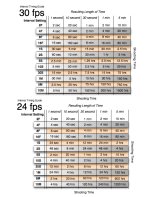
One shot every minute will be an extremely fast time lapse. I made a chart to quickly figure out the time lapse settings. The variables are: Interval Settings on Camera, Shooting time, and Resulting Length of time. I attached the chart to this post as a .jpg
 

Attachments

  • HVX200 Interval Timing Guide.jpg
    HVX200 Interval Timing Guide.jpg
    192.8 KB · Views: 0
Rygh,

I hadn't even thought to check what it looked like in the camera. I just now checked and it DOES look substantially smoother (better) in both the viewfinder and on the LCD. I mean a LOT better than what I ended up with in FCP.

any ideas what that means? Maybe an import setting or something?

Josh,

Thanks for the chart! Just printed it out.
 
What were your sequence settings in FCP and what was your base frame rate for the timelapse (30P? 60i?) If you bring either 30P or 60i into a 24p timeline, FCP will try to force the footage to 24p by dropping frames and creating a really awful, choppy clip. What you should do in that case is open the clip with Cinema Tools and change the frame rate to 23.98, and then reimport it into FCP, where it will play smoothly at 24p.

If your sequence settings match the base frame rate of your timelapse, then it should play back fine.
 
Todd,

Yeah, I came across the same problems before. Stas_Tagios is correct. If you take it into Cinema Tools, and conform it to 23.98, things should look good for you.
 
Stas_Taglos & Rygh,

Thanks much for the tip. I did as you suggested and conformed the clip to 23.98 and re-imported to a 24p timeline. I think the results are moderately better:

http://homepage.mac.com/todd_fowler/iMovieTheater22.html

Still not as smooth as others I've seen (I'm chalking it up to the 1 minute interval time), but definitely better than it my first one. Thanks again, for the input, you guys are a huge help.
 
Back
Top