Time Freeze Sequences...

NBside

Active member
Hey everyone...

I figured I would start a discussion thread about time freeze sequences, and different approaches to achieving unique results.

One of my favorite recent sequences is from "The Other Guys" starring Mark Whalberg and Will Ferrell. There is a bar scene in which the camera moves through the bar in one continuous shot, showing the characters frozen in different positions throughout the bar. From what I was told, they used a motion capture camera and programmed the movements. However it was done, it is an incredible sequence.
http://www.youtube.com/watch?v=zTkXwVmcRsE

Generally speaking, the couple of times that I played around with time freezes, I have just used stills and animated movements, however, I checked out the VideoCopilot method once, and did a pretty awesome sequence and created some cool elements in C4D to composite in.

Does anyone else have any cool time freeze tips and tricks to share? I'd like to create a really awesome sequence in my spare time, utilizing a bunch of different methods.
 
Best place to start is a good base, which means:

1. Actors that are REALLY good at holding still for extended takes
2. A professional steadycam operator to get ultra smooth movement for the shot


Once you have that, adding cg elements like things floating in the air, etc is much more fun.
 
It's sometimes possible to fake time freezes with an ultra-high frame rate camera, i.e. the audience is actually seeing a very very slow motion shot. Obviously the illusion is harder to maintain, the longer the shot is.
 
@Erik... agreed...the CG elements are most certainly the most fun. The couple of times I messed around with it, it was hard for me to get my actors to hold still enough to really use most of the live action footage. I dollied all of my shots, and timed my panning motions at certain intervals in distance to ensure that each take had identical motion. I wanted to use the same actors in different areas of the shot, with the perception of one continuous shot, similar to "The Other Guys", however my talent made it pretty much impossible. I ended up settling for animated stills and a lot of CG elements. Too bad really, but I want to try it again soon!

@clang... That is a very interesting idea. I never thought of it that way. That would be even more crucial for your talent to remain as still as possible!

You know, I had a discussion with a friend of mine who does effects makeup work, and he had mentioned that he heard of someone using mannequins and wax characters to achieve a time freeze in a horror film once. Id love to see the footage to see how that turned out. I guess when you need your actors to be dead still, theres no better substitute than lifeless characters..lol But that really demands a budget and some incredible wax and makeup work.
 
Almost forgot to link this, it's a 24 hour film festival short we did last year. There are 6 time freeze sequences, 3 with CG, 3 practical. All done in 24 hours. : D Have the actors hold still, use a dolly and bam! Instant time freeze.

 
Here you go.... Everyone stood still in this shot (well, almost everyone). All you need is some CG....

 
Almost forgot to link this, it's a 24 hour film festival short we did last year. There are 6 time freeze sequences, 3 with CG, 3 practical. All done in 24 hours. : D Have the actors hold still, use a dolly and bam! Instant time freeze.

Pretty damn good for 24 hours!
 
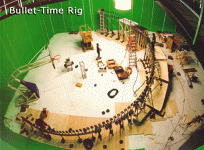
I think it is a bullet time:
There were many many cameras that shooted one single photo at the same time.
Then they postprocessed all (and interpolated some frames)

There's a famous scene in Matrix with this effect: http://www.youtube.com/watch?v=WhxbYTMNMxo

Here's the making of with a good explaination:
 
Last edited:
I mean in bullet time there isn't a real camera moving around the subject.

Just look at this video: http://www.youtube.com/watch?v=ZlZPmABrLu8
and at its making of:


As you can see, many cameras (generally placed around the subject) take one photo at the same time.
Later, in post production, those photos will be shown sequentially (i.e. First the photo taken with camera 1, then the photo taken with camera 2 and so on)
This will give you the illusion to be able to move around a "frozen" subject.
 

Attachments

  • ent_bullet-time3.gif
    ent_bullet-time3.gif
    126.8 KB · Views: 0
Last edited:
Corridor Digital did an amazing Time-Freeze with CGI, Tracking, Props, Particles, etc... you can see it here:

AND here's they way they did it:

( and while I'm mentioning vids, here's a link to our first Freeze-Time attempt with tracking elements: http://www.youtube.com/watch?v=zVUlAs6F8bg I used After Effects with a Camera Tracker Plugin, but if I were to do it again, I'd plan better and use Mocha. )
 
Back
Top