THE VEGAS CHALLENGE - can we pull this off?

They gave me a 2 pop to place before the first frame and that's what they use to sink everything. I don't even know what AAF files are. What are they?

Basically they want the sound files without my pans/volume curves, EQ and effects, which they want to redo from scratch (ogh)...

So I guess that AFF files are supposed to export the audio and some info (start and end points etc...) but not the fades, volume, etc...

Who can elaborate on that?


Well, what I would do (and this probably isn't the optimal method), is:

1. Split all audio onto 8 or more stereo tracks corresponding to characters in the scene, effects, music, etc. Make sure you have notes for each scene as to what is on each track.

2. Remove all effects, curves (if you have any) and set faders to 0 (neutral).

3. Put in the 2-pop at the start, and copy the audio to each track.

4. Render the audio tracks as 24-bit 48kHz stereo AIFF. There will be 8 or more very long files (the length of the film). (Why 24 bit? Because you didn't normalize the audio (many engineers hate when clients pre-normalize), and the engineers will be able to get some information out of the noise-floor if need-be.)

The engineers can dump all of the files into their DAW, and use the tools they have to split the audio with the size of "handles" they need -- and everything is in the right place without any futzing around. There's a bit of work for them in organizing the original 8 (or more) tracks to the channels they want to use, but that's way less of a nightmare than dealing with timecode that doesn't work.


There's other ways, but this to me seems simplest and least-annoying to the engineers.

Can the guy come over and look at your setup and recommend something?
 
Well, what I would do (and this probably isn't the optimal method), is:

1. Split all audio onto 8 or more stereo tracks corresponding to characters in the scene, effects, music, etc. Make sure you have notes for each scene as to what is on each track.

2. Remove all effects, curves (if you have any) and set faders to 0 (neutral).

3. Put in the 2-pop at the start, and copy the audio to each track.

4. Render the audio tracks as 24-bit 48kHz stereo AIFF. There will be 8 or more very long files (the length of the film). (Why 24 bit? Because you didn't normalize the audio (many engineers hate when clients pre-normalize), and the engineers will be able to get some information out of the noise-floor if need-be.)

The engineers can dump all of the files into their DAW, and use the tools they have to split the audio with the size of "handles" they need -- and everything is in the right place without any futzing around. There's a bit of work for them in organizing the original 8 (or more) tracks to the channels they want to use, but that's way less of a nightmare than dealing with timecode that doesn't work.


There's other ways, but this to me seems simplest and least-annoying to the engineers.

Can the guy come over and look at your setup and recommend something?


yes, Patrick is coming over next week to watc the film and see what it is he will be dealing with. We will go from there... Thank you for the suggestions, which may prove helpful in the near future :)
 
CHALLENGE #3

Create a temporary credit roll in Vegas for this Saturday's big screening .

Problem #1:

How do I reduce the amount of space between the lines?

Problem #2

How do I reduce the amount of space between character name and actor name??
 
Last edited:
CHALLENGE #2 UPDATE.

thanks to Perrone who was way cool and helped me over the phone, I was able to burn a dual layer DVD in time for my (very very successful) private screening last saturday.

Problem #1

The amount of black frames at the "half way" point (when DVD switches layers) was quite long. Maybe about3 entrire seconds :( ... Can this be fixed?

Problem #2

We are experiencing some heavy strobbing on pans. Strobbing is not that bad on footage, just the usual amount of strobbin expected to happen with 24 fps.
Sometimes I will speed up a pan in post, with velocity curve for exemple. Will that cause strobbing? Or, if I when i shot the pan, I did follow the 7 second rule, am I OK, even if I speed up footage in post later?

Hmmmmmmmmm... Woudl appreciate feedback urgently, cause i raelly want to fix this for my BIG screening this coming saturday..

I was wondering if maybe the rendering did not produce optimal quality and maybe that is why it is strobbing so much?? Many people noticed it, both industry people and regular everyday people.. So I knwo it is a problem and I need to resolve it ASAP...
 
CHALLENGE #3

Create a temporary credit roll in Vegas for this Saturday's big screening .

Problem #1:

How do I reduce the amount of space between the lines?

Problem #2

How do I reduce the amount of space between character name and actor name??

You're using a Credit Roll generated media? The Styles tab has options (set separately for each of the three text types) to set Space Above and Space Below. You can also alter Tracking and other attributes for each style.
 
CHALLENGE #2 UPDATE.

Problem #2

We are experiencing some heavy strobbing on pans. Strobbing is not that bad on footage, just the usual amount of strobbin expected to happen with 24 fps.
Sometimes I will speed up a pan in post, with velocity curve for exemple. Will that cause strobbing? Or, if I when i shot the pan, I did follow the 7 second rule, am I OK, even if I speed up footage in post later?

Hmmmmmmmmm... Woudl appreciate feedback urgently, cause i raelly want to fix this for my BIG screening this coming saturday..

I was wondering if maybe the rendering did not produce optimal quality and maybe that is why it is strobbing so much?? Many people noticed it, both industry people and regular everyday people.. So I knwo it is a problem and I need to resolve it ASAP...

Could be worth some quick experiments with your project File Properties, especially Motion Blur Type and Deinterlacing Method - I've had some very annoying motion glitches which have been greatly reduced or eliminated by fiddling with File Properties.
 
First of all sorry for my english.... and maybe some language gaps ;)

For audio problems with lots of tracks
(i'm working for foleys and sfx production for 3d films in poland)

audio sfx production should be done at final video material/scenes

Common problem is: lots of track - that's thru, but you should mixdown finished parts of sfx for example

One Track only for atmosphere (animals, nature, everything in background - should be stereo)

One Track is only for major SFX (steps, explos, engines, doors etc.) - they can be done in mono, becouse in final you can add them "breath" - reverb, panning etc. (even for 5.1 panning)

One Trck is for Dialogue, they also should be done in mono (see point above)

Last track is for Music and only for it.

So you finally have only 4 trcks for final editing. Keep the track in 24Bit 48kHz WAV

I always start working having only dialogues, then i do atmospheres, music ant last major SFX. For me it's the best way, becouse if you'll start for ex. from SFX, you'll do too much not necessary SFX which dissapears in finalmix (will be covered by others)


For DVD creating, in DVD arch, you've properties to each clip and endaction, so you can cut your film in specific moments (for example fadeout (to black screen), the new clip can be next chapter, and you can smooth set endaction from one clip to start new clip)

You also will have movie splitted to for example 10pars, each part 16min (it's also easier to sounded....

If you want some extra help (with for example music for teaser, or some sfx) - please let me know...

/regards from Poland
/Mell
 
I am unable to fit my entire film onto one timeline, too many nested project , too much info so vegas is crashing.
Perhaps you should explore solving this problem before you worry about a work-around. Maybe some more computer memory? Do you know of any Vegas limitations that explain the issue? If not, what does Vegas support say about it?
 
Plugging away in Filmland, Vegas City ;)

Thanks to Perrone, who was a real angel who patiently walked me through the process of burning my DVD architect DVD, I was able to produce a double layer DVD at he test Screening in Florida on October 24th.

Screening went very very well by the way :)

Now back to editing, and very close to getting picture lock.

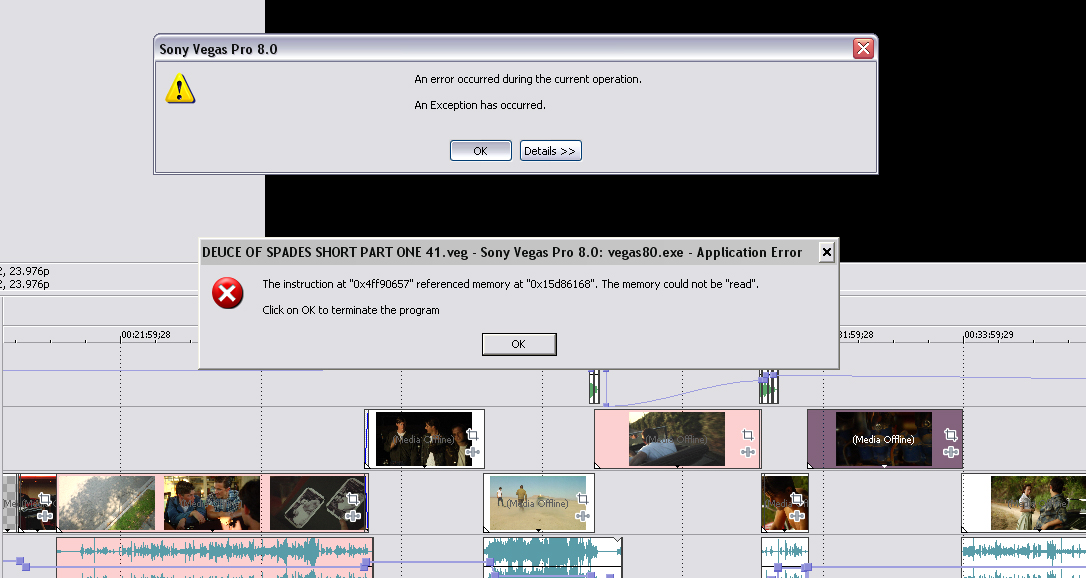
Over the last 2 weeks, Vegas has become more instable. I am doing everythign the same way I always do and have not changed anything in my computer, but Vegas is crashing on and off. Not something it used to do before, it has always been a very stable software.

My timeline, if anythingm is shorter now than it was before (as few scenes have ended up on the cutting room floor) so I am not sure what is going on.

All I know is that it usually happens when I am updating one of the project in a seperate window and then return to the main timeline and it starts to "update media" and then gives me the screen of DEATH below.

CAN ANYONE HELP??


Vegas%20exception%20error.jpg
 
I cannot tell you exactly what is wrong (I have similar errors in projects for no reason sometimes as well) but something that may help.

In Vegas' preferences, turn off the box that says something to the effect of "unlink project media when Vegas is not the primary application." The wording isn't exact, but when you switch windows out of a Vegas project, by default the program unlinks all ties it has to the media files in your timeline and then when you switch back it must relink to all of them. If this is where you are having a problem, telling Vegas to keep them linked up no matter what may provide a solution.
 
That looks like a memory error. Are you getting any blue screens? You may have a week module. I would replace my memory sticks in my PC. Hopfully your running all 64bit so you can go higher that 3gig with files as large as your using.
 
I cannot tell you exactly what is wrong (I have similar errors in projects for no reason sometimes as well) but something that may help.

In Vegas' preferences, turn off the box that says something to the effect of "unlink project media when Vegas is not the primary application." The wording isn't exact, but when you switch windows out of a Vegas project, by default the program unlinks all ties it has to the media files in your timeline and then when you switch back it must relink to all of them. If this is where you are having a problem, telling Vegas to keep them linked up no matter what may provide a solution.


Thank you for tip, I will try it today. I'll let you know if it helped :).
 
That looks like a memory error. Are you getting any blue screens? You may have a week module. I would replace my memory sticks in my PC. Hopfully your running all 64bit so you can go higher that 3gig with files as large as your using.

Nopes, I am 32. (magic number HAHAHAHA - I say this because the deuce of spades is a 1932 ford ;) )

I am not getting any blue screens.
 
Sideline issue(s): What version of VV are you using on what platform? i.e. 64 bit 9.0c on Windows 7 64? Or what?

Secondly: what application are they trying to open the VV AAF file format on?

From Adobe's site:
http://livedocs.adobe.com/en_US/Aft...WS3878526689cb91655866c1103906c6dea-7f2a.html
QUOTE:
AAF (Advanced Authoring Format) is a multimedia file interchange format that contains all of the editing decisions of a project from a non-linear editor (NLE). Using AAF, you can exchange NLE projects between platforms, systems, and applications. AAF files do not contain media, such as video and audio; rather, they contain editing decisions and links to media. - UNQUOTE.

So my question to your mixer would be clarifying, what do they normally expect to receive in an AAF file, (and why are yours' blank)?

To help Faith clarify: Are there others out there that have experience exporting their files in AAF to third parties for remixing? What did you actually give them in these files? It seems it isn't the actual audio media, but editing decisions. Should you also be giving them other files?????? Or am I misreading this?
 
Sideline issue(s): What version of VV are you using on what platform? i.e. 64 bit 9.0c on Windows 7 64? Or what?

Secondly: what application are they trying to open the VV AAF file format on?

From Adobe's site:
http://livedocs.adobe.com/en_US/Aft...WS3878526689cb91655866c1103906c6dea-7f2a.html
QUOTE:
AAF (Advanced Authoring Format) is a multimedia file interchange format that contains all of the editing decisions of a project from a non-linear editor (NLE). Using AAF, you can exchange NLE projects between platforms, systems, and applications. AAF files do not contain media, such as video and audio; rather, they contain editing decisions and links to media. - UNQUOTE.

So my question to your mixer would be clarifying, what do they normally expect to receive in an AAF file, (and why are yours' blank)?

To help Faith clarify: Are there others out there that have experience exporting their files in AAF to third parties for remixing? What did you actually give them in these files? It seems it isn't the actual audio media, but editing decisions. Should you also be giving them other files?????? Or am I misreading this?

Well, I currently put this on teh back burner, tending to other tasks, but I promise that once I go back to it, I will post here whatever I find out. I would apprecaite it if anyone else has info on this and could post their solution here too. I am getting very close to starting soudn design and mixing so we will find the answers soon!
 
Hi Faith,

Did you ever get an answer to your question about AAF?

The problem we are finding is that I don't believe Pro Tools is totally up to speed on the import of AAF into the timeline. We normally deal with OMF in Post. Digitranslator says it should do it but we are going through the steps to find a workflow on this as well. I can pretty much assume that Patrick is on a Pro Tools based Mix stage, at least the last stage I heard he was on. We are testing this from Vegas 8/9.0c and Pro Tools 7.3.1. We also have access to v7.4 and Pro Tools v8. If we come across a decent workflow I will try to remember and get back to this thread. Otherwise you can drop me an e-mail through the forums here.

-John
 
Nopes, I am 32. (magic number HAHAHAHA - I say this because the deuce of spades is a 1932 ford ;) )

I am not getting any blue screens.

You might want to try this http://www.sonycreativesoftware.com/forums/ShowMessage.asp?ForumID=4&MessageID=648182

But like it says back all original files up first.

I used this for both 8c and 9c and it def helps - in 9c you probably won't find the .dll's as I believe those were added to 8x something. So just change the .exe.
 
NEW PROBLEM TO TACKLE:

raylight is giving me an error message (it beeps and a tiny window pops up that reads: )

"WANTED A COMPRESSED FRAME"

the above error happens in one of two situations:

1- trying to play the timeline using the FULL SCREEN button (above left of timeline).

2- Selectively Pre-rendering a section of timeline as avi

NOTE: I never had above errors until my C drive crashed and I had to reinstall all my softwares/drivers. Maybe I didn't set something right in Vegas???


OTHER NOTE: In instance #1, when error appears, the screen freezes. Sometimes I can recover by hitting play again, sometimes I cannot and have to close it down. On occasion it makes the entire software crash. In instance #2, cliking on "OK" allows me to continue rendering, until the next error message, so I keep saying "OK" and eventually it renders fine. Also note that the next time I pre-render the same section I might not get any error messages at all, as though it now figured that section out??? Go figure.
 
Back
Top