The SCCE episode one, what can we learn?

Duke M.

Veteran
Accurate tests are the basis for good analysis. Now its time to look at things a little closer. (Further analysis will be possible once we have the data for the settings.) More important to me is what it means to my F3.

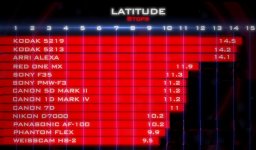
The first thing I noticed was the dynamic range graph. Its not in any kind of order, which made me look up and down, and side to side to try to take it all in. I took a little time to reorganize it so I could make sense of the data. (This is entirely SCCE data and completely belongs to them. Small uses of copyright material is permissible for education purposes.)
LatitudeTest.jpg

The first thing I noticed is that there are three distinct groups of cameras. The 14 stop cameras like the Alexa and film.

These are followed by the ~11 stop cameras including the Red MX, F3, F35, etc. This is the test where the DSLR's looked to shine. (More about that later.)

Finally, were the ~10 stop cameras. Ten stops still isn't bad and there are some very expensive cameras here.

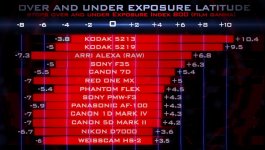
The problem then was that the DR tests aren't the only thing to look at for real world results. Further testing showed the film handled highlights well (as did the Alexa) while the digital cameras mostly did well with the blacks, so where the DR fell on the charts became important, especially for highlights. But again the chart for under and over exposure wasn't organized to make it clear to me when the highlights were most important for digital cameras.
OverUnderExposure.jpg

Here you can easily see that the majority of the digital cameras were between 4 and 5 stops on the high end. The 7D was surprisingly better than the other DSLRs for highlights.

Then there were the side by side real life over exposure tests. As expected the Alexa and film did the best. The F3 looked worse than expected here and I think we need a little more analysis of the exposure.

AlexaF3Exposure.jpg

The F3 looks over blown, but look a little closer. The near/dark side of the table, along with the shadow under the table, are much lighter on the F3. At the same time the orange pillow and the orange in the hand have less highlights.

My initial thoughts were to under expose by a half stop or a stop. Now my thoughts are:

a) Expose for the highlights, not the middle tones. Bring the middle tones up in post if needed.


b) The orange is being handled differently. The matrix may need to be tweaked for color handling.


c) The gamma settings are going to make a lot of difference in the highlight handling. Therefore, picture profiles are going to be important.


Of course the other episodes will tell us more about resolution and other factors. I can't wait to buy a blu-ray of this. I encourage others to do the same.

Did any one else draw any conclusions?
 
one thing about the alexa from the FAQ

you can actually change the place of the exposure, not sure how much noise would that introduce.
so you can go 4.6 to 9.4, or 9 to 5

not sure that the f3 was using log, the thing that strike me the most was color. could see some cameras losing or shifting color on the overexposure test near the dark and bright parts of the image.

the f3 seemed much lighter or more sensitive to light in parts.
 
Very nice analysis, I appreciate you organizing the charts. One thing that I don't understand, and this is a little off topic, is why people are now acting like the 7D has a higher dynamic range. I've seen this in other discussions around the web (and I think on a few of the other threads here as well). If I understand the charts correctly it seems they are pretty much the same just that the 5D has more detail in the shadows, while the 7D has more details in the highlights. Am I understanding that correctly?
 
Overall I think they did it right. It's hard to please everyone, but this was well done. I noticed the same "yellow" on a shoot last week with this guy.
bloom.jpg
If I had had a 1200 to bounce in the room to bring it up I could have brought down the window some more. But you can see in the tree, the green going towards yellow. This was on the 17 x 55 Nikon BTW.
 
Tom Wong and I have been talking about that highlight behavior. There's also other things going on in the mid tones that you'd never realize unless you were really color correcting and trying to make skin tones match another camera.

I want S-Log simply just to get rid of that weird stuff (which it does, btw). There's some broken stuff (in my opinion) in those stock Sony matrices.
 
A little off topic, but here is a perfect example off where we are now in terms of picture quality. More related to DLSR's but..This is a video that's making headlines right now concerning airport security. Two guys got stuck overnight at DFW and made a video with a Canon and what is funny, is people are making comments like.....

" This isn't real it's to good looking",

" That’s not real idiots. Who’s taking the video, look how steady the camera shots are, how perfect the lighting is, the perfect camera angles. it’s a trailer for some movie"

"These guys sure had some fancy video equipment. Have we been had??"

"That’s what I was thinking. Multiple HD cameras including tripod mounts????? I agree, there’s more to the story…"

http://www.theblaze.com/stories/sec...d-travelers-make-wacky-vid-at-dallas-airport/

Just thought that that was funny. They just took their time and used a tripod...but the quality of today's imagers sold it...
 
JDDallas,
What were your settings on the interview shot? Just doesn't mean much to me until I know what gamma and/or knee you were using?
 
A little off topic, but here is a perfect example off where we are now in terms of picture quality. More related to DLSR's but..This is a video that's making headlines right now concerning airport security. Two guys got stuck overnight at DFW and made a video with a Canon and what is funny, is people are making comments like.....

" This isn't real it's to good looking",

" That’s not real idiots. Who’s taking the video, look how steady the camera shots are, how perfect the lighting is, the perfect camera angles. it’s a trailer for some movie"

"These guys sure had some fancy video equipment. Have we been had??"

"That’s what I was thinking. Multiple HD cameras including tripod mounts????? I agree, there’s more to the story…"

http://www.theblaze.com/stories/sec...d-travelers-make-wacky-vid-at-dallas-airport/

Just thought that that was funny. They just took their time and used a tripod...but the quality of today's imagers sold it...


I hate to say it but these comments come from completely uneducated people in the technology world. Also comments are usually from the 13-21 age range of "kids" that just comment without any thought process.

I hate to say it but those are the same people that fall for every story in the news, and its why are society is so messed up today. No investigation, just verbal diarrhea. These are the same people that think the landing of the jet in the east river in NY was fake....
 
More over, I think its sad that they even thought those images looked to good, because they didn't. I've seen the video. It just looks exactly what it is... Theres nothing "too good" looking about it. Just shows that this DSLR move in life has also done exactly what I complain about all the time in these forums... Its dumbing down the quality the general public is used to. The fact that anyone thinks this footage is "too good" and the "lighting is too good" is a horrible reminder on the public's view of cinematography now. They are used to so much crap, they now thing anything slightly above crap is all of a sudden considered professional.
 
I know my comment was off topic just making an off topic point. Back on point, I can say I would love to do some analysis once I have the proper info on gamma, knee, and recorder information. Once that is had, I can comment. till then kinda pointless because I dont know what I'm seeing other than non-blown images from different cameras and blown images from others.
 
I guess a good point to make here is everyone is treating these videos as the test, and the data, but its not. this is a DOCUMENTARY ON THE TEST. Not the test itself. I'll wait for the bluray.
 
Its also the tiny trickle down of test data. One thing that was said (there or elsewhere) was that different gammas shift the mid point of the DR data, they don't actually increase the DR.

Presuming that's true (we'll see if its confirmed later) then the correct gamma will help prevent highlight blow out. S-Log will help a little, but one stop isn't going to be astounding like the Alexa three stop increase is astounding.

The F3 showed a lot more room on the dark side and a shift downward to protect the highlights (Cine gamma 1?) and exposing for the highlights sounds like the ticket if you can then resist the urge to then turn up the exposure because Cine gamma 1 looks darker.

Remember, they give no conclusions. Instead you look at the data and decide what areas you need to test so you can find the settings that work for you (or all of us if we share.)

Its just a learning curve and with out the over exposure scene the camera looks great out of the box.
 
Tom Wong and I have been talking about that highlight behavior. There's also other things going on in the mid tones that you'd never realize unless you were really color correcting and trying to make skin tones match another camera.

I want S-Log simply just to get rid of that weird stuff (which it does, btw). There's some broken stuff (in my opinion) in those stock Sony matrices.

I think my primary conclusion with it is the standard curves and color matrices are based off ex1's and ex3's, with just more control options closer to the f35. clip points, the camera clips it yellow/greenish because it's probably easier for the camera to do so than trying to resolve true white. it's aggravated further within the xdcam codec, and all the layers that is xdcam infecting the skintone too. even with offboard recording you see it creep at the extreme clip points. I'm gonna do some tests if there is anyway to paintbox the image to eliminate a lot of these issues since not everybody is gonna be shooting with log. It's really aggravating because greenish/yellow hues are really miserable colors for skin, it often looks sickly. and the yellow in highlights are really are huge problems because

A. it doesn't look natural, unless it's what you're going for
B. uneven hues in the highlights makes it that much extra work to match the highlight colors. more windows, more hsls, and sometimes the whole thing falls apart before you can do the image any justice, especially with the xdcam.
 
I would say for both of you that this isn't the place for rants, and the topic is not the merits or weaknesses of the DSLR. You can find other threads for that.

SCCE testing and analysis as it applies to the F3 is what is desired.
 
As I noted in the first post, the orange and orange pillow seemed very saturated. Maybe the orange and yellow saturations need to be turned down a bit in the color matrix.
 
I am shocked at the highlight detail loss out the window compared to the Alexa. I wonder what gamma they were running? Anyone know.
I've noted that even running Cinegamma 1 and 2, I have to be REAL careful about not blowing the highlights.
 
Guys, you have to understand that the window was lit to SEVEN STOPS overexposed. What, besides an Alexa, could have a prayer of holding on to detail that's seven stops over the key?

The Alexa has insane latitude, three stops more than the F3, and much of that can be set to over key. Look at the charts, it shows that the Alexa can hold up to 6.8 stops over. That's just ... abnormal for a video camera. Normally you'll have 3/4 of your latitude under, and 1/4 over, or thereabouts. The Alexa was designed to operate like film, and film has tremendous overexposure capability, and so the Alexa is mimicking that here.

So it's not so much a case of "settings" or changing a gamma or whatever, it's a case of -- don't shoot a scene where some elements are overexposed by seven full stops.
 
I think we all understood that this was a stress test and that the Alexa is the only video camera on the market at this time that can do this.

However, we are all going to encounter scenes like this with windows and bright lights outside (usually not as bad as this case). The question is what can we do with the F3 to still show its brighter outside and not blow the highlights?

a) You can throw a couple of 5k lights in the room and melt your actors. I'm only being half way facetious. If you're in Texas, California, Arizona, etc exterior light can be overwhelming.

or

b) if you're small you can do all the little things like change the gamma, put a couple of daylight balanced florescents in the room, expose for the highlights and bring the rest up in post.

The F3 isn't quite 75/25 from the mid point of exposure, but its sure not 50/50 either. Looks to me more like 60/40. Moving the mid point a little lower should just make things easier.
 
Back
Top