The Pure Basics of Audio Recording

Hey guys!
The last few films I've made have had really crappy audio because I really know noting at all about it.
I read over the "MUST READ" stuff on audio but even that went over my head.

Could someone point me to the BASIC basics. I'm not sure what db's I should be shooting on, what they really mean/do or how to change them on my camera.
I tried a few searches but everyone already seems to know this stuff, I'm sorry if you've heard this hundreds of time before but audio just really isn't my area.

For what it's worth I have a Canon HV40 and record on a Rode Video Mic on a boom.

Thanks in advance, it really is much appreciated!
 
I'd start with your HV40 manual .. read through posts here, maybe see if there's an audio school within reach .. or a forum audio member close by so you can get some one on one tuition. Join a local camera club.

.. and change your avatar, that's not helping :)

Cheers.
 
ok... Let's start with some dB's.... dB's are flying aorund your ears.

145dB... 0dB....17dB... - 40dB...

They don't mean a thing, because I don't give a reference.

Now your camera doesn't has dB reading... so anyway it would be kinda guessing and listening. And I think it would only be option "automatic gain", which
will result in compressed/limited sounding sounds.

But back to those dB's.

If you see: dBSPL, that's how loud something can be. For example 0dBSPL is the silence... it's what a small child hears (just to give it a story :-p).
20dB would be a conversation, 50dB would be your mom shouting to clean your room. 190dB...you're dead...

Those numbers are mostly not on levelmeters. What's written there are kinda "indications" to know where it would electrically be limited.
If you have a jar which can handle only 100L of water, and you add 100L and 1ml... it will break.

Well in sound levels, 0dB = 100L, you're maximum. It's what electricaly (sound is converted to electric signal) limited.
So if you want to add some water you'll need some "headroom". Which means you need to fill the thank only with 80L of water.
-20db ---> 80L

The - sign is because the numbers are literary written under the 0 and it's more logical that everything that's written under 0 has a - sign, but it's not mathematic...

On semi and pro camera's those numbers are on the screen. You'll see some bars with 0 --- 20 ----40 ---60

But, as the canon HV40 has no sound level meter.... What you can do is put a small mixer (like 2 channel) in between to have more control. So if you hear it clips
it means you have to lower the level. And I think if you connect the headphone output to the "return" input you can see the soundlevels from the camera...I think...

I might not be 100% right (well I hope I am :-p) or miss some things.. But basicaly it should be correct.
 
Basics:

The closer you can place the mic (on axis if on a boom), the better.
Know the equipment you are using, drawbacks and advantages.
Use more than just a mic, camera, boom pole. A mixer and a dedicated recorder come to mind right away.
Have experience using the gear. Showing up to a set cold, and figuring it out then........results are not going to be pretty.

Those are the basics of the basics. But that is like me telling you the steps to running a camera in the same type of language:
Make camera stationary
Look through viewfinder/LCD to put in focus
Press record.

The basics are not going to assist. Audio is a detailed science AND art, just like cinematography.

Then there is the post process. Better people than me can attest to the magic they do. Any quality work out there, has a huge audio post component involved. Raw audio straight from the recorder ain't gonna cut it, even if it is the best available with thousands of dollars worth of gear. The post guy does his tweaks to it to really make it shine. And I am not ashamed to admit that, as a location guy. My job is to give him the best I can, to make his job easier.
 
Last edited:
Read the manuals and do as many tests as possible. The more you know your gear, the more you'll know how it's going to react to this or that situation.
 
I didn't see this mentioned; find a way to monitor your recorded sound with headphones. This would be extra important if you have no metering.

Grant
 
I've got the OPs Canon HV40, it does have stereo audio metering and you can adjust the levels. It has an onboard stereo mic and provision
to plug in an external mic with a 3.5mm plug.

Directions for all the necessary operations including correct audio levels, are on P60-61 of the manual.

Charles, maybe you are monitoring your audio to loud in your headphones, causing you to record at to low a level?

Cheers.
 
If you see: dBSPL, that's how loud something can be. For example 0dBSPL is the silence... it's what a small child hears (just to give it a story :-p).
20dB would be a conversation, 50dB would be your mom shouting to clean your room. 190dB...you're dead...

Every dB scale in sound has to do with how "loud" something can be, whether it's acoustic or electronic volume/amplitude/strength. SPL = Sound Pressure Level, and is a measure of acoustic loudness, or the amplitude of sound in the air. This is what you hear in everyday life, without sound equipment.

And to clarify, 0dB is not silence... it's the threshold of human hearing. The natural noise floor of a household room is around 30dB SPL. Normal conversation averages around 50dB SPL, and can run as high as 60dB SPL. A roadside with busy traffic is around 90dB. The threshold of feeling, also sometimes called the threshold of discomfort, is 120dB SPL. The threshold of pain is 130dB SPL. Above that and there's a very high risk of permanent hearing damage/loss within a very short time of exposure.

Those numbers are mostly not on levelmeters. What's written there are kinda "indications" to know where it would electrically be limited.
If you have a jar which can handle only 100L of water, and you add 100L and 1ml... it will break.

Well in sound levels, 0dB = 100L, you're maximum. It's what electricaly (sound is converted to electric signal) limited.
So if you want to add some water you'll need some "headroom". Which means you need to fill the thank only with 80L of water.
-20db ---> 80L

To clarify, we're talking about dB FS, or Full Scale. In the analog world, 0dB is the reference point for the optimal signal-to-noise ratio. The signal can go well above 0dB before hitting problems, and especially in the music industry hitting analog distortion can actually be a desired effect. With digital, however, there's a hard limit that cannot be crossed: 0dBFS (hence the name "Full Scale"). This is due to the way digital audio is recorded: in words.

Digital audio has a bit-depth, which has to do with how many bits (or 1s and 0s) are recorded with each word. In 24-bit audio, each word has 24 1s and/or 0s, such as: 001101001110101100011011. Then there's sample rate. We'll use the video standard of 48kHz as an example. That means that 48,000 per second, a word is recorded. There's a point where the data is full.

000000000000000000000000 = absolute silence. There's no present audio in that word.
111111111111111111111111 = absolute loudness. All the bits are full, and no more data can be added. This is 0dBFS, the top of the scale with nothing above it.

Your analogy of the jar is good, except that the jar doesn't break when you add the extra mL of water. The extra water spills out and creates a mess. With dBFS, when you try to push your sound past 0dB, it clips the waveforms (cuts off the extra data) and creates a square wave. This is digital clipping. It's a really nasty form of distortion that is not desired at all and cannot be fixed in post.

The - sign is because the numbers are literary written under the 0 and it's more logical that everything that's written under 0 has a - sign, but it's not mathematic...

It is math. Sound is math. All of it. There is no absolute value for a deciBel as it is only a relative value calculated from a set reference point, and each dB scale has a different reference point. -20dB doesn't mean the same thing in dBm as it means in dBFS. +4dB doesn't exist in dBFS, and -10dB doesn't exist in dBSPL. And dBV has a completely different application and reference value. But it's all math.

And I think if you connect the headphone output to the "return" input you can see the soundlevels from the camera...I think...

Most field/ENG mixers do not reflect the return level on the meters... that's just a monitoring option for the headphones.
 
Last edited:
If you really want to learn about audio, then buy this book http://www.amazon.co.uk/Sound-Reinf...9008/ref=sr_1_1?ie=UTF8&qid=1333031776&sr=8-1http://www.amazon.co.uk/Sound-Reinf...9008/ref=sr_1_1?ie=UTF8&qid=1333031776&sr=8-1

A word of warning - it is VERY heavy going for a newcomer, but is pretty much a standard textbook for students wanting to know about audio and recording. It is NOT a video book, it tells you all about sound - and most transfers to video nicely.

The thing to remember is that sound has the same problems as video. There is no such thing as a standard camera, so your Rode mic may, or may not be the best mic for what you are using it for. So much depends on what you are doing. I'm lucky and have all sorts of kit sitting in the store, but I have to say for my video work, the least used microphone is a shotgun and a boom. In fact, I'd state that a shotgun used badly is almost guaranteed to produce the worst sound you can imagine. Cam you imagine what your pictures would look like if your viewfinder didn't work? Yet we vaguely point a microphone at the subject and hope it picks up what we want. If you want high quality sound, then you need to use your ears. Headphones let you hear the changes to the sound that occur as a mic drifts off the subject.

Manual focus and exposure are the recommended way to get good images, yet lots of people find the auto settings work for them. Same thing happens with sound. Using the right mic, aimed carefully on full auto produces better sound than manually controlled adjustments done badly. Shotguns, especially the longer ones need to be pointed at the mouth of somebody speaking, pointing at their forehead produces thinner and weedier audio, which needs a bit of extra gain, bringing up unwanted sounds in the background. Lazy boom ops who's arms ache let the boom sag, or worse still, the hold it against their hips like a fishing rod, with the mic rarely pointing in the right direction.

Sound can be learnt yourself by having a decent set of headphones and experimenting - but the physics are important and the yamaha book works well for this.
Paul
 
The - sign is because the numbers are literary written under the 0 and it's more logical that everything that's written under 0 has a - sign, but it's not mathematic...

The '-' is required for the mathematics... dB is defined in terms of logarithms, and the '-' is significant. Using 'base 10 logarithms', log 10 = 1, log 1 = 0, log .1 = -1...

Since dB is used in ratios, there is a 'reference value', say 1 mW, and 'power' of a signal is often given in terms of that 1 mW reference... 0 dBm means the signal has 1 mW of power, and so a '-' indicates that the signal is 'less than' 1 mW.

dBm is also not specifically for 'audio'... the WIFI device you have in most computers, and mobile devices, rates it's power in 'dBm', as well as is used in other applications.

A 'naked' dB usually refers to attenuation or gain differences... such as I 'amplified' the sound by 20 dB... but when talking about signals, one needs to indicate the reference
such as mW, SPL, u or V in the case of things audio.
 
I will tell you this...It takes time and experience to get audio down right, and even then, having the best gear isn't going to save you..it's how you use it. Yesterday I managed to get good quality audio onto a GoPro Hero2 because I know what I'm doing.
 
I will tell you this...It takes time and experience to get audio down right, and even then, having the best gear isn't going to save you..it's how you use it. Yesterday I managed to get good quality audio onto a GoPro Hero2 because I know what I'm doing.

On the end of a boom pole? Do you offer adapters to mount micro-cameras like these? :D
 
Having previously used the HV20, I can tell you that the 'sound level/meter'. You first need to read your manual, and ensure the meter is on the screen (this is consumer equipment and consumers usually don't like to see what is actually happening, they just want to know if the camera is 'on' and 'recording'.) So make sure you see the little green bar at the bottom (or right hand side) of the lcd. it should be flashing up and down when you speak into or near the camera (no mic is plugged in). When you see the green bar FULLY lit up, you are 'clipping' and your sound is to load for your HV40. If you see the light being lit up pretty much in the middle when people are speaking, but never being fully lit up then you are in the right place for your sound.

If you then plug in the video mic, you just need to see if the green light is lit up fully again, or not at all, and adjust your distance or output level of the microphone to ensure the green light is in the 'middle'. Now that you have your volume set, lets talk about mic position.

Just get the mic as close as possible to the speakers mouth in ALL situations! If it is not dipping into the frame every now and then you are not close enough! So get closer with the mic.

Those would be the basics in my opinion. Oh yeah, and hit record with fresh batteries in everything before beginning your project.
 
I will tell you this...It takes time and experience to get audio down right, and even then, having the best gear isn't going to save you..it's how you use it.
You don't get it, do you Dave! With low-cost equipment, the skill level to is also low...
 
On the end of a boom pole? Do you offer adapters to mount micro-cameras like these? :D


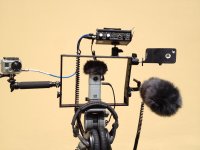
I was using our Norbert DSLR frame with a MixPre-D as the front end. I took the mic out from the mixpre-d and went into the mic in of the go-pro. I was also running two other "cams", a zoom Q3HD that took the line out signal from the mixpre-d, and an iPhone, which didn't get any audio feed, I just did a manual sync. To answer your question, though, we actually do offer what are called our "Tadpoles" which are smaller versions of our aluminum poles with a ballhead on the top with a 1/4x20 threaded stud. We also have what we call the KCAMBH which is a ballhead with a shoe and a female 3/8x16 threaded stud so you can put it on the end of any boom pole and mount a small video camera like the GoPro. If you look at the picture, you can see two of them. One is mounting the MixPre-D and the other is mounting the iPhone in our iPhone case.

Norbert_3_cam.jpg
 
Last edited:
OK, I'm just going to go ahead and plug the Sound for Film and Television DVD, because it's specifically geared for exactly this kind of situation. VERY accessible to newcomers, very entertaining, and will answer almost everything you've asked about here. Most importantly, it teaches you why you do it all.

http://www.dvxuser.com/articles/dvxshop/SoundDVD/
 
Thanks Alex for adapting and clarifying what I've written.

The sound devices 442 and 552 mixer can "see" what's in the return. It's a setting in the "hidden menu".
 
Back
Top