The New Display

  • Thread starter Thread starter Guest
  • Start date Start date
$1,175 if you know someone who works for Apple....
The insider! Haha.

Any news yet? Whenever I have to wake up a third party monitor on a Mac, the sometimes several seconds lag gets me, and I start thinking about this monitor.
 
Early report on the LG 5K:

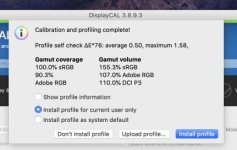
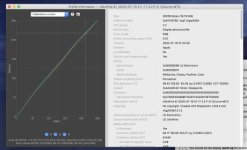
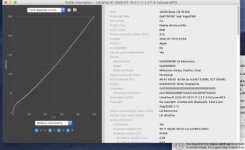
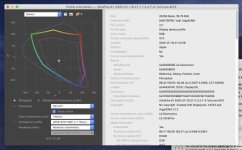
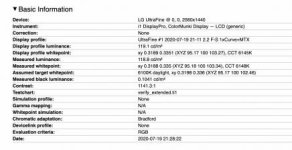
Ran it through DisplayCal with my X-Rite i1 Display Pro and it was VERY similar to when I calibrated my 5K iMac - did almost the same thing. Lowered the contrast and got rid of the blue/magenta shift that seems to come standard with all Mac displays. The main difference is that the monitor itself scored better out of the box than my previous iMac's display. (I've attached a bunch of screen grabs below for anyone that's interested)

However, I am running into a very weird quirk where when I'm inside Premiere it's almost like the display profile disappears....my footage is VERY saturated inside Premiere, but once I export out a file and play it back in Quicktime or Preview it looks totally fine. If I click back to Premiere that same clips looks way saturated again.... Haven't opened Resolve yet to see if it has the same problem

Screen Shot 2020-07-19 at 9.23.59 PM.jpg
Screen Shot 2020-07-19 at 9.24.35 PM.jpg
Screen Shot 2020-07-19 at 9.24.44 PM.jpg
Screen Shot 2020-07-19 at 9.24.52 PM.jpg
Screen Shot 2020-07-19 at 9.46.29 PM.jpg
Screen Shot 2020-07-19 at 9.46.53 PM.jpg
Screen Shot 2020-07-19 at 9.47.53 PM.jpg
 
Ran into colour difference issues when jumping between FCPX, Davinci, and Premiere, and then QuickTime player. Same footage looked very different in each application. And not just colours, but the contrast and/or sharpness was effected too.

that is an issue with the apps and system all processing the images differently. Hence why so many try to bypass the system and the GUI.
 
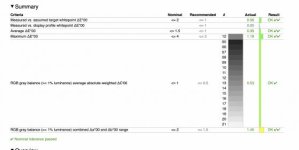
The DELTA E average in the last screenshot says 1.5? is that correct? That is pretty good. According to more critical reviewers, that is just on the cusp of "noticeable". Anything over tends to skew towards bad, and anything lower tends to be really good. BUT, I am not an expert in these things, and I am just going by what I have read and noticed from personal experience so far.

The first screen shot is saying that the colour gamut is completely covered, which is great! Apple's DCI-P3 colour gamut is pretty big, and I had issues with it on the BenQ.

How is colour uniformity and black uniformity? I just take a photo of a white screen, and then a photo of a black screen. Not the most accurate test, but if you can't see any issues by eye, then there really isn't any issue. right? I've never seen a perfect monitor that was affordable.
 
Ran into colour difference issues when jumping between FCPX, Davinci, and Premiere, and then QuickTime player. Same footage looked very different in each application. And not just colours, but the contrast and/or sharpness was effected too.

that is an issue with the apps and system all processing the images differently. Hence why so many try to bypass the system and the GUI.

Interesting....I never noticed a difference (well ok Quicktime always does something, especially with ProRes files...) on my iMac between programs. I'm also wondering if something is getting lost in the handshake between my MacBook Pro and the Monitor/Software, because the difference is insane. For my film I actually plugged my old iMac back in to do final color correction, ejected the external drive, and then plugged it back in to my new computer to render. The grade looked crazy inside premiere, but after exporting it looked exactly as it should on all my devices.


The DELTA E average in the last screenshot says 1.5? is that correct? That is pretty good. According to more critical reviewers, that is just on the cusp of "noticeable". Anything over tends to skew towards bad, and anything lower tends to be really good. BUT, I am not an expert in these things, and I am just going by what I have read and noticed from personal experience so far.

The first screen shot is saying that the colour gamut is completely covered, which is great! Apple's DCI-P3 colour gamut is pretty big, and I had issues with it on the BenQ.

How is colour uniformity and black uniformity? I just take a photo of a white screen, and then a photo of a black screen. Not the most accurate test, but if you can't see any issues by eye, then there really isn't any issue. right? I've never seen a perfect monitor that was affordable.

The DELTA E average is actually .39 on the last screen shot (to the left it says that equal to less than 1.5 is nominal and less than 1 is recommended (I know DVXUSER squashes those images, so hard to read on here)

DisplayCal has a good uniformity test where you move the i1 Display Pro all around the screen, but I haven't ran it on this monitor yet. (I remember my iMac being all over the places, especially at the edges).
 
The grade looked crazy inside premiere, but after exporting it looked exactly as it should on all my devices.
Not sure why that is. I haven't worked in premiere for colour grading.
The DELTA E average is actually .39 on the last screen shot (to the left it says that equal to less than 1.5 is nominal and less than 1 is recommended (I know DVXUSER squashes those images, so hard to read on here)
Yes, most of the text was not clear enough for me to read. And perhaps I don't understand these charts as well as I thought. I just saw the AVERAGE said 1.5, but I was zoomed in to see the text and cropped out the "actual" column. 0.39 is better than EIZO, yeah? At least for Apple's colour space DCI-P3.

DisplayCal has a good uniformity test where you move the i1 Display Pro all around the screen, but I haven't ran it on this monitor yet. (I remember my iMac being all over the places, especially at the edges).
I haven't run one yet, as most of the monitors I've used are visibly non-uniform.
 
Last edited:
Just replaced the CS2420 with the CG2420.

First impression is that the difference is not quite as big as I might have hoped. Black level and contrast are improved (brighter brights with darker black point). Improved viewing for darker rooms.

Still doesn't compete with OLED. Nothing really does.

Like the CS2420, the white screen is where is shows some colour drift and dips in brightness. Black uniformity seems good.

Made the jump to the CG from the CS because the pandemic has gone on longer than I or anyone anticipated and so I find myself needing a slightly better screen to do grades and build luts at home. The CS2420 felt good, and gave some confidence, but it became less than ideal in a dark room. So, giving the CG2420 a go.
 
Quick exports to the OLED phone look more comparable to the fast grades I do. So, that is a welcome improvement with the CG2420 over the CS2420. Not sure I would totally care about the upgrade in a none-pandemic world, but certainly simplifies things while doing my own post work and camera testing. I guess I'll have to see how it makes grades look going to the LCD laptop.
 
Last edited:
Though I’m using a PD2500 BenQ and a 1st gen HP Dream Color (ducks, runs for cover).

I’m an indie filmmaker on a tight budget though, not a colorist.

So learning a lot here.
Yeah, feel like we are all in a similar boat: indie film maker or DP needing to do some colour and post work on a reliable monitor, yet on a budget, and yet so little direct information online for that.

I was very tempted by the HP Z27x G2 early on, as I was just needing a good monitor for the Pandemic, and I wasn't worried about the longevity of the colour accuracy. Which it seems that the main complaint about the Z27x or whatever was colour shift over time due to a sensor going bad.

And I while maybe the Benq I got was bad, the tech seemed promising.

Just that I was coming from a lot of cheaper monitors in my personal coloring work and kept running into issues. I'm actually shocked how much better my exports are on the first round now, even without calibrating the CG yet. With the CS my colors felt right, but occasionally ran into the shadow and black levels being an issue on OLED screens, nothing crazy though, just subtle stuff. But that all seems easier to just eyeball with the CG. Still have to watch the scopes and such.

I ended up with the Eizo for lighter weight, 1:1 pixel in my 1080 workflow, and the 3-5min colour stability may be nice if I transition this to a set monitor, I can feel like I can trust it a little more in those on/off moves. Also, in a pinch, the onboard sensor can calibrate it if something seems really off in the field. The HP Z27x G2 just felt too heavy for small crew work, and I don't get paid for little bits of work I do at home, so having the option for a set monitor means I may get some rentals in the field. =/ who knows.

Will be interested in your workflow.
 
Last edited:
Honestly the dream color is such an awesome monitor I’ve graded things on that screen that has displayed on AMC’s screens that look in the theatre exactly how they looked on the dreamcolor
 
There certainly is and I’ve used both the Z27X and the bigger Z32X

With the Z32X and the Z27X you get to choose the color space you are working in and there are many flavors to choose from.
 
Ok thanks.

$4-500 for 27x? Gotta love that price.

It was certainly a lot more when it came out and honestly there wasn’t any need for it to come down in price because it’s really great but oh well the moment I saw the prices coming down I said “my gain” you have to actually try the monitor yourself to see what I speak of.
 
Back
Top