FS7: The necessity of choosing a LUT or Scene File for some shoots

I also think that's it Doug. I was actually looking through your videos earlier today trying to find where you mentioned that. Noticed the index was at 800, and also that I was having to shoot nearly wide open (F3.2) on a scene I considered fully lit (gelled window backlight, 650w fresnel fill through frost diffusion, 500w softbox key). So moving to iso 2000 should help solve both issues.
 
Last edited:
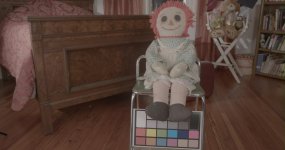
Camera now set at 2000 ISO. SLOG 3 frame exposed at 90%:

200 iso test slog.jpg

...and with Cine 709 LUT added in post:

200 iso test.jpg

Looks correctly exposed now to me, maybe a bit contrasty, but now it's nighttime. If anyone thinks it needs to go a bit one way or another, would like to hear.
Doug, appreciate your help, would like to know what exposure should be if I decide to use the 709A LUT instead.
 
Hello Everyone,

someone on a different thread pointed me here because my open source web app and Mac App LUTCalc got mentioned and on the other thread I was pointing out a really silly bug I put in the release candidate which turned off most of the available corrections (colour temperature, black / highlight level, plus / minus green, false colour and ASC-CDL). In case anyone took a look and couldn't understand why it didn't seem to do anything, it's (seemingly) fixed now:
LUTCalc main page
LUTCalc For Mac release page on Github

Possibly relevent here it'll do correct log exposure adjustment LUTs for situations where you shoot log and your post software doesn't read the CineEI ISO metadata properly to automatically perform the shift. An apparent stop and a half over exposure just becomes CineEIing down a stop and a half for cleaner blacks ;-)

Sorry to butt in and thanks,

Ben
 
mainstreetprod,

don't know if this helps, but if you are shooting log, using built-in LC709A as a monitor LUT (but not baked in), then exposure IREs for the main reflectances are:
0% Black - 4% IRE
18% gray - 40% IRE
38% - 55% IRE
44% - 58% IRE (38-44 reflectance is roughly caucasian skin tone range)
90% white - 71% IRE

for LC709 it's:
0% - 2% IRE
18% - 40% IRE
38% - 55% IRE
44% - 58% IRE
90% - 72% IRE

For S-Log3 itself the figures are:
0% - 3.5% IRE
18% - 41% IRE
38% - 50% IRE
44% - 52% IRE
90% - 61% IRE

These are all calculated directly from the LUTs in the case of LC709 and LC709A and from the Sony white paper for S-Log3. Even though (default) LC709 / LC709A skin tones will look dingy (to fit 6 stops above mid gray in 100% IRE), it is still about twice the contrast of S-Log3 in the 18% - 90% reflectance range (the waveform shifts up or down about twice as much with changes in aperture) making it easier to judge consistent exposure by waveform. If you have a LUT applied, those figures will hold for the waveform, whatever the CineEI ISO.

For baked-in I tend to start from a custom LC709A scaled to extended range (clip at 109% rather than 100%) for brighter skin tones and scope for CineEIing down a stop or two within legal range. That sets the LC709A(Extended) IREs to:
0% - 4% IRE
18% - 44% IRE
38% - 60% IRE
44% - 64% IRE
90% - 79% IRE

That one is also handy for conventional log recording as the picture looks brighter for the client and you rarely really need four stops headroom in legal range (Rec709(800%) is about 3 1/3 in legal range, HG7/HG8 about 3 1/2).
 
Last edited:
For completeness, Cine+709 is:
0% - 4.5% IRE
18% - 49% IRE
38% - 71% IRE
44% - 75% IRE
90% - 90% IRE
with white clip about 4 1/4 stops above 18% gray and at 100% IRE.

If you want to try a basic LC709A MLUT scaled to extended range (as mentioned in my previous post), here is a Dropbox link to a zip containing one along with an LC709A with false colour. The important ones are: 18% reflectance comes up green, one stop over 18% - a caucasian skin guide - is pink and 90% white is orange. These LUTs are for S-Log3/S-Gamut3.cine.
LC709A Extended & LC709A False Colour

Just make sure you don't bake in the false colour!
 
Last edited:
Thanks for posting camermanben, I tried 71% with the 709a monitor LUT and to me it looks just right (blown windows at top will normally be out of shot). In post I digitally zoomed in and found the 4K resolution held up nicely.
709a test.jpg
709a test zoom.jpg
 
Back
Top