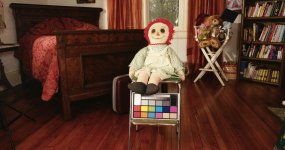
FS7: The necessity of choosing a LUT or Scene File for some shoots

I'd say that what my lut does (linked in Doug s paper)

in the tests I'd say he under exposed it by a stop though (fair enough no 'user guide')

(if I remember rightly it is a deep S with the toe at 4%)

S
 
Last edited:
https://dl.dropboxusercontent.com/u/33167160/FS7_SMM_TestLut001_34.10StopGrad1.cube

This was my first go... I think it is a little harsh to 'todays eyes' that have been detuned to accept the destaurated log look.

What does it do..

Well takes the LC709 and adds a full punchy Scuve adding a lot of saturation and contrast. (kind of in line with 709)

It should roll off nicely to clipped white, unlike a standard gamma (see how the flame is not flouro) - some private tricks there - and crunch and desaturate the low end to avoid colour noise.

Im guessing you would want to give it at least one more stop than you might expect.. aka camera at 2000 would want light meter at 1000

You can see it it Dougs video number 8 in the fruit test. You will see the flame and colour are good the black glove is, however, gone.

That is a combination of Dougs exposure choice and lighting methodology (im used to filling my shadows and exposing as far right as possible), neither of those things reflect badly on Doug.. just his setup didn't really match that LUT which might match a very cinematic set up (aka controlled)

FS7toCion might be a good title.

Mine LUT is at 1.02 in Dougs video, compare the flame to the flame in '5' at 50seconds, the supposed 'winner'

S
 
Last edited:
Have you guys seen the app by "cameramanben" called LUTCalc

https://cameramanben.github.io/LUTCalc/

There is a thread on the Sony community site about it called False Color.

http://community.sony.com/t5/FS7/False-Colour/m-p/497849#U497849

I'm not totally clear on it only because Ben's language is sometimes more complex than I grock and it seems to good to be true - but it seems as if LUTCalc will read any LUT you choose then make adjustments to the LUT and create a new one with those adjustments.
The thread began with Ben explaining how it could make a false color LUT for use in the FS7 but more exciting to me if I understand this correctly is that it could also alter a LUT to compensate for fluorescents or to lower blacks etc. Haven't tried it yet but it looks exciting.

"LUTCalc The Adjustment Tool
As well as displaying the basic appearance of different looks, LUTCalc can make a number of adjustments. Output levels can be scaled to preferred values for black and arbitrary reflectances, different colour spaces can be applied to shadows and highlights and the colour temperature can be adjusted, either as a CTO / CTB shift or by directly setting recorded and output temperatures.
Once the input, output and adjustment options have been set LUTCalc can then output .cube LUTs suitable for use in camera as monitor LUTs or in post to provide one-click base looks."

I'm going to start a new thread for this with a duplicate of this post.
 
I'd say that what my lut does (linked in Doug s paper)

in the tests I'd say he under exposed it by a stop though (fair enough no 'user guide')

(if I remember rightly it is a deep S with the toe at 4%)

S

Sam.

All the LUTs, inlcuding your's, fell apart real fast when exposure got above 80%. I very much doubt that 75% was an under exposure.
 
Tried this, but got a severely overexposed image. 61% looks about right.
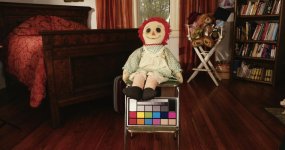
Then you can't be using it correctly, or we are talking about two different things, because there is no way Cine+709 Look Profile looks correct at 61%. Not even close. It would be at least 2 stops, if 3 stops, underexposed. That is not even within the realm of opinion as to what looks good. I strongly suggest that you go back and re-evaluate you procedure. Please post some examples and a detailed description of what you are doing.
 
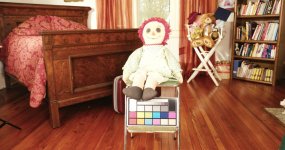
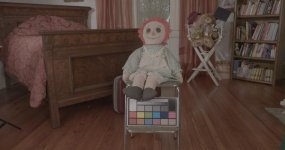
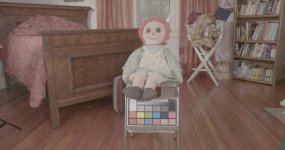
I'm sure there is a simple explanation for what I'm doing wrong, so here are the settings. Both shots were done with shooting mode Cine El, color space Sgamut3C, recording format 4096 24P. Monitor LUT in the viewfinder set at look profile Cine 709. I used Zebra 2. First shot , zebras set at 61%, second shot, 90%. I was exposing for the doll and color card, not the room. F3.2, shutter 1/48. Zebras just to the point of filling white portion of color card . LUT applied in post was SGamut3CineSLog3_To_Cine+709.cube.
61 percent.jpg
90 percent.jpg
 
Last edited:
You're not actually recording the LUT are you? I'd be interested to see frames BEFORE you apply the LUT in post.

Edit: Sam you beat me, but I think you are on the right track. He might be applying a LUT in camera and in post.
 
Nope, LUT is only applied on the timeline and in the viewfinder. Definitely not baked in. Same two files directly out of camera:

61 percent slog.jpg
90 percent slog.jpg
Looking at the second frame here, it looks like the detail is actually there, and the LUT is blowing it out in post. Am I using the correct LUT?
 
Last edited:
I don't want to go out on a limb and say anything else. There are too many unknowns and neither clip really looks like pure S-LOG3 to me. It's just too hard to troubleshoot by long distance without having more information and having access to the original clips. I hope you don't mind, but I'm going to step away from this. The problem could be in post and that is a whole subject I don't even want to touch even of the camera settings turn out to be correct.

Why don't you do a new test and just forget about LUTs until you get the rest of the workflow sorted out? Turn off all LUTs, expose S-LOG3 at 61%, and see where that gets you in post. Once that looks correct, then try turing on a LUT and exposing for the LUT as we were talking about earlier in this thread.
 
Last edited:
Original 61% frame:
61 percent.jpg
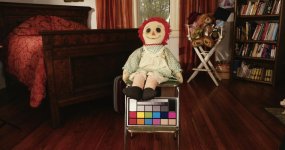
All LUTS off, Slog 3, 61%, Cine + 709 applied in post:
test 2 lut.jpg

Looks like it's about a stop brighter. I think if I use the viewfinder LUT and expose around 65-66%, I should be where I want to be (about midway between these two frames)
 
Last edited:
Are you saying the top photo - original frame 61% was shot with SLog3? If so it sure doesn't look like log to me.
 
Main Street, I'm sure I have the answer to the mystery. I'll explain later tonight when I have time to post.
 
I'm 99% you've run into a problem I warn people about on page 16 of my FS7 book and Chapter 16 of my Master Class video.

What is your camera's Exposure Index setting? 800EI, right? That is the default setting of the FS7 and it is a firmware mistake by Sony that they have not addressed yet. You need to change the Exposure Index to 2000EI so that the LUT you are looking at accurately reflects the camera's native 2000EI that S-LOG is actually being recorded at. In other words, if you expose by looking at a LUT that is rated at 800EI, and you are really recording S-LOG at 2000EI, you are over-exposing the S-LOG files by more than 1.5 stops. And that might not sound so terrible, but the way S-LOG works, it is very bad. S-LOG really falls apart quickly with even a little over-exposure. So set your Exposure Index properly at 2000 and then my advice of 90% for Cine+709 is correct. If you want to leave your Exposure Index at 800, then expose Cine+709 at 70% instead. But I recommend you set the EI correctly. Sony really needs to address this foul up.
 
Back
Top