The incredible shrinking viewfinder!!!??

jeans

Well-known member
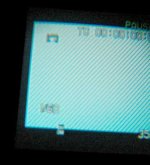
Okay so it really seems like the image in my viewfinder is getting smaller, using less and less of the lcd screen inside. Has anyone else had anything like this happen? It's not effecting my flip out lcd. It's not just the knob that adjusts for glasses. Am I going to have to send it in to be fixed, or am I missing something? WTF? :zombie_smiley: :zombie_smiley:
 
Last edited:
I guess nobody else has had this problem. Really I'm just posting again so this will go back to the top of the list and maybe someone will have an idea about what is going on with this thing.
 
J.E.
I have a similar problem.
When I'm high, my footage which is so obviously crystal clear, Orson-Wellian like in composition, becomes smeary and out of focus...something you would see on the outtakes of America's Funniest Home Video's from 12/25/1996. I think it's a setting in my Core detail.

But seriously Jeans...
I wear glasses and I know the viewfinder can be a bit tricky getting it into focus. Never had a problem with losing image as compared to the LCD, although the image gets smaller in the viewfinder as I adjust for my myopia. Having progressive lenses does not help. I think that is normal. It's the same way when I look through a scope or a telescope.
 
Okay, it's not out of focus, I haven't gotten high in years, and there is a black boarder all the way around my image, not just on the top and bottom (letterbox). I can clearly see the edge of the lcd screen and it's not being used. I'm pretty sure the image was using the full frame when I first got the camera. Granted, I don't use the viewfinder nearly as often as the flip out screen, so it's possible I didn't notice the smaller size of the image before, but I'm not ready to accept that yet, unless someone tells me it's supposed to be like that and my mind is playing tricks on me. As to weather it continues to get smaller, probably not, that's like watching your hairline recede. Anyway I've included an image so you guys wont think I'm crazy or mentally challenged. You can see for yourselves the black bar to the left of my image. There is one on the right also, but it's hard to take a picture of the inside of a viewfinder.
 

Attachments

  • view.jpg
    view.jpg
    16.7 KB · Views: 0
i dont get the shrinking issue.... i use the viewfinder alot and by adjusting the small rotating wheel on the side i enlarge the pic.... its seems fine to me
 
J P said:

If it was the diopter, wouldn't I get the same problem with my flip out lcd and my imported video? I guess I would just like to know for certain if it is or is not supposed to look like that.
 
The diopter only affects the EVF. It does not affect the LCD image. Have you tried adjusting the diopter?

Daniel Wee
 
Not the diopter. The Dvx100B has a feature called underscan which allows you to see the very edges of the frame being recorded. Most likely what has happend is that you have turned on underscan which reduces the size of the frame in the viewfinder and the LCD (although in this case, not as much) thus showing the very edges of the recorded frame.
 
scharky said:
Not the diopter. The Dvx100B has a feature called underscan which allows you to see the very edges of the frame being recorded. Most likely what has happend is that you have turned on underscan which reduces the size of the frame in the viewfinder and the LCD (although in this case, not as much) thus showing the very edges of the recorded frame.

Thanks for the info. I hope that is the case. I will check as soon as I get home.
 
Back
Top