OTHER: The great big PX270 info thread.

The menus are a bit intimidating at first but if you work your way through slowly and focus on the things that most pertain to you it's really not bad. The manual that ships with the camera is pretty slim, but you can download the full manual at the Panasonic PASS website.
http://eww.pass.panasonic.co.jp/p2ui/guest/TopLogin.do?lang=en

Once I got over that initial feeling and worked through the logic, I now really like the menu structure and huge customizability of the camera. Take it slow, shoot some footage, enjoy the camera and it all starts to make sense.


I read that one of you has bought a couple of Barry Green's books but did not find it helped much with this 270 camera because it has menu's more like broadcast camera's is that right? Looking for idea's where to look. I was able to glean some information after reading here thanks.

I just bought the 2011 HPX book thinking it is the closest to this camera. What are your thoughts

 
looks like you need a user name and password to download. So I guess I will have to wait until I actuall get the camera to get teh manual. Thanks

June 13 I was not paying attention. I had to play around a little and then I got it . Thank you.

I also received today the HPX book I will skim through it and find information to read that may help. Thanks to all of you.
 
Last edited:
Havent been using the PX too much recently. Got back to it yesterday and realized: The picture looks quite greyish and pale. I was using the CINE V scene file. Can anyone recommend any settings to improve it? I need something for run and gun and dont wanna do a lot about the picture quality later...
 
Last edited:
I use Video-Rec with Cinelike Gamma. I also have custom color correction/matrix numbers with the color saturation set to taste. This is a complex camera for settings so it would be best for you to spend time learning and tweaking to get your look.
 
Looks like you want a baked-in look without color grading in post. HD NORM gamma is one of the baked in gammas. This is a widely used gamma in live TV news and multicam event production.

Havent been using the PX too much recently. Got back to it yesterday and realized: The picture looks quite greyish and pale. I was using the CINE V screne file. Can anyone recommend any settings to improve it? I need something for run and gun and dont wanna do a lot about the picture quality later...
 
does anyone know how to reduce the amount of noise happening in shots? I'm getting a lot on skin and reading through the settings manual looks like the way to reduce noise is to adjust the master detail, coring, V detail and H detail. You can also adjust skin tone detail (A, B or C) - anyone played with these?
I've tried changing the master detail/coring and the v/h detail (slightly) but haven't been able to get rid of the noise - even in daylight with ND filters on, F stop of about 5.6 shutter speed of 1/50th, 0db. I've played with settings of scene files - default, Cine D, Dine V etc - still can't get a clean pic - it's driving me nuts.

I'm happy to ready up about all this stuff if there's some site that explains it in detail, is there such a site or book or something? I've looked through the Panasonic settings handbook but it doesn't really explain things all that well.

I've shot a couple of things (part of my doco and some paid corporate work) - two very different shooting environments - one and outdoor sporting event the other indoors in a poorly lit room (very grainy but my fault for bumping the db up to 6 - neat video has done a reasonably good job of fixing) - one thing I will say is there is a lot of latitude in post, heaps of info still in the pic even dark images can be brought up nicely.

any advice would be much appreciated
thanks
 
Plus, I would say there is something amiss with your settings or your camera. The PX-270 is the lowest noise Panasonic camera I have ever been around. I shoot exclusively with the log GOP codecs and even at 6db noise is not even close to an issue. My detail settings are around 0 to -3. You might want to put your camera next to another PX-270 if you can as this has not been my experience.
 
Plusone, is it possible you have your camera in the "high sensitivity" mode? I imagine that might increase the noise level.

Advanced menu (hold down the button) / System Mode / Shooting Mode --> Normal

I've found the PX270 to have very low noise unless I intentionally push the gain way up. I routinely shoot at +6 dB with no concerns. If that's not the problem, I'd try doing a full reset to factory settings and then (assuming that eliminates the noise) recreate your scene file one setting at a time until you find what's causing the noise issue. Save your existing scene files first, of course.

- Greg
 
Last edited:
Exactly, as I mostly for TV in Germany. Honestly speaking I am a bit of a "user person", not very much into spending hours on setting details. Would you be so kind to share a scene file with me??


Looks like you want a baked-in look without color grading in post. HD NORM gamma is one of the baked in gammas. This is a widely used gamma in live TV news and multicam event production.
 
thanks Bassman and Greg

Just checked my settings and am shooting in normal mode. I'm starting to think their might be something wrong with my camera! here are two screen shots, part of a frame, one external and one internal in a marquee (both well lit). The files are 100% view from Prelude at full resolution playback.

0db on both - can't remember the scene file but maybe Cine D

the noise on the skin is unacceptable to me but maybe I'm being fussy!

PX270-longG25-NDfilter-.jpgPX270-AVCIntra100-noND.jpg

the left file is longG25 + NDfilter, the right is AVCIntra 100 no ND
 
Last edited:
thanks Bassman and Greg

Just checked my settings and am shooting in normal mode. I'm starting to think their might be something wrong with my camera! here are two screen shots one external and one internal in a marquee (both well lit). The files are 100% view from Prelude at full resolution playback.

0db on both - can't remember the scene file but maybe Cine D

the noise on the skin is unacceptable to me but maybe I'm being fussy!

View attachment 102655View attachment 102656

the left file is longG25 + NDfilter, the right is AVCIntra 100 no ND
 
Plus, the attachments are coming in too small to see anything.

On a side note, what NLE are you using? Have you tried hooking the camera up live to a nice HDTV and seeing if the same noise is present?
 
I'm using Premiere Pro CC 15. I'll try plugging into a tv and see what it look like and I'll try your suggestion of a reset to factory settings - but I haven't really changed much from when it shipped to me (brand new) - I've got the latest -1 firmware version.

here's a couple of full screen grabs from video - same shoots as above - these are the whole frame @ 100%

View attachment 102671View attachment 102672
 
I suspect the images are too large - here's a link to them - hopefully they work

https://drive.google.com/file/d/0BzSvGNAflEj_U2pxdm1LaXJOazQ/view?usp=sharing longG25 / NDfilter / iris around 5.6 (probably) / shutter 1/50 / scene CINE D? shot outdoors

https://drive.google.com/file/d/0BzSvGNAflEj_S2pVV3VPWFQzYUE/view?usp=sharing AVCIntra 100 / No ND / iris open (or 1.8 ish) / shutter 1/50 / scene CINE D? shot in a marquee with open sides and good light


not sure the noise is coming through that well on these screen captures - but it's really quite visible on my machine - i'm using an iMac 27" mid 2011 with Yosemite and CC 15 products (premiere pro & prelude)

will have a go on the weekend of 1) resetting the factory defaults on my camera 2) plugging it into my HD tv and checking the files 3) doing a lot more testing an tweaking to scene profiles

unfortunately I don't think putting it next to another PX270 is an option, they're scarce in Canberra.

anyone willing to offer up a scene profile they're getting good results with so I can test that on my camera?

 
Last edited:
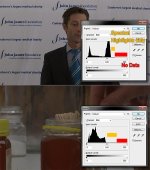
Those 2 screen shots are significantly under exposed. The areas I've marked in red have absolutely no data, and the orange areas are just spectral highlights.

Which exposure guides are you using?
 

Attachments

  • PX270-UnderExp.jpg
    PX270-UnderExp.jpg
    59.7 KB · Views: 0
thanks for analysing these Mike - I use primarily zebras and sometimes wave form monitor. I'll check my camera to see what those particular settings are - but don't think I've changed them from factory settings.
 
thanks for analysing these Mike - I use primarily zebras and sometimes wave form monitor. I'll check my camera to see what those particular settings are - but don't think I've changed them from factory settings.

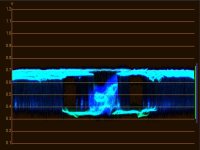
See how underexposed it looks on a waveform monitor? If your PX270 is peaking near 100 (1.0) then there is definitely something wrong.
 

Attachments

  • PX270-UnderExp2.jpg
    PX270-UnderExp2.jpg
    37.1 KB · Views: 0
Last edited:
BTW, if you are using zebras set to 70% and keep the exposure low enough so they don't show on the skin, you will get exactly this problem. Personally, I never have used zebras to expose skin.
 
All HD cameras tend to look noisy if they are underexposed. While you are doing your test press the auto iris button just for a second opinion.
 
Back
Top