The Best Hvx Green Shooting Mode

SUPADOG

Member
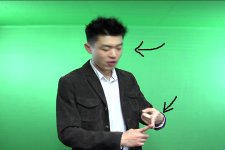
HEY EVERYONE, I HAVE SHOT SOME GREEN SCREEN FOOTAGES FOR MY FRIEND IN HIS BASEMENT WITH VERY SIMPLE SETTING.

THE SHOOTING MODE IS DVCPRO50 480i/24p, AND I DUMP IT IN EDIUS.

HOWEVER, THE FOOTAGES I GOT IS REALLLY DISAPPOINTING, LOTS OF VISIBLE ARTIFACTS WHEN HE MOVES, THIS MAKES A CLEAN CHROMAKEY ALMOST IMPOSSIBLE.

SHOULD I USE 720P INSTEAD OF 480i, I ONLY HAVE ONE P2 CARD, SO THAT MIGHT BE THE HIGHEST QUALITY I COULD GO FOR THE SAKE OF A DESCENT SHOOTING TIME. ALSO HE NEEDS THE FOOTAGE IN 4:3 ASPECT. THATS WHY I CHOSE 480i TOO.

I am a beginner on hvx200, any suggestion is PRICELESS! THANK YOU ALL.
 
What kind of EDIUS timeline? If you used a 480/24p timeline, your footage should look fantastic. You should use the camera setting of 480i/24pA, but even so, DVCPRO50 @ 24p keys very very very well.
 
Thank You Mr Green, You Are Always Here For Us!!
Seems You R The Perfect One To Answer This Question, Both Your Last Name And Knowledge : )
I Used The Suggested Project Setting "dvcpro50, Choose One Of The Dv Ntsc Preset, Then Choose 16:9 Or 4:3" I Then Chose 4:3, Seems This Is The Only Preset Fit To My Shooting Mode.

I Export The Output Footage In "dvcpro50 Avi" Format. Maybe I Did Something Wrong During The Output Process?

Well, It Got Be Something Wrong, Cuz The Footage Really Dont Look Good, I Can Even Clearly See The Horizontal Artifacts On My Friend's Face When He Speaks.
 
The higher the resolution and the better the sample rate of the picture, the better the key. I would shoot in 720p and then knock it down to a smaller res if you are shooting in 480 overall. (might be an issue if you're shooting in 24p though)

To get the best results you need to use a decent plug-in like Keylight in After Effects. Even the most poorly lit screen can be keyed!
 
You might also have the wrong field order happening in your NLE. Switch between upper first and lower first to see if it helps the tearing.
 
yes, please...

I am curios to see that too as I might be green screening a bit of stuffs soon
so I'd like to get an idea of how clean things get, thinking about shooting no less than 720p, but still curious about how it behaves that low


BTW... if I were you I'd just get a laptop with a PCMCIA slot on the set
 
Thank you everyone who contributed lots of useful thoughts for the problem.
here are two screengrabs from the footage (in dvpro50 avi format directly exported from edius)

i used three lights while shooting, two lit up the background greenscreen, one to light my friend.
however, if the footages have serious artifacts, i think i am dealing with the camera recording mode and NLE project setting conflics. As Barry mentiond, the result from dvpro50 should be fantastic... i used the botom field first for my project, and i think it is default from Edius.

HERE ARE SOME SCREEN GRABS, NOT SURE IF YOU CAN SEE THE ARTIFACTS.
 

Attachments

  • screen shot1.JPG
    screen shot1.JPG
    30.1 KB · Views: 0
  • screen shot 2.JPG
    screen shot 2.JPG
    30.1 KB · Views: 0
wow, it looks like it keys VERY well!
what you have to stop doing is filming interlaced so that it still looks good if you don't watch it on a TV

also you might want to add an other two or even four lights to the green screen so as to make it even... or try to diffuse them more and add only two lights

and try to do something about that fold on the green backdrop itself
 
about the lights: maybe drop those two lights down a bit, and then add in each side an other two heavily diffused lights higher and a bit deeper than the others.
 
You say you used 480/24p. In EDIUS, choose a 4:3, 23.976 over 60i timeline. Your footage should drop into EDIUS right away, removing all pulldown and giving you straight perfect 24P with no interlacing (which is what you're seeing, interlacing).

You're probably using a 60i timeline, and that's what's causing the problem.
 
wow, it looks like it keys VERY well!
what you have to stop doing is filming interlaced so that it still looks good if you don't watch it on a TV

also you might want to add an other two or even four lights to the green screen so as to make it even... or try to diffuse them more and add only two lights

and try to do something about that fold on the green backdrop itself

thanks man, totally agree, the lighting needs lots more works to make a even background, there is no backdrop used , we actally taped up one side of the wall in the basement! with some kinda green tape we got in homedepot, so wut you see the dark line isnt wrinkle or something, thats the border of ceiling and wall, the 90 degree angle corner causes the shadow, we need fiugure out a better way to lit up the ceiling .
 
You say you used 480/24p. In EDIUS, choose a 4:3, 23.976 over 60i timeline. Your footage should drop into EDIUS right away, removing all pulldown and giving you straight perfect 24P with no interlacing (which is what you're seeing, interlacing).

You're probably using a 60i timeline, and that's what's causing the problem.

thanks again Baryy. Somehow, in Edius i am using, the suggested dvcpro50 project presets (Which i mean in the preset description box i can see "Additional info: DVCPRO50") all have 29.97 (30000/1001) frame rate. I HAVE NO CLUE WHY.

HOWEVER, YOU KNOW WUT, WHEN I PLAY THE SAME FOOTAGES AGAIN IN WINDOWS MEDIA PLAYER, THE INTERLANCING LOOK IS GONE.... I USED TO USE ANOTHER PLAYER TO PLAY AVI FILE. SO. I DONT KNOW, SEEMS PROBLEM SOLVED, HOWEVER, WITHOUT KNOWING WHY. I AM NOT A VERY TECHINICAL GUY, REALLY HATE TO BE BOTTHERED BY THOSE STUFF.
 
wait, I think I see the tape now... search B&H for it and other stores, you might have a place close by, or you can order online... it will be well worth the investment if you plan to do a lot of green screen stuff

right angles are not possible without creating a probably not so neutral shadows on the finished product, that's why slow tapering curves are used on edges to make then invisible while keeping the lighting of the surface as simple as possible so the setup is easiest, no messing around

Look at this image on Richard's website (a DVXuser called CooLights who has a line of lights)

upThink_Cyc.jpg


the thing you avoid when playing in on RealPlayer is to show the video still Interlaced (i), but on players that only show stuff that is not interlaced will show these horrible lines which were designed to reduce the bandwidth necessary for broadcasting TV... real player must know how to play, and how to recognize interlaced footage... always shoot progressive, since you can always make a progressive interlaced but you can't always make interlaced into progressive...
good for you that the HVX's footage can be made progressive by using pulldown... and that edius can do it for you so long as you set up your project the right way when you start it, so:

like Barry said, "choose a 4:3, 23.976 over 60i timeline" on Edius


Vegas is the most intuitive program if you are learning... but don't worry about the footage that you already shot if you still want to use it... so long as you can "choose a 4:3, 23.976 over 60i timeline" then it will all be wonderful again

but get rid of that shadow, and always shoot as big as you can (and focus it perfectly)

here watch this dude that smoked a spliff and decided to make an instructional video about how to do this in the most guerrilla filmmaker way possible: http://www.youtube.com/watch?v=w6brdwY-dvU
 
Hey everyone,

I know this is an old thread, but I would think that 1080P would be the ideal mode to shoot greenscreen on. I'm getting ready to shoot a green screen short so I'm curious.

thanks!
JP
 
Back
Top