
Navigation
Install the app
How to install the app on iOS
Follow along with the video below to see how to install our site as a web app on your home screen.
Note: This feature may not be available in some browsers.
More options
You are using an out of date browser. It may not display this or other websites correctly.
You should upgrade or use an alternative browser.
You should upgrade or use an alternative browser.
The Best High-Budget NLE System!!
- Thread starter aboammar
- Start date
- Status
- Not open for further replies.

Matt Gottshalk
Resident Preditor
Thank you very much everyone for the feedback, espically Butcher, Jim2000, mcgeedigital, milksac, and grinner. I apreciate it so much ...:dankk2:
mcgeedigital .. thanks alot for your advice to stay away from VelocityHD.. and thanks for the links, but, why people are dumping Avid's systems if you are recomending them?!!
I only recommended them because you mentioned you wanted to stay on the PC platform. Despite the fact that they are losing a lot of market share to Apple, they are still the leader on the PC side.
Hi,
Got your point mcgeedigital ...
I watched the Avid Tutorials for Xpress Pro HD , and Media Composer Adrenaline HD. I noticed that video clips in the timeline are shown as a solid color block, not as a thumbnail images like in all NLE software such as Vegas, Velocity, etc.!! Can this be changed, or Avid's NLE dose not offer such option?
Regards ...
Got your point mcgeedigital ...
I watched the Avid Tutorials for Xpress Pro HD , and Media Composer Adrenaline HD. I noticed that video clips in the timeline are shown as a solid color block, not as a thumbnail images like in all NLE software such as Vegas, Velocity, etc.!! Can this be changed, or Avid's NLE dose not offer such option?
Regards ...
medeamajic
Carbonite Member
Sorry I don't have much high end "hardware" experience but sounds like Butcher knows what he is talking about
I'm a windows person too but my next computer will be some type of mac just so I can edit with FCP.
I really like Premiere UI and ease of use. Not to mention I love the Dynamic Link between adobe products. I use after effects etc.. a lot.
I'm sure many more will tell you a lot of clients do care about your NLE. I think they should only care about the final output as well but that isn't always the case.
Do you have a demo reel I could view?
Your demo real and client samples are all the client will care about. I have never had a client ask me what program I used to create their commercial. I say this because I am in the process of doing much more graphic design(Indesign Illustrator) for print than video editing. I have contacted several printing houses that actualy print on news print. All I need to do is ask to see a few samples and get a quote. I do not need to ask if they are using a Hiedelberg system. If the print quality is good and the price is right then what more needs to be said? I just need to know if their system can accept Indesign files, PDF or Quark Express.
Why not just waste your money on a FCP system to impress your clients but actually edit the work using Premiere and AE? I had heard a lot of hype about FCP but was really let down when I got a hands on demo. Can DVD Studio even burn to Blue Ray as of yet? Keep in mind the CineWave (flagship system for FCP) died after Avid bought out Pinnacle Systems.
Bad Avid!

Keep in mind the CineWave (flagship system for FCP) died after Avid bought out Pinnacle Systems.
Bad Avid!
No different than Apple buying KeyGrip (from Macromedia, I believe, with a PC and Mac version) then renaming it Final Cut Pro and killing the PC version. It's just business--develop or buy the technology you need and try to keep it from helping the competition.
Regarding clients and the edit system you use--you're right, it shouldn't matter. Unfortunately, edit systems have gotten so cheap that producers and clients are buying their own to play with. That means they want someone who has a compatible system so they can rough cut then send it on, or even try to finish the piece then hand it over to fix their mistakes. Plus, perception is everything.
None of our clients even know what editing software we use, and we don't tell them because they don't care. They just want a quality product that sells their product or brings them customers. How we get it done doesn't matter, as long as it's good and within budget.
Michael
medeamajic
Carbonite Member
No different than Apple buying KeyGrip (from Macromedia, I believe, with a PC and Mac version) then renaming it Final Cut Pro and killing the PC version. It's just business--develop or buy the technology you need and try to keep it from helping the competition.
Regarding clients and the edit system you use--you're right, it shouldn't matter. Unfortunately, edit systems have gotten so cheap that producers and clients are buying their own to play with. That means they want someone who has a compatible system so they can rough cut then send it on, or even try to finish the piece then hand it over to fix their mistakes. Plus, perception is everything.
None of our clients even know what editing software we use, and we don't tell them because they don't care. They just want a quality product that sells their product or brings them customers. How we get it done doesn't matter, as long as it's good and within budget.
Michael
I understand companies get bought and sold. I was just letting it be known that the flagship RT system for FCP is no more (CineWave, Targa 3000, Liduid Chrome). It was a great piece of hardware and still works for the Liquid Chrome Software but I have heard even the Liquid Line is supposed to end soon.
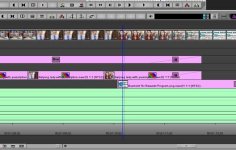
It's an option you can turn on. See:
View attachment 9191
You can add a Filmstrip across the top that shows a general thumbnail representation of your footage, and you can turn on clip thumbnails that show the head frame.
Michael.
Thanks man .. now it make sence

But why this feature is not utilized?? I mean I looked for almost every snap-shot of Avid's NLE timeline in the web, and in Avid's website, and all shows the timeline without thumbnail representation!!!! I do not understand .. I mean this feature is very important, and makes editing very easy! I do not know .. dose it has bad effect in the performance of Avid's system or something??
No different than Apple buying KeyGrip (from Macromedia, I believe, with a PC and Mac version) then renaming it Final Cut Pro and killing the PC version. It's just business--develop or buy the technology you need and try to keep it from helping the competition.
Regarding clients and the edit system you use--you're right, it shouldn't matter. Unfortunately, edit systems have gotten so cheap that producers and clients are buying their own to play with. That means they want someone who has a compatible system so they can rough cut then send it on, or even try to finish the piece then hand it over to fix their mistakes. Plus, perception is everything.
None of our clients even know what editing software we use, and we don't tell them because they don't care. They just want a quality product that sells their product or brings them customers. How we get it done doesn't matter, as long as it's good and within budget.
Michael
You are 100% correct :thumbup:
I think you're overstating the importance of this feature. I don't see the value in looking at some tiny thumbnail image in the timeline to try to navigate my way through the material. Heck, I can look at the record monitor or an external monitor and see a large image of the same thing without having to squint.I do not understand .. I mean this feature is very important, and makes editing very easy!
If I need to look at the timeline and quickly recognize different segments in the program I'll color code the clips in the timeline. That way I can easily see where the segment breaks are - again, no squinting or zooming into the timeline required. The other tool that's useful is the locator tool. Locators are sorta like bookmarks, you can quickly move to sections of the timeline quickly with locators. You can also add notes to each locator.
There are tons of tools available in all NLE's, the trick is to find the ones that speed up your work flow.
I think you're overstating the importance of this feature. I don't see the value in looking at some tiny thumbnail image in the timeline to try to navigate my way through the material. Heck, I can look at the record monitor or an external monitor and see a large image of the same thing without having to squint.
If I need to look at the timeline and quickly recognize different segments in the program I'll color code the clips in the timeline. That way I can easily see where the segment breaks are - again, no squinting or zooming into the timeline required. The other tool that's useful is the locator tool. Locators are sorta like bookmarks, you can quickly move to sections of the timeline quickly with locators. You can also add notes to each locator.
There are tons of tools available in all NLE's, the trick is to find the ones that speed up your work flow.
I agree with you that color coding, and bookmarking are very usefull tools, and with them you find your clip very fast.
But, I do not agree with you that thumbnail images are not important!!:huh:
This feature is so important to identfy what clips are in the timeline at a glance. This usefull tool can be utilized straigh away after placing any clip into the timeline, unlike color coding, and bookmaring wich require a time to add them in order to use them.
If you do not agree with me, then maybe it all depends on eveyone's style of editing. To me, I can not edit without having a filmstrips of my clips shown with thumbnail images
I forgot to mention... I learned that Avid's NLE are a littel hard to learn, so, is there any demo version for Media Composer, or Xpress Pro for instance?
THanks
Avid is not hard to learn.
It's only hard to learn if you try to mess around in it without looking at the manual or help. Just spend a week with the tutorials on the avid site and you'll get the hang of it pretty fast.
just got avid symphony nitris, real time full hd on hd-sdi. realtime color correction, realtime universal mastering. we use 8 core machine with iscsi 10gbe connection. easily handles 6-8 streams.
Thanks .. I am considering it very seriously. With 8 core you get 6-8 HD streams .. dose it make a difference if using 4 core or 8 core in the HD performance? I mean dose symphony nitris depends on its hardware for RT performance, or on the host PC, or both?
xmephestox
Carbonite Member
it will use your PC hardware and it's own symphony nitris hardware for all your RT needs. that giant device hooked into the pc with all the flashing lights. yeh that's where all your streams hook into, and it helps process that. keep in mind too you can always do offline editing via laptop or whatever with media composer software. DNxHD is a awesome codec where you can do great offline editing with very little loss in visual quality. Symphony Nitris systems are considered to be the finishing station. but hey if u got the money to just buy and work on it good on you.
if you also got the money to swing get a unity, mass raid system fiberlined to your nitris :]
i love unity setups...
if you also got the money to swing get a unity, mass raid system fiberlined to your nitris :]
i love unity setups...
medeamajic
Carbonite Member
Thanks .. I am considering it very seriously. With 8 core you get 6-8 HD streams .. dose it make a difference if using 4 core or 8 core in the HD performance? I mean dose symphony nitris depends on its hardware for RT performance, or on the host PC, or both?
I imagine the Avid systems are very good but I think you are putting to much emphasis on the RT of the system rather than the actual editing experience. Some people like the Avid GUI others hate it. I say test it out before you buy.
I made mention of the CineWave/Targa 3000 because it was the best RT solution for FCP. As of now I am not sure what highend options there are for Final Cut Pro. If there was a system that allowed for 12 streams of HD using FCP would you prefer that instead of the Avid? Is RT power more important than a good GUI?
I like Avid, FCP and Premire Pro but when all is said and done I do like the GUI of Premiere the best. You may prefer FCP or even Edius. There are highend Canopus solutions if RT is a must have. Have you looked at the Edius platform? Edius has some great RT performance.
Thanks .. I am considering it very seriously. With 8 core you get 6-8 HD streams .. dose it make a difference if using 4 core or 8 core in the HD performance? I mean dose symphony nitris depends on its hardware for RT performance, or on the host PC, or both?
i don't really believe the box helps in realtime processing (timeline playback). We can't prove it since symphony won't run without the Bob turned on. most of the time the cpus hover around 20-30 %. we manage to get 90% of the 8 cores on multiple color correction PIPs on a test project i did.
we upgraded from avid adrenaline dnxcel hd, of course its not realtime. its worth it IMHO.
John
Last edited:
Are you running the old Symphony Nitris, or the new Nitris DX (damn Avid and their ridiculous naming schemes)?
The new Nitris DX handles on board transcoding to DNxHD during capture for sure. As far as realtime playback of effects--I don't believe there's an effects board in the new NitrisDX. That's handled by the GPU and CPU. However, the NitrisDX does handle scaling of thin raster formats to full raster, which frees up the CPU for media and effects playback. That's why, if you're running Media Composer with the DX, you should get more realtime playback with the BOB turned on. Unfortunately there is no way to test what it helps with the Symphony since there's no Symphony Software version, but the increased playback with Media Composer points out that something is being handled by the BOB. I assume it does the same for the Symphony.
Michael
The new Nitris DX handles on board transcoding to DNxHD during capture for sure. As far as realtime playback of effects--I don't believe there's an effects board in the new NitrisDX. That's handled by the GPU and CPU. However, the NitrisDX does handle scaling of thin raster formats to full raster, which frees up the CPU for media and effects playback. That's why, if you're running Media Composer with the DX, you should get more realtime playback with the BOB turned on. Unfortunately there is no way to test what it helps with the Symphony since there's no Symphony Software version, but the increased playback with Media Composer points out that something is being handled by the BOB. I assume it does the same for the Symphony.
Michael
nitris dx. out of curiosity (its cost), i peeked into the box because its very small compared to the adrenaline and there's only 2 chips with heatsink. one on the mainboard (control), one on a daughter board (i believe the dnxhd encoder) . i can also see an expansion slot. if nitris dx does the scaling the data must come back to the cpu for effects processing then it should be uncompressed hd on its return. the DX uses 4x pci-e. so that's 10gbe and 2.5gb/s per uncompressed hd stream. theoretically we're limited to only 4 scaled streams, but i tried it with dvcpro hd materials same 6-8 streams. im sure dx does the down convert/cross convert though.
i have an adrenaline SD with media composer 3.0, exactly configured like the symphony nitris, same realtime performance in SD. i can directly compare the projects because we can switch them instantly back and forth. the major difference is the latency. however,i can still see a very small delay on the DX.
i have an adrenaline SD with media composer 3.0, exactly configured like the symphony nitris, same realtime performance in SD. i can directly compare the projects because we can switch them instantly back and forth. the major difference is the latency. however,i can still see a very small delay on the DX.
Last edited:
- Status
- Not open for further replies.