GH2 Testing NanoFlash HDMI recorder

ed_lee83

Well-known member
I had some free time so decided to take the NanoFlash to test with the GH2.
Here is my first test comparing certain ISO levels with a stock GH2 and NanoFlash footage recorded at 220mbps.
I had researched the NanoFlash a lot before acquiring it, and saw a lot of mixed reviews with the GH2. I intend to use it for Sony FS100 or other cameras but I still have the GH2 so decided to finally put it through my own tests.
Have a look if you're interested to see the results, and if you know of some other test methods, or which hacks to go against, let me know.
In this test, to be honest, it seems the NF footage is grainier. There's also the colour tint - less saturated than from the GH2. Sharpness? Hard to tell.
I will be shooting some outdoor stuff later in the week.

 
Did you not have to go the avisynth route at all since the Nano has 3;2 Pulldown or what?
 
I just have to say how extremely jealous I am of your city and locations. Love it. What lens where you using for these tests? I couldn't tell much difference concerning motion. Could you tell from your opinion if there was a difference in motion between the gh2 and the nano? Thanks for doing these tests btw.
 
I think test 2 shows a little less mud in the background. A little cleaner and more professional looking.
 
I just have to say how extremely jealous I am of your city and locations. Love it. What lens where you using for these tests? I couldn't tell much difference concerning motion. Could you tell from your opinion if there was a difference in motion between the gh2 and the nano? Thanks for doing these tests btw.
Hah, you're jealous of me living in one of the most densely populated and noisiest cities in the world?
I wouldn't presume there'd be "better" motion? Or is there a more effective way to test that? How about using Twixtor or something to compare the footage?
I used a Zeiss 50mm f1.4
 
I would have hacked the GH2 and up'd the bitrate to 175Mbit.

Also, the output of the HDMI on the GH2 is... modified, not quality wise, but for sync'ing purposes, which is why someone asked about the avisynth route, which fixes it.

The GH2 sensor scans at 23.976P and embeds the picture in a 59.94i stream by adding 3:2 pulldown. Nothing unusual about that. But, when it sends this signal out the HDMI port, it adds in extra fields to make the signal a true 60.00i. These extra duplicate fields create havoc when attempting to remove the 3:2 pulldown. Plus, they throw the audio increasingly out of sync the longer the camera rolls.

http://www.dvxuser.com/V6/showthread.php?237584-HDMI-Capture-Problem-SOLVED-AviSynth-RULES!
 
I would have hacked the GH2 and up'd the bitrate to 175Mbit.

Also, the output of the HDMI on the GH2 is... modified, not quality wise, but for sync'ing purposes, which is why someone asked about the avisynth route, which fixes it.


http://www.dvxuser.com/V6/showthread.php?237584-HDMI-Capture-Problem-SOLVED-AviSynth-RULES!

So is that one of Driftwood's? I think I stopped keeping up to date on the hacks last year.

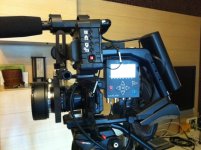
Check out how I've rigged the NF on my Edelkrone

photo(24).jpg
 
Last edited:
I've noticed here and in this post at dvinfo that people are now recording externally and getting solid results without running the avisynth script.

I wonder if Panasonic quietly fixed the HDMI pulldown problem with the v1.1 firmware update without announcing it? Or is the sync still bad on these clips and we aren't seeing it for some reason?
 
I read that post as well. The output seems to be 60i only which the Nano could turn into 30p or 24p. The PIX 220 looks like a better option as one could put XLR audio in the unit at the same time.
 
I read that post as well. The output seems to be 60i only which the Nano could turn into 30p or 24p. The PIX 220 looks like a better option as one could put XLR audio in the unit at the same time.

It was a close call with the Pix220. I believe the price is almost the same (new). The XLR was the only biggest advantage I wanted. Yes the monitor is handy but too small for me and is it colour accurate?
But I preferred the NF because of its weight (3 times lighter), size, timelapse function, and additional HD-SDI ports - you need the Pix 240 for SDI costing $2,700. So, I don't have to be constrained by HDMI cameras.

But back on track, I will be doing a green screen test soon.
 
Yes, it is. I believe the latest hack is called Quantum v9b. It is the hack they used in the latest Zacuto shootout, where the GH2 placed 3rd, behind the Arri Alex and F65.
 
Yes, it is. I believe the latest hack is called Quantum v9b. It is the hack they used in the latest Zacuto shootout, where the GH2 placed 3rd, behind the Arri Alex and F65.

Nuts. I don't have 64g SDXC cards. But I should be able to record at least a limited amount on a 32g/95mbps?
 
I've noticed here and in this post at dvinfo that people are now recording externally and getting solid results without running the avisynth script.

I wonder if Panasonic quietly fixed the HDMI pulldown problem with the v1.1 firmware update without announcing it? Or is the sync still bad on these clips and we aren't seeing it for some reason?
Someone with v1.1 and a NanoFlash could answer this real quickly. Plug in the Nano and see what format it claims to be seeing -- it'll either say 1080/59 or 1080/60. If it's 1080/60, then no, it's not fixed, and the cadence error will still be there. If it now says 1080/59, then yes it would be fixed and should be true 2:3 pulldown at that point, which the Nano can interpret and automatically strip out.
 
Ed_lee! You have your mission!

I don't have the NanoFlash right now, and camera's not near me so I couldn't connect it to a monitor or anything. Would love to know what's going on.
 
Ed_lee! You have your mission!

I don't have the NanoFlash right now, and camera's not near me so I couldn't connect it to a monitor or anything. Would love to know what's going on.

Mine says 50i, and I was using v1.1
 
OH! You're shooting PAL, so not 24P, but 25P. That makes sense. And it also explains the motion. Either that or yo uwere using a 1/50th shutter setting. Goottt it.

Can you switch to 24? I think that requires a patch or something no?
 
OH! You're shooting PAL, so not 24P, but 25P. That makes sense. And it also explains the motion. Either that or yo uwere using a 1/50th shutter setting. Goottt it. Can you switch to 24? I think that requires a patch or something no?
Ok i actually followed the advice from Atomos' site:They said shoot in HBR/25p but change the output setting to NTSC/24p. And that was how I recorded my tests. Seems to be ok. I'm just following advice from other people, haven't a clue myself!
 
Back
Top