DanielRutter
Active member
Hey guys;
Considering how popular this recorder is, I'm surprised to find there is bugger all info on this problem through google searches.
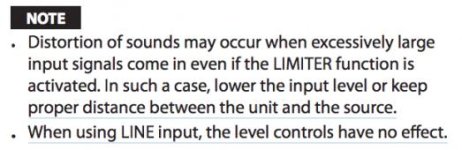
I recorded two live sets for some heavy metal bands in my local area yesterday, and had trouble feeding the house mix into my DR40. I had the recorder set to "dual record" mode, house mixer fed into the recorder via a RCA to 3.5mm jack cable (REC out connections on the mixer) and a VXLR adapter. When adjusting the input levels on the recorder (buttons on the side) I could not lower the volume enough to dodge the distortion/clipping. I found switching from Mic input to Line input (via the switch on the side) manages to stop clipping (as did having the dual record function record at -12db)... but I could not lower the volume all that much. Also, the desks I run into at these gigs do not have a line-out/REC Out volume adjust... so I can't fiddle with that.
I've come from using a Zoom H1 on these live performance recordings, just feeding the house mix into the Zoom via RCA to 3.5mm cables, and if the mix was too loud, I just adjusted the volume using the buttons on the side. I could completely stop all audio coming in by lowering the volume to 0, but on the DR40... this does nothing. So either something is wrong here, I'm missing a setting, or... there is something I haven't thought of.
I've heard of Attn Pads, but I have no idea what I'm looking at. All I want to do is record house mix audio into my DR40, and not have to worry about audio while I'm shooting (I am a lone-shooter for the most part). Someone point out what I'm doing wrong?
Help?
Considering how popular this recorder is, I'm surprised to find there is bugger all info on this problem through google searches.
I recorded two live sets for some heavy metal bands in my local area yesterday, and had trouble feeding the house mix into my DR40. I had the recorder set to "dual record" mode, house mixer fed into the recorder via a RCA to 3.5mm jack cable (REC out connections on the mixer) and a VXLR adapter. When adjusting the input levels on the recorder (buttons on the side) I could not lower the volume enough to dodge the distortion/clipping. I found switching from Mic input to Line input (via the switch on the side) manages to stop clipping (as did having the dual record function record at -12db)... but I could not lower the volume all that much. Also, the desks I run into at these gigs do not have a line-out/REC Out volume adjust... so I can't fiddle with that.
I've come from using a Zoom H1 on these live performance recordings, just feeding the house mix into the Zoom via RCA to 3.5mm cables, and if the mix was too loud, I just adjusted the volume using the buttons on the side. I could completely stop all audio coming in by lowering the volume to 0, but on the DR40... this does nothing. So either something is wrong here, I'm missing a setting, or... there is something I haven't thought of.
I've heard of Attn Pads, but I have no idea what I'm looking at. All I want to do is record house mix audio into my DR40, and not have to worry about audio while I'm shooting (I am a lone-shooter for the most part). Someone point out what I'm doing wrong?
Help?