Tascam DR-05 settings

guerriglia

Active member
Hi everybody.
I just bought a Tascam DR-05. I didn't have a big budget and some reviews I read said pretty nice things about this recorder.
Just one question: what settings do you recommend to add the sound in post-production with FCPX (I shoot documentaries with interviews, and also have a lavalier and a shotgun)?
Right now I have WAV format 16-bit, 44.1k, mono.
I don't know much about audio, as you probably can tell, so please keep it as simple as possible :)
Any other suggestions are greatly appreciated.
Thank you!
 
WAV 24-bit, 48kHz.

But what are you recording? Dialog (interviews)? Ambient sounds and sound effects? And are you using the built-in mics, or are you feeding an external source to the recorder?
 
Thanks Alex for your reply.
I will use it as a backup for interviews, with the built-in mics. It's just for an emergency situation.
Is mono ok?
 
There's a challenge to using a stereo mic array like that for interviews and other dialog. The mics are too wide-patterned, meaning that they will hear a whole lot of background sound. Plus, they are angled, so one is always off-axis to the person speaking. Using mono mode combines these mics, and that can cause sound issues. Your best bet, if you do need to use it, is to record in stereo and then, in post, split the stereo file into separate, mono files. Delete the one that is off-axis and pan the other to the center of the audio mix.
 
Hi Alex.
Can I do that (splitting the stereo file into separate mono files) in FCPX? Or do I need a specific audio editing software? Quite frankly, I'd stay away from that :)
Otherwise, if I record in mono, what are the "sound issues" you mention?
Thank you for your patience and help.
(PS: Like I said, it's just for back-up and emergency, it won't be my main audio recording equipment).
 
Yes, you can do that easily in Final Cut. Select the audio in the timeline and "unlink stereo pair." You'll then have full control over panning and can delete one of the channels.

One of the biggest problems can be phase cancellation. Two mics recording a source but not properly aligned can each receive the sound source at a slightly different time (this is called "out of phase"). Put them together by combining them into a mono signal, and the two out-of-phase sound signals can start canceling each other out. They likely won't be 180° out of phase, which would result in complete signal loss, but rather slightly out of phase which causes loss of certain frequencies and a "hollow" sound.
 
My best tip is do not use the auto record levels, ruins the recording! Set level manually, and leave some room for louder parts of the recording. Meaning, better to have level set on the low side, as it's easy to add gain in post. Record too loud and get clipping and there's no coming back from that, clipped audio is junk. Clipping is when the waveform is flat across the top = maxed out. The audio is distorted and lowering the level in post does nothing, not fixable.

If just doing interviews, then the audio level will be pretty consistent so it ought to be easy to find a good record level by testing before the shoot begins. I do a lot of live events where levels vary wildly and then it's harder to predict where to be, so I have to aim low to allow for the loud crowd cheers, loud music, etc. that mix with other quieter speeches and such.

Also, you do have the option to plug in an external mic, such as a lavalier or shotgun, as the built-in mics may not sound the greatest as others have mentioned. Be sure to connect headphones when setting up the Tascam to check your sound.

Thanks

Jeff Pulera
Safe Harbor Computers
 
Thanks guys, great suggestions!
I will do some tests and hopefully I won't bother you anymore, even though I am sure I will need some help with the post-production.
THANKS!
 
Screenshots

Screenshots

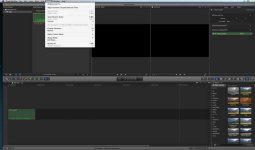
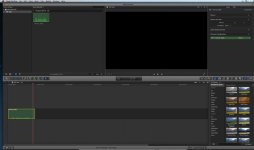
Oops... I was too quick with my celebrations. Where do I find the "unlink stereo pair" function? Or am i screwing this up altogether?
Thanks.
(See screenshots)
 

Attachments

  • screenshot 2.jpg
    screenshot 2.jpg
    47 KB · Views: 0
  • screenshot.jpg
    screenshot.jpg
    42.6 KB · Views: 0
From the FCP-7 manual:
To separate a stereo pair
1 Select a stereo clip item.
2 Choose Modify > Stereo Pair, so that there’s no checkmark next to the menu item (or
press Option-L)
 
Guerriglia - for FCPX - in the audio tab of the Inspector find Channel Configuration (it's the green thing at the far right in your screen shots)
At the right of that green line the word Stereo is a drop down menu - change that to Dual Mono - this puts everything centered in both the L and R tracks
If you need to silence a channel, click the triangle to twirl down the options and just uncheck the audio channel you don't want to hear

.wav works perfectly in FCPX - just drag them into the Timeline or an Event or Project, depending on whether you're on 10.1.x (10.1.1 came out today) or 10.0.x

I have a DR-05 also but use a MixPre to let me run phantom powered mics into it
As others have said, it's not great for what you're talking about (using the built-in mics to record interviews), but at least try using it on manual and turning on the limiter
 
Last edited:
Wow! Thank you so much ddixon for this thorough explanation. Now I understand why I couldn't see what others were seeing: I have FCPX 10.0.9, just updated to 10.1.1.

Do you really recommend to turn the limiter on?
 
Last edited:
One more thing, if I may: any simple suggestions on how to use the pan? I do understand that I can't ask to know everything about audio through a forum, but at least I'd like to avoid major mistakes and screw-ups before it's too late...
Thanks.
 
What do you mean by "how to use the pan?" Literally, where to find it, or what it actually does?
 
No, I know where to find it. In your previous replies you said "full control over panning" and "pan the other to the center of the audio mix". So I was wondering what pan does and if there are some basic rules to follow. Again, I don't want to become a sound technician in a couple of hours, I just want to avoid irreparable mistakes and do some basic editing. Please forgive my presence here in this hardcore-audio-guys forum :)
 
No, I know where to find it. In your previous replies you said "full control over panning" and "pan the other to the center of the audio mix". So I was wondering what pan does and if there are some basic rules to follow. Again, I don't want to become a sound technician in a couple of hours, I just want to avoid irreparable mistakes and do some basic editing.

Pan is what controls the sound source's playback between left and right in the stereo image. When you bring in a stereo sound source, the channels are automatically panned for stereo playback (ch1 left, ch2 right). When you split a 2-channel (linked stereo) file into two mono (1-channel) files, the panning stays in place.

Dialog is a mono source, and should always* be panned to the center. So, when you have two channels of the same dialog linked as a stereo pair, and you unlink and delete one of them, the other remains panned to the side. Use the pan control to center it.

*There are exceptions to the rule. Dialog that is coming from off-camera may be panned to the side to indicate that person's location to the viewer. This is a special purpose, and is to be used intentionally and sparingly.


Please forgive my presence here in this hardcore-audio-guys forum :)

Nothing to forgive! This is a great place to learn, so keep at it! Just needed to make sure I was answering the right question.
 
Hi.
I am working on my test files.
I noticed that in FCPX when I manually increase the volume in the timeline (I just see some very tiny yellow parts in the levels, and it should be fine, right?) in the stereo file, the levels play just fine. But when I split the stereo file into two mono files, they reach red/clipping levels. After I delete one of the mono channels, the levels of the remaining channel go back to normal. Is that ok?

I am sorry for my primitive audio terms... :)
 
Back
Top