
Navigation
Install the app
How to install the app on iOS
Follow along with the video below to see how to install our site as a web app on your home screen.
Note: This feature may not be available in some browsers.
More options
You are using an out of date browser. It may not display this or other websites correctly.
You should upgrade or use an alternative browser.
You should upgrade or use an alternative browser.
GH4 Taking the GH4 to the next level…………….10bit 422 with A Ninja Assassin
- Thread starter Vardalos
- Start date

joe12south
Veteran
And don't forget this guys: http://videodevices.com/products/portable-video-recorders/pix-e5h
Smaller, more rugged, dual battery, fan shuts off during recording, cool USB media option, etc.
Smaller, more rugged, dual battery, fan shuts off during recording, cool USB media option, etc.
Brandon Freeman
Well-known member
Oh snap! And it does actual C4K!
Barry_Green
Moderator
Just got in a PIX-E5H for evaluation yesterday. My first impression is that this is one hell of a product.
Brandon Freeman
Well-known member
I haven't tried either product yet and I'm already won over by the C4K with 10-bit. Done and done! (Also cheaper!)

emweb
Member
Just got in a PIX-E5H for evaluation yesterday. My first impression is that this is one hell of a product.
Does the PIX-E5H support Luts and is it too heavy for shoulder rig use?
Last edited:
Just got in a PIX-E5H for evaluation yesterday. My first impression is that this is one hell of a product.
Barry,
We would love to hear your comments on the PIX-E5H after you evaluate it. Perhaps you could post them on this thread.

visceralpsyche
Well-known member
I just played with the PIX-E5 a couple of days ago at a presentation.
It's awesome and definitely on my shopping list!
Here's a couple of stills of it mounted on my GH4 setup. It does full C4K 4096x2160x24p at 10 bit 422 ProRes. The new firmware supports custom LUTs so you can put the Varicam LUT directly onto your monitor output and have the scopes reflect the proper exposure.
Highly recommended!
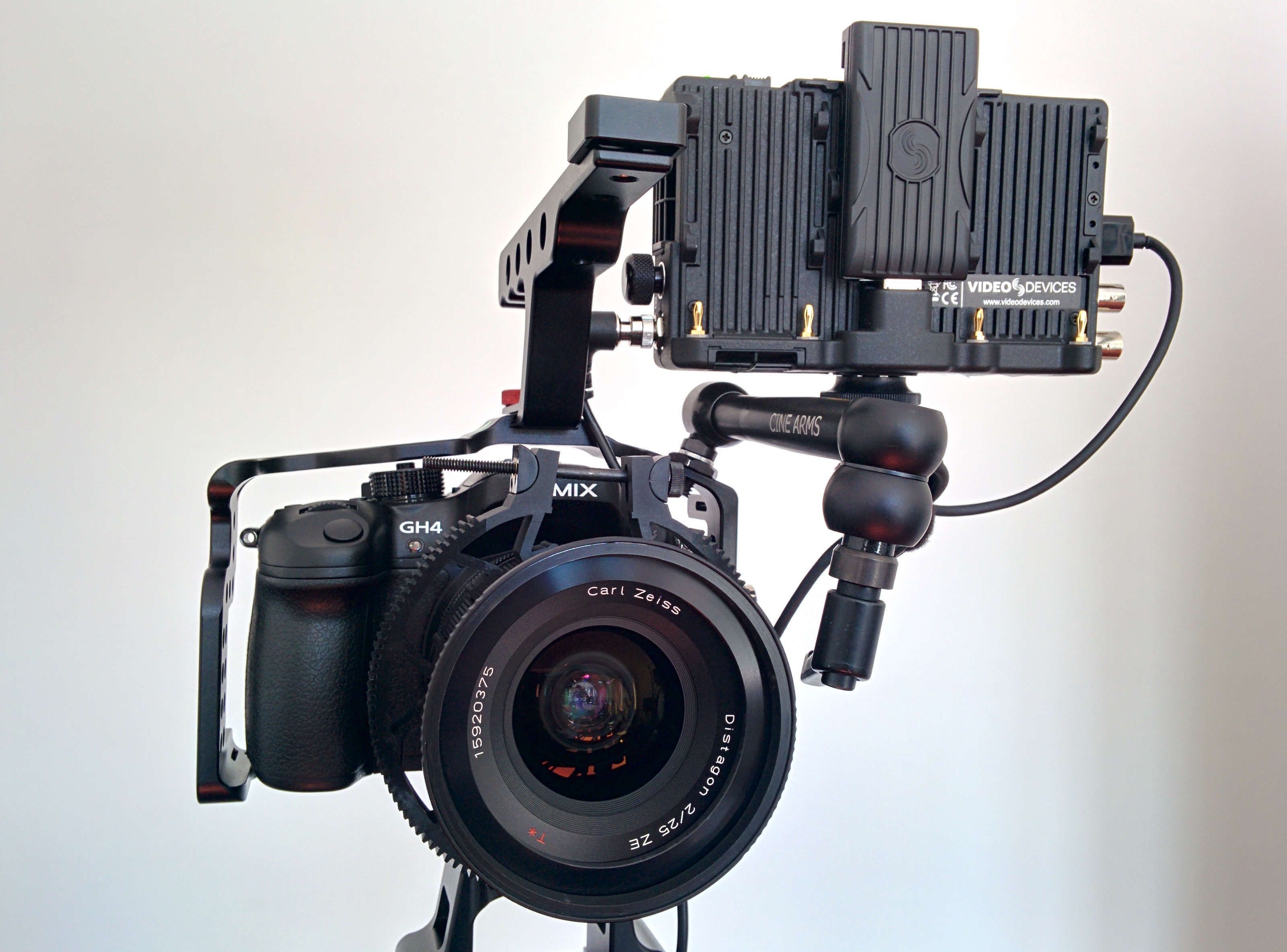

Cheers from Berlin,
Paul
It's awesome and definitely on my shopping list!
Here's a couple of stills of it mounted on my GH4 setup. It does full C4K 4096x2160x24p at 10 bit 422 ProRes. The new firmware supports custom LUTs so you can put the Varicam LUT directly onto your monitor output and have the scopes reflect the proper exposure.
Highly recommended!
Cheers from Berlin,
Paul
Barry_Green
Moderator
I have a PIX-E5H and an Odyssey 7Q+ for evaluation. I will probably do a comparison review.Barry,
We would love to hear your comments on the PIX-E5H after you evaluate it. Perhaps you could post them on this thread.

dustylense
Veteran
How's the battery life on the PIX. I have the Shogun and I just feel it's too big and cumbersome for the Gh4. Nice recorder, but would like a 5 in screen.
Barry_Green
Moderator
No idea, just got it in yesterday, and have been using it in AC mode. It'll be a while before I have answers like that...
dustylense
Veteran
I just did some skin tests of my daughter who is of dark complexion to my shogun in 10bit against in my kitchen with a large window light (she won't let me post them) but here is what I'm seeing. Yes, without doubt 10bit external is better. But there are still issues.
I'm a guy that likes rich full saturated images. Not that milky lifted black nearly black and white look. And while treating the 10bit footage with various LUTs, manual grade, film convert, Koji, I'm just seeing the image break up more than other 10bit LOG files I've worked with (BMD, Fs7, A7s to recorder although it's 8bit out). It's just not holding up (for me) and my tastes compared to other treated 10bit capture. Almost as if the true 10bit info is not represented. Lets just say that I've had better success when I shot Clog on the C100 internally. And thats 8 bit 24Mbs footage.
Super noisy. Don't under expose. Watch that waveform and clipping.
I do like the look that Vlog could give the Gh4. But I'm coming to the realization that I'm gonna pass on it both internally and externally for me and my tastes.
So before you rush out and drop $1500 in external recorders thinking it will solve everything for the Gh4 Vlog. Sit it out a couple weeks and see what people are coming up with.
I'm a guy that likes rich full saturated images. Not that milky lifted black nearly black and white look. And while treating the 10bit footage with various LUTs, manual grade, film convert, Koji, I'm just seeing the image break up more than other 10bit LOG files I've worked with (BMD, Fs7, A7s to recorder although it's 8bit out). It's just not holding up (for me) and my tastes compared to other treated 10bit capture. Almost as if the true 10bit info is not represented. Lets just say that I've had better success when I shot Clog on the C100 internally. And thats 8 bit 24Mbs footage.
Super noisy. Don't under expose. Watch that waveform and clipping.
I do like the look that Vlog could give the Gh4. But I'm coming to the realization that I'm gonna pass on it both internally and externally for me and my tastes.
So before you rush out and drop $1500 in external recorders thinking it will solve everything for the Gh4 Vlog. Sit it out a couple weeks and see what people are coming up with.
Brandon Freeman
Well-known member
Well I don't have the cash to run out and grab it anyway right now! Haha. And with FilmConvert's grain masking the artifacts (I know I keep saying it, but it's really true) I'm getting results that satisfy me.
el presidente
Well-known member
Not sure if you can record a downscaled 4k to 1080 signal on the blackmagic video assist..might be a good cheap solution for some if so.
visceralpsyche
Well-known member
I just did some skin tests of my daughter who is of dark complexion to my shogun in 10bit against in my kitchen with a large window light (she won't let me post them) but here is what I'm seeing. Yes, without doubt 10bit external is better. But there are still issues.
I'm a guy that likes rich full saturated images. Not that milky lifted black nearly black and white look. And while treating the 10bit footage with various LUTs, manual grade, film convert, Koji, I'm just seeing the image break up more than other 10bit LOG files I've worked with (BMD, Fs7, A7s to recorder although it's 8bit out). It's just not holding up (for me) and my tastes compared to other treated 10bit capture. Almost as if the true 10bit info is not represented. Lets just say that I've had better success when I shot Clog on the C100 internally. And thats 8 bit 24Mbs footage.
Super noisy. Don't under expose. Watch that waveform and clipping.
I do like the look that Vlog could give the Gh4. But I'm coming to the realization that I'm gonna pass on it both internally and externally for me and my tastes.
So before you rush out and drop $1500 in external recorders thinking it will solve everything for the Gh4 Vlog. Sit it out a couple weeks and see what people are coming up with.
Dusty, just to check, are you using Premiere Pro to edit/grade?
Because if you are (like I have been), that's introducing bad errors into the ProRes files that show up the YUV chroma smearing. Resolve 12, After Effects CC2015 work properly with 10 bit ProRes422 HQ and that's where I'm finding the image to be pleasing and without issue (at least compared to the 8 bit internal V-Log).
Cheers,
Paul
dustylense
Veteran
Both FCP7 and FCPXDusty, just to check, are you using Premiere Pro to edit/grade?
Because if you are (like I have been), that's introducing bad errors into the ProRes files that show up the YUV chroma smearing. Resolve 12, After Effects CC2015 work properly with 10 bit ProRes422 HQ and that's where I'm finding the image to be pleasing and without issue (at least compared to the 8 bit internal V-Log).
Cheers,
Paul
joe12south
Veteran
It does not yet support LUT's. It's a tiny bit lighter than the Shogun.Does the PIX-E5H support Luts and is it too heavy for shoulder rig use?