Synchro Scan

oogabooga

Member
I am wondering if the synchro scan function (ie faux shutter speed) can affect motion in the same way as a true film variable shutter? Or is it just for syncihng to TV sets?

Ie - Saving Private Ryan (for lack of an immediate better reference) uses 45 degree shuterr angles in the combat scenes to make things look choppy. I wonder if the HVX can do the same. And if so- shouldn't a 360 degree angle at a slow frame rate blur things a bit? Maybe even streak?

I should just go and test this but I figure bringing it up will get others interested as well.
 
oogabooga said:
I am wondering if the synchro scan function (ie faux shutter speed) can affect motion in the same way as a true film variable shutter? Or is it just for syncihng to TV sets?

Ie - Saving Private Ryan (for lack of an immediate better reference) uses 45 degree shuterr angles in the combat scenes to make things look choppy. I wonder if the HVX can do the same. And if so- shouldn't a 360 degree angle at a slow frame rate blur things a bit? Maybe even streak?

I should just go and test this but I figure bringing it up will get others interested as well.
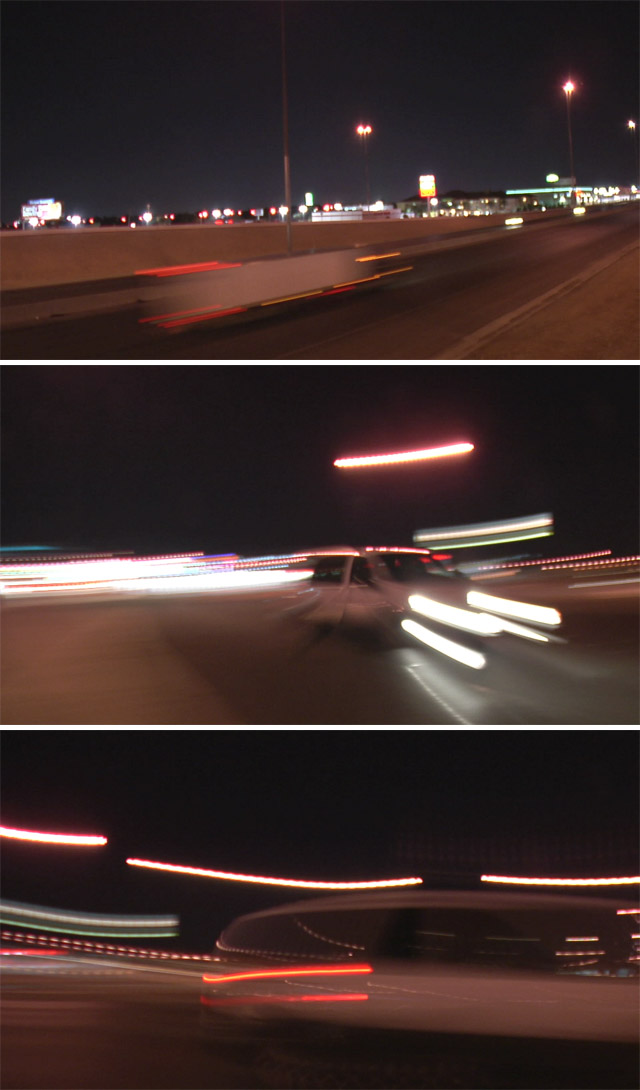
You nailed it on the head. It is supposed to work the same as the shutter on a film cam.

At 45, it will look choppy. At 360, it will look a little blurred. Per Evin, Collateral was shot with a 360 shutter on a Viper.
 
Yes, in fact the HVX allows you to specify the shutter angle in degrees. You can choose any setting from 10.0 to 350.0 in 0.5-degree increments.
 
I've been trying to test this, trying to reach the blurred/streaking effect by opening the shutter angle to 350 but everytime I play back it doesn't show any signs of the blurred/streaking effect... I'm shooting on 720P/25PN in FILM CAM mode... I can achieve the look with a 1/12 shutter speed on video cam... but i want to be able to shoot it in 48 frames.... is there something I'm not doing right? I want to achieve the look of what its like in the viewfinder when you shoot at 12fps, that blurred effect... thanks guys
 
Last edited:
Use the shutter speed to actually select the syncro scan speed. Just changing it in the scene file accomplishes nothing unless you've actually selected it by using the shutter speed +/- buttons.
 
yeah i've definately selected through the shutter speed selection... 350.0d displayed at the bottom of the viewfinder...
 
Well that's they key. Try setting up two scene files, identical to each other, but one with 350 degrees and one with 10 degrees. Swap between 'em and you should see a massive difference in blur and in light sensitivity.
 
well i had someone moving in front of the camera very quickly and i switch between the 350.0d to shutter off and there is a change in light sensitivity but not in motion blur/streaks... I've spoken to the camera rental place I bought it from, they're going to look into it... what kind of image do you have when your HVX is set to 350.0d on the viewfinder? Does it look similar to when its set to 12fps? thanks mate, really appreciate it!
 
Well... it's dependent on your frame rate. If you're shooting at 25fps, the slowest shutter speed you can get is 1/25. That's going to give you equivalent motion blur to 12fps @ 180 degrees.

If you want streaks, you've got to really drop your frame rate. 12fps @ 350 degrees is a start, but if you want streaks you have to use the Frame Rate Hack to get down to 2fps. 2fps @ 350 degrees can make for marvelous streaks because you've got an exposure time of 1/2 second.

TwoFPS-collage.JPG
 
Back
Top