SxS and EX1R: the ultimate way to save

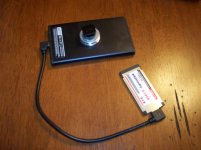
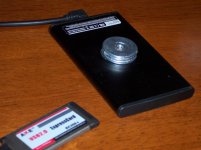
I have two EX1Rs, they both work just fine. All it take (if someone want to check) is to get a USB 2.0 to ExpressCard 34 54 Express Card Adapter BC268 (http://www.trait-tech.com/product/T-PCA-5057/) (= $7.99 + s/h) and the usb–powered HD. And a camera, of course. Providing the camera have bios (firmware) updated up to the latest version. You see, I only have EX1Rs, so I can NOT guarantee the setup will work with EX1 original cameras. BUT,–if I had EX!– I would jeopardize that insignificant amount of money needed to find out, before looking for any other c o s t l y solutions..
 
...The whole purpose of this thread was to demonstrate that SxS has pretty cheap alternative that exceed recording time available letting you under/over-crank. If we could just make it record through the HD-SDI, that would make another thread. But we can't.
Did you read this thread?.. http://www.dvxuser.com/V6/showthread.php?181643-Anyone-using-Convergent-Design-s-Nano-Flash

Sure I did, and I have a Nanoflash, plus use SDHC with MxM cards.

Your solution is ingenious and simple at the same time. I can't imagine a better solution for a guy shooting weddings or live events where he might miss something otherwise. Plus it would be in the usual file format they are used to using.

Heck, I would just turn it on and let it run for the whole wedding. If he's worried about a bump of the drive or camera causing a glitch they should get an SSD.

I was simply noticing that the data rate is fast enough on a HD or a 6Gb/s SSD to record uncompressed. If there was a way to turn the data stream into files you'd have pretty much what the portable recorders have.

I was simply thinking out loud. You did a great job with this idea.
 
(...) I can't imagine a better solution for a guy shooting weddings or live events where he might miss something otherwise.(...)
– I think, the advantage of huge amount of recording time would be really appreciated by documentary creators: when camera power source is set to external power source, one can run an interview without worries of media capacity,with unattended camera(s) setup and without need to interrupt the process for battery change.
(...) Plus it would be in the usual file format they are used to using.(...)
–Here you lost me. I red this line several times trying to get to the meaning of it, but I couldn't. The file format of recorded on HD footage , as well as file tree structure media are same as these of SxS. You are probably comparing it with routine of nano-flash workflow, of which I have no practical experience. In any case, – if that is what you meant - Sony utilities (both– file transfer and clip browser) are working just fine with HD media. (I wish XSCAM transfer would let us convert footage directly to ProRes, but it does what it does, and this is a completely different story)
Also,
..after acquiring my previous camera, Panasonic DVX100B I red about one company (Andromeda?.. not sure bout name) that offered to modify the camera (the price seemed to be an arm and a leg at that time) to capture 4:4:4 12 bit uncompressed footage via usb, – at least that is what I can recall now– but I can't remember any big outcome from it.
My solution – which in fact is just a fair (price wise) implementation of MXM SSD Recording Kit (http://mxmexpress.com/product.php?id_product=40) that can be assembled and configured by user. I would be happy to learn whether this setup works with original EX! cameras, but no one here seems to replicate the setup I propose...
 
Last edited:
– I think, the advantage of huge amount of recording time would be really appreciated by documentary creators: when camera power source is set to external power source, one can run an interview without worries of media capacity,with unattended camera(s) setup and without need to interrupt the process for battery change.

Exactly.

–Here you lost me. I read this line several times trying to get to the meaning of it, but I couldn't. The file format of recorded on HD footage , as well as file tree structure media are same as these of SxS.

That is what I was getting at.

If you use the Ki Pro Mini you are stuck with ProRes, which means a plug in for some older PC NLEs. If you use the Nano its MXF or MOV, but at least in CS3 you need a plug in. (I think CS5 now handles it natively.)

All the other external recorders needs some extra installation steps before you're work flow is smooth again.

I would be happy to learn whether this setup works with original EX1 cameras, but no one here seems to replicate the setup I propose...

I was looking doing the same thing with a USB 3 enclosure and card. It would give higher transfer rates when connected to the edit bay, but would cost about $140. Still not a bad price.
 
I was looking doing the same thing with a USB 3 enclosure and card. It would give higher transfer rates when connected to the edit bay, but would cost about $140. Still not a bad price.

Perhaps, that would make transfer faster, however using Mac I would have to get a usb3 card installed. Also, I have no idea what wattage is driven by USB 3.0 to ExpressCard 34 54 Express Card Adapter.
I've done several shooting with my set-up so far, and the largest amount of footage I had to transfer was about 8 hours. I was setting up the transfer overnight, so if it took a couple of hours less – I wouldn't notice:)
 
Guys,
for these of you who was wondering:
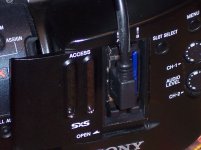
the above mentioned set-up works fine with EX1 (non-R) camera, with 1.2 firmware version. While both of my 300 GB drives were not available for testing, I had 80 GB drive (Seagate ST980412ASG) which was recognized by camera and successfully formatted, providing 281 min. of recording time.

Sorry about the picture quality, but – here it is:


Uploaded with ImageShack.us
 
Hmm. I just did a first try with it in an EX1 (non-R). It threw the error of unrecognized media. To be fair I used the USB3 express card adapter. I ordered both USB2 and 3 but only the USB3 card has arrived so far. The drive is recognized by my computer if I plug it in there and only with one USB port. The blue LED does come on powered soley by the bus. I used a Hitachi Travelstar drive, with the same case, same same cable as in the original post.

To check on other factors, what battery type are you using? I'm wondering if my bigger IDX or SWIT type batteries would be better. On a regular Sony battery the blue LED flashes and stops.

The other question is, did you pre-format the drive? My computer wants to format as NTFS. I think what I need is FAT32 or FAT16.

EDIT: I just tried a U62 battery (small brick at 15.8 volts) with the same results. That pretty much eliminates the battery as the issue.

That means it might either be the USB3 express card adapter gobbles too much juice, or the hard drive gobbles too much juice.

EDIT 2: I'm trying to remember how to check the version number. I know I upgraded the firmware a couple of times and I regularly use SDHC cards with an adapter, but I don't remember which firmware it is.
 
Last edited:
I just received the USB2 adapter and that did the trick. The camera formatted the 320GB drive to 308 minutes (over 5 hours). I tested the set up and it records just fine.

I do suspect a drive size limitation, perhaps the camera uses an old version of FAT16.

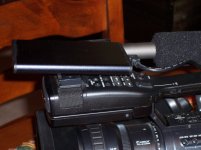
Also I formed an attachement socket with a tall 1/4"-20 vibration nut, a 3/8" hole x 1 1/4" washer and three 7/16" hole x 1 1/4" washer.

All parts were glued to the case with JB Weld, which is stronger than the case. The nut was glued in with the nylon insert closest to the case. The tapered part of the nut fits in the smaller washer hole.

The next washers all fit around the outside of the nut and are glued together as well as to the nut.

Finally, after everything dried, I screwed in a simple hot shoe mount like this. The external recorder now slides into the camera hot shoe or a wing cold shoe.
http://cgi.ebay.com/1-4-20-Tripod-s...=Camera_Flash_Accessories&hash=item4cec13b55f
 
Last edited:
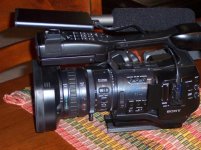
Here are some pictures. There are a couple of things I'd do differently. The cable is probably the right length but I'd angle the mini USB plug the other way. Using the left/right cable without tucking it in the handle and it sticks out in front of the LCD. I think what I'd want would be a cable that goes the other direction on the mini.

I painted the end caps of the enclosure flat black to avoid reflected light. I'm going to paint the washers but haven't done it yet.

I decided there wasn't enough room inside to put a screw from the inside sticking out. I could have glued a nut to the outside by itself but it wouldn't have been strong. Just screwing in the hot shoe mount would have popped it off.

Using a vibration nut with the nylon closest to the enclosure means the screw threads will hit the nylon and tighten before they hit the case, while the washers give more surface area to contact the case. This way the nut is about flush with the washers. It adds a few ounces, but its very strong and over all the whole unit is still lightweight.

I thought about a ball mount, but it makes the camera a bit top heavy.

DIYRecorderCardS.jpgDIYRecorderOverallS.jpgDIYRecorderEnclosureS.jpgDIYRecorderColdshoeS.jpgDIYRecorderWashersS.jpg
pencil.png
 
Last edited:
Thanks for sharing! This is a great thread. What about some sort of cage that would go in between the bottom of the camera and the tripod plate that the drive could slide into? It would get the drive out of the way and even closer to the cable hookup.
 
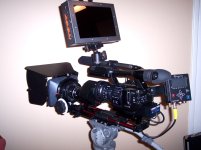
I have a wing permanently attached to the baseplate on my camera where I normally mount my Nanoflash on a cold shoe. Putting this recorder on it would be a slide in affair.

Ex1NanoLetusR34S.jpg

There have to be a dozen other options too.
 
Last edited:
Thanks for posting your image. I think this drive approach is the perfect second backup recording option along with a Nanoflash. Only access the files if there is an issue with the Nano and just reformat each time at the beginning of the shoot.

BTW, which Letus adapter are you using and are you happy with it? I see a fair aount on Ebay and am thinking of giving the adapter approach a try over DSLRs. Thanks!
 
Last edited:
I have the Letus Extreme with the EX1 achromat. Its excellent. I'm going to sell it but I've had a couple other adapters and this is the only one I've been happy with. Its definately better than a DSLR. I had a 7D and I still have a T2i. No comparison.

I'd love an F3, but I'd have to sell the EX1, which I don't want to do. But, budget wise I'll probably add an FS100.
 
Thanks for your feedback. Since I do Still photography as well I own a 5D & 7D but I just have this block about using them for my video business. I shoot video, not movies so I need video cameras with servos but love SDOF for interviews and other special situations. The used adapters are now cheaper than DSLRs which favors the adapter purchase.
 
BUMP! My trait-tech card (the one in the original post) finally got here. I haven't taken the time to order a 2.5" drive and enclosure yet, but I just tested it out with a big ol' normal external hard drive I had laying around. Works great! it's a only a relatively small 160gb, but it's nice to see I have about 530 minutes of avaliable record time :)

TIP - if the drive you are trying to use is already formatted to NTFS, it will display "media error" and will not let you format it. What you need to do is plug the drive into your PC and format it to fat32. Fun part is windows will not let you format a drive larger than 32gb to anything but NTFS.

Just download this free little guy (don't even need to install it!) - http://www.ridgecrop.demon.co.uk/index.htm?guiformat.htm (click the big picture to download it). Use that to do a quick format to fat32.

That's all! Now plug the drive into your EX and format it and you'll be good to go.


I4OLU.jpg
 
Looks awesome man. Do we have an exact shopping list with links and prices? THAT would be a helpful stickie that I'm sure they would put up.
 
yup, it's the very first post of this thread!

If you want, you can substitute the drive he suggests with this one, as I plan on doing - http://www.newegg.com/Product/Product.aspx?Item=N82E16822136387

Other than that, pick up the 8 dollar expresscard in the original post. Then plug in any external hard drive you want. If you don't want to be tethered to a power source for the external drive, grab the enclosure he posted and then a 2.5" sata hard drive to put in it (such as the one I just linked to)
 
The only reservation one may have regarding Western Digital Scorpio Blue WD2500BEVT 250GB 5400 is its speed. I had no problems with overcranking using above mentioned ( in the original post ) drive. Solid state drive should be ideal, but it ruins the primary idea, which was MAKE IT CHEAP
Fohdeesha, does Scorpio let you do it?..I mean, how does it hold speed over cranking for 3–5 min?..

As formatting issue cane done without downloading any additional soft: just delete primary partition. EX1 will format drive for you as it will with mac-formatted media.
 
Last edited:
it would have absolutely zero effect on speed, as at full overcrank the ex series only writes out about 9MB/s (megabytes/s) (90 megabits/s)). That 5400rpm drive can easily hold a constant 80MB/s write, which is about ten times what you would ever be getting out of an EX series camera. Not to mention the USB interface limits the entire process to around 48MB/s anyway, so even if they made a 3000rpm drive and you had one, the limiting factor would still be the usb interface, and you would still never get anywhere near its limit with the EX only writing out a measly 9MB/s at the most. a 7200rpm drive in such a usb configuration as this is rather pointless and overkill in my opinion, as you would never get even half its write speed capability, not to mention their higher power usage, faster moving parts and higher data density on the disk (more prone to larger data loss if you ended up in a situation where the drive was shaken or bumped to the point of causing the head to move), and cost.


By the way, I just tried out a 5400rpm ATA laptop drive (not even sata!) from around 5 years ago, overcranked to it for about 20 minutes before I got bored :)
 
Last edited:
Back
Top