FS7: Swans at Greenwich Cove

Sam, if you expose bright whites with your LUT at 90%, I can pretty much guarantee you that the underlying S-LOG3 is being overexposed.


EDIT: I should say overexposed based on Sony's recommendations that bright whites for S-LOG3 be exposed at 61%. If your LUT shows whites at 90%, then your S-LOG3 video is going to be well above 61%.
 
Last edited:
Thanks Sam. I get Doug's points too. It isn't smoke and mirrors but it kinda is. I am reticent to use Cine EI because I too want to see exactly what is being recorded on the WFM. But on the flip side, the LUT can make it easier to nail focus and to expose - basically dumbing it down to what we are used to with non-log cameras. It would be nice if you could just click a button to turn the LUT on and off to see the differences as a sanity check...
 
It would be nice if you could just click a button to turn the LUT on and off to see the differences as a sanity check...

From what I understand, that is one of the features of the Zacuto Graticule EVF.

I know it is spendy, but it seems useful for this camera, and you can take it with you when you upgrade cameras in the future.
 
If you want to look at a LUT while shooting so you have a more pleasing picture, that is a perfectly valid use for LUTs and is exactly what they are intended for. But when it come to setting the exposure, you have to factor in whether or not you are looking at a LUT and which one so you still have the proper exposure levels on the underlying S-LOG3 video that is actually being recorded. You need to be aware of the differences between what you are seeing and what you are recording. The last thing you want to do is expose for the LUT, and find out later that the S-LOG3 is off the mark. Personally, I prefer not to use a LUT so I am always looking at what is really being recorded. The image quality in the viewfinder is of no concern to me at the time of shooting. It could be B&W for all I care.

Doug, that's how I do it 95% of the time. But... ...LUTs/Looks have their uses. Using a higher EI on your footage would have given you more stops above mid gray and possibly delivered a more pleasing roll off in the highlights. Maybe I'll shoot some swans tomorrow to illustrate my point:-)

If the wings looked clipped, it is because of how the video had to be handled in post. I assure you there is nothing out of range in the ungraded footage. Nothing even close.

I'm sure that's the case.

Sam, if you expose bright whites with your LUT at 90%, I can pretty much guarantee you that the underlying S-LOG3 is being overexposed.

I still want to know how you are setting exposure. Are you using a light meter, a gray card or just looking at the waveform and using your judgement based on what's in the shot?

I should say, I use a light meter, a pop-up 18% gray card and the waveform.
 
Sam, if you expose bright whites with your LUT at 90%, I can pretty much guarantee you that the underlying S-LOG3 is being overexposed.

There is an Ali Chap video showing his white card moving from 60 LUT off to 90 Lut on on his WFM. Why is this wrong?

90 zebra with LUT should equate to 60 LUT off?

--
 
From what I understand, that is one of the features of the Zacuto Graticule EVF.

I know it is spendy, but it seems useful for this camera, and you can take it with you when you upgrade cameras in the future.

While the Graticle seems awesome, it's inability to flip up or remove the eye piece really limits it's use for run-and-gun. I know for myself at least, on run and guns there's numerous times (low angle shots, high angle shots or the camera is in a tight area) where I can't put my eye to the eye piece and it's nice to be able to flip it up or remove it to see the LCD. I suppose you can have two LCDs on the FS7 just in case, but that kind of defeats the whole documentary vibe that Sony is trying to market.
 
Last edited:
Agreed. You can set one of the assignable buttons to the monitor LUT menu though.
You can? I didn't think I saw this as an option. I also wanted a LUT toggle. If there is a shortcut, I think it's just to the MLUT menu, meaning that you have to press the shortcut button... scroll... click... scroll "off"... click... menu button to exit... Ok looks good! Press MLUT shortcut... scroll... click... scroll "on"... click... Exit menu. OK! An hour later, we're good to roll!
 
Perhaps I should have been more specific. Some of the LUTs and Look Profiles come closer to matching the exposure of S-LOG than others.
I am primarly concerned with, as I think most people on this forum are too, the LC-709typeA Look Profile. Tht is one one everyone talks about. Alister conveniently does not use that profile in his demonstration. Who cares about the profile he's using? Nobody I know of.

You don't have take anybody else's word for it. Get out your camera and your waveform monitor and do your own test. Try setting exposure so a brightly lit white card is at 90% wth LC-709typeA LUT. Now turn off the LUT. Is white at 61% as it should be? Not even close. I rest my case.
 
You can? I didn't think I saw this as an option. I also wanted a LUT toggle. If there is a shortcut, I think it's just to the MLUT menu, meaning that you have to press the shortcut button... scroll... click... scroll "off"... click... menu button to exit... Ok looks good! Press MLUT shortcut... scroll... click... scroll "on"... click... Exit menu. OK! An hour later, we're good to roll!

Apologies. thought I saw it as an option the other day, but it's actually just the video signal menu. I just activated it on my camera and all it does is toggle between waveform/histogram/vectorscope. Might be useful for someone but definitely no cigar...
 
Last edited:
Im too busy to test at the moment but I will in due course.

The overall point is that Level A in Slog will map consistently to Level B with your LUT, and due to that consistency Level B is a useful metering tool (if you have done your homework and understand the relationship between A and B)

As a side note I think the chaps here who come from 709 video cameras can be a little to obsessed with exposure accuracy with this Slog3 - I come from raw stills and am used to being fairly cavalier - not becuase Im a loser - just becuase it doesn't matter - the Slog is performing fairly linear - otherwise EI exposure could not work.

It is demonstrating a huge amount of latitude as I found here using someone elses footage..


I am not encouraging poor exposure but I just think that going the final 5-10% in post is fine.

Simply with a lowEI and a LUT the clips are going to come in bright and end up clean!

I mean there are people on other threads talking about NReduction - that is something Ive only ever used on any imager when I was shooting black cats in coal holes - desire for NR is indicitive of under exposure.

S
 
Last edited:
The overall point is that Level A in Slog will map consistently to Level B with your LUT, and due to that consistency Level B is a useful metering tool.

S

No it won't!!!!!!!!!! Please stop posting and do some testing first.
And just because you can kind of fix it up in post is no excuse for being sloppy about exposure. Why even bother with waveforms, zebra, light meters, or anything else if it doesn't matter anyway? Why do you think Sony gives us very specific number such 61% if it doesn't matter? I'm not saying you need to hit it right on the nose, but the closer you are, the better it will all come together in post.

I give it up. I've got better things to do today.
 
I give it up. I've got better things to do today.
..than consider that we are all learning this thing together.

Why will A not map to B consistently?

Will the camera get PMT and give different outputs compared to different inputs randomly over a cycle of time? - nope it is an electronic device - it is consistent.

One may argue over the values of A and B for sure or they may need more mesurement but they will be consistent for a given LUT. Thats why I stopped referring to 60% and 90% - yes we need to check those figures.

S
 
Last edited:
BTW - Im sure your swans vid is under exposed - the backgrounds look really muddy. (and you did admit that the white swans have not clipped) - you would have been better using CineEI on a Low ISO and just keeping a zebra off the swans to make full use of the DR of the camera?
 
No, raising the EI would not make any difference at all. EI is just an illusion and makes no difference whatsoever in the video that is actually recorded. It doesn't matter whether EI is set to 800 or 3200, the recorded video remains precisely the same. The problem is that S-LOG3 does not handled highlights well, with barely any gradiations at all. So when you have something like the fine detail found in bright white bird feathers, it just starts to mush altogether. S-LOG2 does not suffer from this problem.

Even with The 800 LUT zebra at 90 (aka 60 in Log) you are keeping your 'whites' well out of the flat 'knee' highlight part of the curve

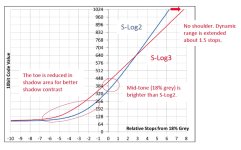
EDIT - looking at this image SLog3 doesnt really have a 'knee' it is virtually linear to clip - which is why IMO it works so well (so much better than Slog)

slog31.jpg


S
 
Last edited:
If I was going to post again on this thread, which I am not, I would say that chart is completely bogus. S-LOG3 clips at 92 IRE and nothing can go above that . So to look at a chart and think that you're going to get whites up to 1024 is just dreaming. In some ways it is worse than not haveing a shoulder. Besides you have to look at how the data is allocated across the spectrum, and most of S-LOG3's data is spent in the shadows. While S-LOG2 provides more data in the highlights. S-LOG3 is great for faces and controlled lighting, but it's not very good in high contrast outdoor shooting. After having used them both for 18 months you're not going to convince me otherwise. If your three days of experience with S-LOG3 says otherwise, then we'll have to agree to disagree. Perhaps we are looking for different performance charasterisics.
 
Doug is right here.
SLog3 ends somewhere at 92IRE and it is not going any higher.
One can say that you loose a lot of values that SLog2 covers, as it
goes up to 100IRE. This is only true if you don't look any further.


The chart is also true, because SLog2/3 has 6 stops headroom
over 18% middlegrey ( +8 stops under = 14 stops total DR).
6 stops over equals 880 values (10bit) in the chart, which is
somewhere around 92 IRE.
You'll understand the chart wrong if you think you'll gain 1,5
stops of DR with your F5/55/FS7 because it ends at 6 stops over.
SLog3 is somewhere futureproof for upcoming sensors with a
DR up to 8 stops over.


SLog3 does not spent most of the data in the shadows.
Simply do the maths:

SLog3:
From -8 stops under to 0 (below mid): 420 values
from 0 to +6 stops (over mid): approx. 460 values
SLog2:
below mid: 347 values
over mid: approx. 650 values

SLog3 just spends more values for the shadow region
than SLog2.

What does that mean?
If you look at the graph you'll see that SLog2 is simply optimized
for highlight protection and therefore doesn't really care for shadow
details. It's made for high-contrast settings with lots of interesting
details in the highlights. You'll see more compression artifacts in the
darker areas than with SLog3 (non-RAW only) but your highlights
will be protected better.

SLog3 looses highlight details for a better coding of shadow details.
Don't forget we're speaking 10bit world - still enough values for good
highlight details after conversion to 8bit. Be aware that this is only
reue if you protect your highlights carefully! SLog3 is not very forgiving
in the highlights area. I think, SLog3 is better in situations where you
have lots of shadow areas in the image that you want to show more than
crushed blacks.

I'll repeat it again and be aware it only reflects my very limited experience:
SLog2 is not "better" or "worse" than SLog3. It's just different!
It's always good to know which is best depending on the image you want to
create in the end. Make your own tests before using it!!!
 
Perhaps we are looking for different performance charasterisics.

This is possible. Usually internet 'arguments' between sensible people derive from them assuming different 'givens'.

My aim is to use the camera to capture data with the best possible S/N ratio and then use post adjustments to put that data in the right place to make pretty pictures. This may involve adjustments or use of multiple LUTs in post.

If you are trying to make a single lut with no adjustments work in post then that is different.

Each approach has merit. The single LUT approach is fast in post and will work on location with no or a single LUT - particularly a single LUT on a directors monitor which we may assume may be using its own internal LUT that may not support EI_ISO.

My approach will bring the best S/N from the file.

My experience says that a mix of both approaches work, being that one wants to minimise post where possible, give the director the best view possible, but for more challenging scenes the more complex approach will produce the best results.

My feeling with the Swans is that you made a reasonably pretty picture with minimal post but that exposure was too close to the noise floor and the shadow areas became muddy. Using the 800LUT and a low CineEI value would have rendered a cleaner image after appropriate 'work' in post (I use the word work with great care - 'work' is different from 'correction' - 'correction' implies error)

S
 
Last edited:
Sam,
I'm not sure about using Look Profiles (3D LUTs) as MLUT for nailing exposure.
They do not work exact with different CineEIs. Be careful here!

This is what Alister says:
I found that when you lower the EI gain, below native, the output level of the LOOK lowers, so that depending on the EI, the clipping, peak level and middle grey values are different. For example on my PMW-F5 at 500 EI the LC709TypeA LUT has a peak output (clipping) level of just 90% while at 2000 ISO it’s 98%. This also means that middle grey of the LOOK will shift down slightly as you lower the EI. This means that for consistent exposure at different low EI’s you may need to offset your exposure very slightly (it is only very slight). It also means that at Native EI if the waveform shows peak levels at 90% you are not overexposed or clipped, but at low EI’s 90% will mean clipped Slog, so beware of this peak level offset with the LOOK’s.
When you raise the EI of the LOOKS, the input clipping point of the Look profile changes. For each stop of EI you add the LOOK will clip one stop earlier than the underlying Slog. For example set the LC709TypeA LUT to 8000 ISO (on my PMW-F5) and the LOOK itself hard clips 2 stops before the actual SLog3 clips. So your LOOK will make it appear that your Slog is clipped up to 2 stops before it actually is and the dynamic range and contrast range of the LOOK varies depending on the EI, so again beware.
So, the Looks may give the impression that the Slog is clipped if you use a high ISO and will give the impression that you are not using your full available range at a low ISO. I suspect this is a limitation of 3D LUT tables which only work over a fixed 0 to1 input and output range.
http://www.xdcam-user.com/2013/12/cine-ei-mode-when-recording-s-log23-and-raw-on-the-f5-and-f55/

When I spoke to the Sony development guy last week, he pointed out that they
want the WFM always to show the signal, which is mapped to the viewfinder.
ME personally, I would like it to be oppsite!
The WFM should always show what actually is recorded, not what the viewfinder
is showing...
 
Back
Top