Surgical EQ

I have been involved in videomaking since 1990. Audio is my Achilles. My skills may match yours at your 2-year mark.

It was only just now that I happened upon a technique that gives me pause.

Let's make this as simple as possible. Suppose you recorded a voiceover, in a properly dampened studio, with the microphone of your choice. Everything was perfect. What is left to do in post?

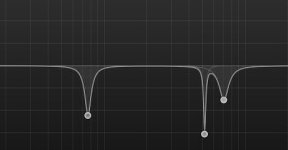
I was web-searching for "dialogue sound editing" or something and happened upon a raft of articles and videos about surgical EQ. You wind up with something like this:
surgicaleq.jpg

This doesn't look it would sound natural at all.

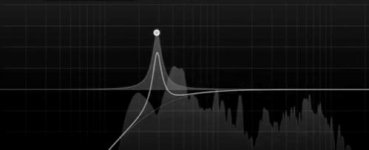
The way you do it is you first raise the EQ in a narrow band and sweep your audio, intently listening for "unpleasant" frequencies. What causes these unpleasant frequencies, I don't know.
sweep.jpg

When you find one, you lower it by a few decibels (some say 3, some say 10). Then you start over and do it again.


1. Have you ever heard of this?
2. Do you practice it?
3. What is the theory behind it? What causes an otherwise pleasant voice to contain "unpleasant frequencies"? (I may be falsely representing the scenario. In one video, he said it probably was coming from the glass in the room. So if you recorded in a sound booth, there would be none of these? That at least makes sense.)
4. Do you do it to anything besides voices? Guitars? Drums? Sound effects? African or European swallows? Etc.

Here's a video of someone going through the whole process, in case you're interested:


I think I hear the "unpleasant" frequencies they're talking about, but who knows?
 
My humble view on this is that the sharp spiky curve lets you find things, when you can actually learn the sound and go petty much straight to it with a more musical gentle boost or cut. Voice in particular for me NEVER have narrow Q boost or cut - it sounds wrong. One of the troubles with digital processing is the move to watching sound rather than listening. That said though - seeing the curve superimposed on a fun spectrum display is a great tool - because you can see where energy is, and where it's missing.
 
I work with VO talent all across the U.S.
Some have great sounding rooms, some have booths which can sound boxy or boomy, or have other frequency based issues.
I generally save an EQ preset for each remote voice talent I work with which helps in the removal of said issues.
This is my initial EQ applied to the talent.
I then use a secondary EQ if necessary. For example... Matching 3 different remote VO talent using 3 different brand mics, into the same scene location.
 
Do it a Lot. Well recorded dialog in a good acoustic space will rarely need anything like that, but then how often does one get that in post... Not sure about the "unpleasant" sounds, what I am looking for are resonances. If you sweep the dialog recorded in a non optimal way you will often find resonances. These frequencies pick up on harmonics in the space and accentuate parts of the spectrum. The main effect of them is to make the dialog somewhat muddy. A lot of less experienced folks will try to over power the mud by boosting some frequencies but this almost always is a bad choice. This technique brings those resonating frequencies back into a reasonable range. With the original if you rise the volume much the resonances will clip even though the over all level is not too hot, so along with the mud you can have level issues. Any boost will just make that worse.
How tigh and how much you cut really depends on the track. Sometimes you need a steep and deep cut but often just a little notching and a softer Q will do the trick. As long as you are just taming frequencies that were hyped by the acoustics of the space you should not get weird artifacts. But if you are using a bunch of steep cuts you can get some bad results. Like noise reduction it is very important to check against the original to make sure you are making it "better" and not just "different". It is way too easy to dive down the rabbit hole and spend hours only to end up with something that sounds worse than the original. We have all done it. You get fixated on eliminating some issue and succeed, but destroy the track in the process.

BTW this is a "trick" that predates computers. Rerecording mixers would use "Little dippers" (Universal Audio 565 Filter Set) to sweep dialog looking for resonances and then invert the curve. Little dippers have filters that can get extremely tight.

https://www.youtube.com/watch?v=V1qmjEE9xrc
 
Last edited:
I notch out unwanted frequencies frequently. As Paul stated, start out with a wide notch and narrow the width down to I.D. the offending range. A para-graphic EQ is my go-to for this type of processing. Most filtering can be done right in a DAW with plug-ins. I use Sound Forge Pro for destructive surgery, for instance, taking out clicks, extreme peaks and other waveform repair the DAW and plug-ins achieve.
FWIW, the Vegas Pro NLE/DAW has the option to open an audio event directly (or a copy of) in a user assigned audio editing app.
 
I use a similar technique in sweeping with a narrow Q, except I subtract 10-15db instead of add. I used to always search for frequencies to boost until an audio engineer sat in with me one day and literally turned my approach upside down. You don't want to drown out the bad with the good... You just want to remove (or minimize) the bad.
 
1. Have you ever heard of this?

Oh yes. It's generally included in the broader class of "sweetening".

2. Do you practice it?

Oh yes. Very valuable tool.

3. What is the theory behind it? What causes an otherwise pleasant voice to contain "unpleasant frequencies"? (I may be falsely representing the scenario. In one video, he said it probably was coming from the glass in the room. So if you recorded in a sound booth, there would be none of these? That at least makes sense.)

I'll give you an example. This happens all the time with recordings of choir. Voices that are trained to enunciate clearly. Often one or more members have some vocal ticks -- clicks, lip smacks, etc. Usually happens up around 9 kHz. You use a parametric EQ to search for it and reduce it. Not eliminate it. Just lower it so that it doesn't call so much attention to itself.

If you are standing where the mic is during the recording, your ears might not hear it, or your brain might filter it out for you. Microphones, however, are not ears, and they are certainly not equipped with the brain's ability to filter on the fly. So the microphone hears it, and the recorder records it just like it is, in all it's glare and splendor. So you have to go in and "tame" it.

Another example might be recording a soloist, say a violinist. You can put all the marks on the stage floor you want, but some musicians aren't going to pay a bit of attention, and can wander forward toward the mic. This in turn can cause the instrument to sound "scratchy". You can use this same technique to tone this down a bit without loosing the "violin-ness".

You can also boost/cut (relatively narrow, low peak) in the consonant range (up over, say, 1 kHz) to improve understandability for voices that need it. You can boost/cut (wider range, low peak) in the nasal range (up over, say, 2.5 kHz), and this range may contain some of your "annoying" frequencies that need their own sharp peaks to tame. The boost/cuts in the nasal area can help distinguish one voice from another if you have two people who sound a lot alike.

As to what causes an "otherwise pleasant voice to contain "unpleasant frequencies"?" All kinds of things. A cold. Even from last week. Pushing too hard. Being tired. Just the unique layout of their vocal tract. Breathing. Posture. A fight with the ex. Worry about a child. Countless others. People just don't sound the same from day to day.

All these things are "people things" that occur no matter where you are recording. A well designed sound booth won't make these things go away. That said, a poor space adds it's own problems on top of the human's problems. Best to avoid crappy spaces from the start. Just sayin'.

4. Do you do it to anything besides voices? Guitars? Drums? Sound effects? African or European swallows? Etc.

Oh yes. Anything that needs it. The opportunity of post is you can shape the sound the way you want it. That can be to make it smoother, to make is more scratchy, more/less dynamic, all that. Whatever you (or client) needs.
 
I tend to not do much sweetening unless I hear muddiness due to lav placement or room reverb. For room reverb, the "unpleasantness" is just a sense that the voice doesn't sound quite right when it is played back at a normal volume. I do the spike sweeping method and it becomes immediately obvious which frequency(s) is bothering me. For fixing a lav mic, I find it sometimes easier just to boost the frequency that I can hear is missing for intelligibility.

My best example of sound requiring surgical eq is actually playing live music. I play bass and certain venues are the perfect size for to be a resonant chamber for one specific frequency and its harmonics. One bar that I regularly play at is the perfect length for the frequency of the b note. I also play a boat that resonates at a g note. The only way to not drive myself and the audience insane with amplification from the reverb is to do a massive cut on that frequency using the amps equalizer. I am sure most FOH systems are already preset to cut those frequencies.

Anyway, I am sure many professional sound editors can name you the problem frequencies without even sweeping the eq.
 
Back
Top