Super whites and After Effects CS5.5

Eimulis

Active member
I recover super whites in Premiere pro easily, with Fast or Three way color correction plugins.
But in After Effects, the only way I know is by working in 32 bpc color space. This makes everything weeery slow.

Is there a way to recover super whites in After Effects CS5.5 without turning 32 bpc on?

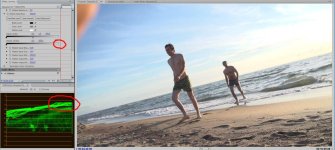
cause sometimes those bits can be very useful:

fs100_normal.jpgfs100_detail_back.jpg
 
Can you bring the super whites down in Premiere and then dynamic link or render out to AE?
Easiest way to get all my range back in Premiere is to use procamp and adjust the brightness and contrast while looking at my RGB parade display. With those two settings I can set the super whites to under 100 and the shadows to 0. Then I apply my other color effects after that usually with curves.
 
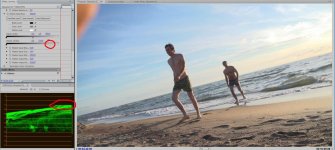
How do you use the FCC and 3way to bring down highlights?

1.jpg2.jpg


Can you bring the super whites down in Premiere and then dynamic link or render out to AE?
Easiest way to get all my range back in Premiere is to use procamp and adjust the brightness and contrast while looking at my RGB parade display. With those two settings I can set the super whites to under 100 and the shadows to 0. Then I apply my other color effects after that usually with curves.

Dynamic link do not bring super whites into AE
 
Cool...I usually used Luma curves to drop the top end of the curve...will try this next time. I don't see any way to do it in AE without going 32bit. Perhaps try other tools like luma curve or even shadow/highlight effects?
 
Is there a way to recover super whites in After Effects CS5.5 without turning 32 bpc on?

Somebody?
 
Back
Top