Sub $1500 switchers for live webcasts? Anyone tried IOGEAR's new UpStream?

Jim Feeley

Veteran
Recently, for well-known reasons, I've been asked a lot about helping with (and making recommendations to) some groups and people with big budget constraints: A book festival, some musicians, some churches; stuff like that. Basically, they want more than just use smartphones, laptop cameras, and Zoom. Maybe one to three small consumer cameras, a switcher, audio from a mixer, and a way to get the feed on YouTube, Facebook, and perhaps Twitch. But I know nothing about low-cost switchers and the like.

What have you all found that works well for simple switching with a couple of cameras, an audio feed from a mixer, and an easy to use means of getting everything up on Facebook and YouTube? I know about OBS Studio; I'm more thinking of before you get to OBS Studio.

The little US$295 Blackmagic ATEM Mini is still backordered, and perhaps a bit too limited, but interesting:
https://www.blackmagicdesign.com/products/atemmini

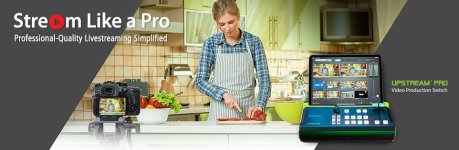
One interesting new device is the IOGEAR UpStream Pro Video Production Switch. But it requires an iPad for monitoring, is HDMI, and while IOGEAR says it lets you stream directly to two online services (e.g., FB and YT) without a laptop, the manual makes getting that set up for each live event to be a bit of a hassle. Still, for $1000 (plus iPad), kinda interesting. But it's new; I haven't seen any reviews yet. Has anyone here tried one?
https://www.iogear.com/product/GUV303/
WP_RichContent_GUV303WP_RichContent_GUV303-mODULE-1.jpg

What else have you all used and liked in a low-cost switcher? How's the BMD ATEM Mini working for you all?
Any other thoughts?
 
Actually looks really interesting, but I'm leery of no onsite backup recording.

You could possibly pair the new Shogun 7 with a BM Ultrastudio Mini Recorder and a laptop... granted, that's putting you over $1500 unless you get a really swell deal on a laptop. That combo works with the Sumo (+BMUSMR+laptop), and lets you record iso's and program on site. Only 4 inputs and no fancy schmancy transitions, though.
 
Mcbob, the website says you can, "Save rough footage or final cut video by connecting an external hard drive to the USB-A 3.1 port." Presumably in h.264.

I think I need to read the IOGEAR's manual more closely, but I'm not sure if you'd kinda want a laptop along to use with their system (to make the getting-to-the-Internet part smoother). In addition to the iPad.

The Shogun 7 idea is interesting, though I don't know if these various people will have access to cameras with SDI...and HDMI-->SDI converters is another cost and confusion point. (Yes, I'd much rather not deal with HDMI, but there you go). But that looks pretty straight ahead... hmm... https://www.atomos.com/shogun7
 
Jim:

Just beware, streaming, no matter what tools you are using, can be an incredible hassle when it comes to the Internet/Ethernet/5G wireless POV. In my limited experience (I just inked a deal with a friends streaming company and have been pitching it as well as
doing a few shoots here and there), there are many latency, sync and interface issues that require you to have a "big bag of tricks" as we call ours to fix and off set video and audio.

There are configuration issues that differ with almost every shoot. Bottom line is, streaming is still far from a plug and play endeavor, regardless of which tool you are using. Every job is different. I just bid a job the other day where the client wants three cameras on an eight doctor panel that is delivering content to 60-70 medical students. The client wants and
needs to have 60-70 students be able to speak with and ask the doctors questions at any time. How to moderate and modulate that? How do you have 60-70 medical students on their phones and laptops be able to mute their microphones and unmute when they want to ask a question? Which platforms
support teleconferencing mixed with live streaming?

In the real world of streaming clients, I am discovering that it's never simple and straightforward. If it was, they would just use their phone and Facebook Live. Even the fairly simple one I directed a few weeks ago for a University, 2 cameras and a feed from clients AV people with title cards, it took almost a full
day of troubleshooting and configuration experimentation to get everything to be in sync and doing what the client needed it to do. A lot of video production companies are jumping on live streaming, which means that a lot of inexperienced people are doing it
with very mixed results. It helps if you are a complete audio AND IT/computer nerd. I'm not, but fortunately my partner is a PhD in Physics and computer science and an audio engineer. I know you know audio really well but how are your IT skills?
 
I just bid a job the other day where the client wants three cameras on an eight doctor panel that is delivering content to 60-70 medical students. The client wants and needs to have 60-70 students be able to speak with and ask the doctors questions at any time. How to moderate and modulate that? How do you have 60-70 medical students on their phones and laptops be able to mute their microphones and unmute when they want to ask a question? Which platforms support teleconferencing mixed with live streaming?

That’s a monster of a job, Dan. Zoom sort of supports that, but the problem you run into when you try to join 70 different people from 70 different locations is that bandwidth gets chewed up and every window ends up with dropped resolution, plus delays and dropouts and disconnects. Preaching to the choir, I know, but for anyone else following this thread.
 
Last week, I did a meeting for a local municipality that required availability for public input and questions. It was basically 2 cam and a laptop (via scan converter) switched, program output to dual stream encoder, and out to YouTube and Facebook live, repost to Twitter, direct encoder to Granicus (public meeting stream service), and a conference bridge via Skype for audio only (so public can access by phone).

What might be of interest to you is the audience participation component. There were several ways available: email, phone, Twitter and chat/comment sections from the social media platforms where it appeared. Questions and comments were aggregated, triaged/moderated, and fed via chat to talent on-set. It was remarkably instantaneous.

Obviously, a much more scaled down version of that would be more appropriate for your needs, but it eliminates the need to jam 50+ users on a single video conference call (in our case it was potentially hundreds of participants).

Btw, the planning for this particular meeting began before the shelter in place restrictions started to really kick in (here in SF). A follow up meeting for this same agency in two weeks will be done differently: they will conduct a video conference via MS Teams (similar to Zoom, Skype, etc) only among the presenters. We will then feed this conference (via scan converter) to the encoder, and out to social media streaming platforms live. Audience input mechanism will be the same. The only difference is our remote production being replaced by the video conference (which will be only 5 participants max).

Hope this helps somewhat!
 
Last edited:
Thanks for the input guys. At this point, I am recommending to the client that we just use the Live Chat component in Vimeo Live instead of trying to handle the mess that audio would be.
The questions really need to be moderated too as many will be repetitive probably or just not great questions.

As for right now, pretty sure this particular one is canceled anyway since LA is on total lockdown now. We can technically do it because it's medical but too many issues with trying to keep
at least six feet distance between eight doctors, even if we stack them on multiple tables, it's just going to be awkward and weird to frame and try to shoot with 2-3 cameras.

But this client has said they want to do these for the near future so fingers crossed.
 
Just for clarity, our next meeting will be a video conference in MS Teams. Each participant will be joining remotely. The pool of participants = talent (panel members) + 1 or 2 staffers (who will monitor and feed Q's to panel via chat) + me, who will distribute the signal to YT/FB live. This can (and likely will) be accomplished without 2 or more people ever in the same room. All of the mute/unmute settings are handled in the conference software itself (and are easy to understand and change on the fly... That's what it's designed for!).

Good luck!
 
Yes, there are lots of weird variables with livestreaming. Luckily, I know some IT stuff (from past jobs and from growing up in Silicon Valley). Still a bunch I don't know.

About Zoom et al... My wife's a high-school teacher, and since we live about two miles from UC Berkeley, a bunch of friends are professors. Some of them have been doing at least some online teaching for years....Now they all are. And I've been a part of a whole bunch of online meetings with three to twenty(ish) participants; usually a participant, sometimes a leader. I'm no expert, but things are working much better than a few years ago. And more and more people are getting the hang of how to run online meetings... But some still need enlightening, and it seems like that becomes another task/skill for those providing streaming services, at least if you're going to help produce interactive two-way streams.

The client wants and needs to have 60-70 students be able to speak with and ask the doctors questions at any time. How to moderate and modulate that?

That sounds tricky, but the tools are out there. Three of the more-common platforms that currently get discussed in my world (and that I've used) are Zoom, Google Hangouts [not Google Classroom], and Adobe Connect. There are others, but I either haven't used them or haven't used them recently (e.g., WebEx, GoToMeetings). All have Q&A features that come in handy for teaching/presenting meetings with more than about 10 people. Up to somewhere around 10, I find that we can just unmute our mics and ask the question. But more than 15, it seems to make sense to have questions asked via the integrated text interfaces.... And then the leader, or better a moderator, can sort through the questions and pass them to the lecturer/presenter. There's why more options in the services, but it seems to me that having 50 people all able to talk at once.... I've been there and it doesn't work. But usually, the moderator can mute everyone's mic, and then allow or not allow them to unmute to ask a question. But the "Ask a question via text" options are pretty flexible and useful (you can set questions to be seen by everyone at the meeting, to be voted up or down by participants, let participants answer questions themselves, etc... or have questions just seen by the meeting leader and/or moderator, for example.

So instructors/leaders may need to modify how they'd run a panel, class, or presentation in real life... But there's good basic info on how to do that. And people can pick up the basics pretty quickly. For example, a friend attends a small church in West Marin, and they've held online services the past two weeks. Some really technically astute members, some not at all. Here's part of what he said on FB: "We did another Zoom meeting. 68-70 people, one hour service and one hour or so discussion afterword where we split into small groups..." Apparently the connections held up and decayed gracefully (e.g., good audio was maintained even if the picture went to s***), and everyone figured out how to participate in the service, and then talk amongst themselves later.

I don't want to make this too long, but it seems like something we also need to figure out (or encourage clients/friends/orgs to figure out), is how to basically run a Zoom/etc meeting both in terms of getting it up and running, and handling basic protocol. Zoom, Slack, MS, and the rest have good protocol/best-practices info on their websites. I've payed attention to that stuff in the past; a bunch of it is pretty good since the services want customers to have successful meetings and keep using their products.

Anyway, I'm still wondering what, if any switcher to check out more deeply. I'm borrowing a BMD ATEM Mini this week and perhaps not having any preview won't be a deal killer. And I may spend more time with OBS Studio....

Looking forward to what you all learn in the coming weeks!
 
Last edited:
Anyway, I'm still wondering what, if any switcher to check out more deeply. I'm borrowing a BMD ATEM Mini this week and perhaps not having any preview won't be a deal killer. And I may spend more time with OBS Studio....

Looking forward to what you all learn in the coming weeks!

I do a ton of live streaming. I use Wirecast Pro a software based switcher/encoder/graphics etc solution. I also
own an ATEM Mini. And for the record, the ATEM Mini DOES have preview. What it doesn't have is multi view.
So you can 'preview' one camera other than the one that is live on air. You cannot see ALL cameras which are not on air
at one time. So say cam 1 is going out live on air. You cannot see cam 2, cam 3 and cam 4 all at the same
time. You can punch up one of them at a time to the preview monitor. Hope that makes sense.
 
For the public meeting, we used a Sony Anycast (Sony AWS-G500E). It's a discontinued product, but a solid performer with a ton of options and configurations. I just saw one on eBay for $500.
 
Just for consideration, we are running a custom hardware version of Livestream Studio using several Blackmagic cards in a custom built PC case. I loathe PCs and was nervous about using it but so far,
for several multi hour live streams with multiple switch cameras, both manned and robotic, external graphics sources, and several channels of audio, this product impresses the hell out of me, its been rock solid.
I used to TD some live TV back in the days of the Grass Valley 110 and 200 and this Live Stream software mixed with the hardware is pretty impressive, it does pretty much everything a simple video switcher does,
then a lot more, and takes care of multi channel audio, video roll ins, picture in picture and integrated graphics for L3s and title cards.

If you are handy at building or configuring PCs, (luckily my live stream partner is), this seems like a pretty good way to go. There are a lot of choices out there though and all have their pluses and minuses
so it'a just like buying a camera or edit system, you have to really weigh all of your choices and what's important to you and your clients needs.
 
And for the record, the ATEM Mini DOES have preview. What it doesn't have is multi view.
So you can 'preview' one camera other than the one that is live on air. You cannot see ALL cameras which are not on air
at one time.

Thanks for that. As I mentioned, I haven't done much live streaming, and when I do, I don't run the board. So the preview screens I've glanced at were all multiview, so I conflated the terms. D'oh. So just be sure I'm not extending my ignorance, you're saying with the ATEM Mini, you can have say, cam1 going out to air/net and then preview cam2 without disturbing the cam1 out... Is that right?

PureD writes:
Just for consideration, we are running a custom hardware version of Livestream Studio using several Blackmagic cards in a custom built PC case. I loathe PCs and was nervous about using it but so far,
for several multi hour live streams with multiple switch cameras, both manned and robotic, external graphics sources, and several channels of audio, this product impresses the hell out of me, its been rock solid.

Interesting.

Oh, and about my Zoom Q&A ramble last night. Sorry it's so wordy. I think my main points are that the better webconferencing/meeting SaaS things can handle a few dozen people and have pretty good Q&A tools. And just as we sometimes need to persuade clients that perhaps the marketing director shouldn't conduct the interviews (since we have more experience at getting the responses that will work for what they want), we might want to help guide livecasting clients on how to use the tools to make their panels/events/etc a success. Unless, that is, they have that part of the gig under control.

Useful thread. Thanks everyone.
 
Thanks for that. As I mentioned, I haven't done much live streaming, and when I do, I don't run the board. So the preview screens I've glanced at were all multiview, so I conflated the terms. D'oh. So just be sure I'm not extending my ignorance, you're saying with the ATEM Mini, you can have say, cam1 going out to air/net and then preview cam2 without disturbing the cam1 out... Is that right?

Kinda. You can have preview if you are going to the net, but not if you are going to a local screen
(which is what I am assuming you might mean when you say 'to air'.)

ATEM Mini has 2 outputs. One is an HDMI out. The other is a USB C out. The USB C can be connected to a
computer (either via a USB C to USB C cable or for older computers via a USB C to USB A cable). The computer
'sees' the ATEM Mini as a 'webcam' which allows you to use it to broadcast directly to Facebook, YouTube, Skype,
Quicktime, or any app that can take a webcam input. It just so happens that this particular 'webcam' can switch
between 4 different sources! You can then connect a monitor to the HDMI out. It comes configured in the 'cut'
configuration so you must change that to 'preview/program' in the software. Once you do that, you will get a preview
on the HDMI out. So as you say, you can have cam1 going to the net and preview cam 2 (or 3 or 4, just not all at once)
on the HDMI monitor, without affecting the camera that is going out to the net. HOWEVER, if you want to use the HDMI
out to go directly to a projector or screen (say for IMAG use) instead of to a 'preview' monitor, you have NO preview.
You cannot 'preview' on the USB C output. Therefore, the only way I am aware of to have preview is when you are
streaming to the internet. That allows you to use the USB C for your 'program feed' and the HDMI out as your 'preview'
feed. Hope that makes sense.

However, good luck in finding one right now. I don't think there is a place in the world selling them
right now and supply chain for making more of them seems to be down for the immediate future.
I have had 4 or 5 different production companies from around the U.S. offer me 3 to 4 times what I
bought it for as they want to try offering live-streaming services in the current climate.
 
Last edited:
Thanks for the details. Yes, I was thinking/hoping USB-C to Laptop-->Internent and HDMI-->Preview.

And I found a local ATEM Mini that's idle (owned by a semi-retired TV acquaintance who's in an at-risk group and won't be heading out for a while :( ), so I'll be good to go for a few weeks... Well, closer to good to go...


I have had 4 or 5 different production companies from around the U.S. offer me 3 to 4 times what I
bought it

Wow.
 
Last edited:
Back
Top