Strapping color profile on short film

Just asking for a little help pal. You don't have to waste your time if you don't want to.

What I said had nothing to do with your shot composition, lighting, or asthetic. I was addressing the fact that your taking screen grabs off your computer instead of exporting the frame out of your NLE to preserve the highest quality for grading purposes. I wasn't insulting you or your work.
 
I just can't believe people are wasting time on these low-res files.... If I didn't know anything about the FS100 this would scare me away.

i get even lower rez stills sent to me from set to eval and find a "look" for the DP, it can work for creative, not a waste of time on a good day.... and five months later when i have the full rez files in my suite i pull up what i did, and use that as the starting point to grade a scene

I didn't find it out of the ordnary to take a stab at some lowrez stills.

d
 
I guess for me personally, I wouldn't ever want my work shown unless it was at the highest quality. Just me though.
 
I guess for me personally, I wouldn't ever want my work shown unless it was at the highest quality. Just me though.

Im not sure what the issue is here. Kyle put out some stills albeit low res and a couple of us threw some grades over them? It was just for the sake of throwing out some ideas.
 
The issues is that a single frame grab from the NLE should be close to 1mb in size. The uploaded pics are 20 kilobytes. You are grading a 20kb image that is in no way a representation of the original.

The correct and best way to help Kyle would have been to grade an uncompressed image. Because right now the graded images look worse than the "originals".

Its like listening to an orchestra with every instrument out of tune.
 
don't ever use windows media player to view anything ><

It does wonky things with contrast and pretty much every other aspect of an image.
 
Reason I'm having so much trouble (I think) is because I have switched to a PC from Mac, and from FCP to CS 5.5... Everything worked for me fine before. Now.... Not so much. I'm having to relearn everything. I hope it will all be worth it in the end.
 
I don´t know...On my PC WMP shows everything correctly exactly as in the Premiere Preview and as it later looks on vimeo. VLC shows the wrong picture ,washed out gamma (I think 0-255 instead 16-235), and magenta colors.
 
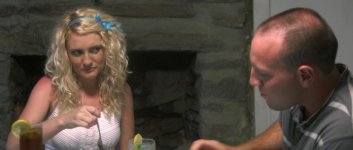
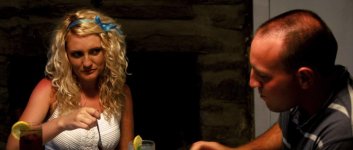
Depending on what you're using to grade I would drop the fireplace and wall down in exposure to make it a bit more moodier. It still seems a bit flat to me, but that could just be how it was lit/shot.

Was she sunburnt?

IMO it's also a bit too green/blue for an interior. Is it a daytime or night time interior?
 
Dermot's grade of that shot is much better than your second attempt. In both of your grades, I'm looking right at the fireplace because it should intuitively be a lot darker than the talent, but it's not. It's right in the center of your screen, so it's unmistakable.

What exactly are you using to grade again?

I'll recant my suggestions from before - just grade on a laptop very quickly. Watch your histograms and make sure you're not clipping anything too much (some can be fine). It sounds like you might have too much stuff (equipment, computer settings, etc.) getting in the way. Simplify the process.
 
Thanks for being patient with me. Using photoshop to approximate what I will do in After Effects/Premiere. Not having much luck with Davinci.
 
Attempt #3:
Should I give up?
No... keep going man! I'd move the temps over to PP/AE tho, if that's what you are finishing in then the metadata is usefull

It's all about salt-N-pepper to taste... for my taste;
- I have the shadow gamma more open, buying back the detail down there.. the back of the guy's neck, and the wall behind the gal for instance
- I tend to run with lower saturation everywhere, then when there's a reason to use BIG color, it has a real emotional hit, unless there's a plot point reason to push the audience into somewhere happy, i'd lower saturation, and keep that arrow in your quiver for when it's really useful.
- If the scene has an underlying tension i might try pushing contrast in the mids further than i already did.

From memory - my base grade was;
- shadows open, rolled off the toe to get the blacks to sit down hard in the fireplace, may have saturation up a bit
- mids de-sat'd and a bit of contrast, secondaries on the skintones to raise the lumanance a bit, and cut against the fireplace.
- highlights down a bit, and like shadows, the highlight gamma is a fair bit more open - then brought them down to maybe 80 units on a scope and rolled off to protect the highlights on his head, and her hair.

So salt-n-pepper to taste, i tend to leave shadows and highlights open and play with contrast in the mids, and juggle the ranges to fit the shot.

d

ps.. if the show needed her to look sunburnt, i'd do that with masks and secondaries
 
Last edited:
Back
Top