GH5 Strange vignette on Gh5S

dtocco

Active member
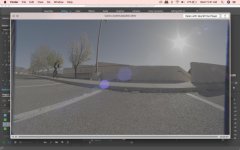
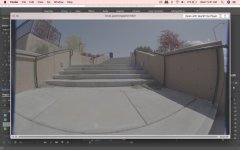
Just upgraded from Gh5 to Gh5s and having some strange issues on my fisheye lens. I'm wondering if there's any quick solutions to this other than punching in on post. I used this same lens on the GH5 and 4 without issue. Is this due to the sensor change? Any thoughts are appreciated!1.jpg2.jpg
 
The Gh5s has a bigger sensor right?

But im thinking here that it is not an image circle problem which usually renders (unless the lens has internal baffles, (see extrashot to remove)) circular cropping.

Maybe the light path is interferd with my some part of the camera body.
 
Does your fish-eye have a removable lens hood? If so you should remove it if possible.

My work-around to the larger GH5s sensor area (that slightly crops my Sigma 10-20 at 10mm with a .71x speedbooster) is to take advantage of the multi-aspect, ah, aspect of the sensor. Here's how...

Since C4K and UHD both are approx the same FOV horizontally on the sensor, if you shoot C4K you just side-crop in your NLE on a UHD timeline to hide the outer edge pixels, while still keeping the full 2160 vertical resolution. This method is not technically a "punch in in post" just a side crop, and it's without a resolution penalty. From the look of your footage I suspect this will just take care of the issue.

Regards
 
The GH5S has a wider sensor than the GH5/4. So you Lens does not appear to be covering the full width of the sensor. Try shooting at some different aspect ratios, like 16:9 or ?
Cheers
 
The vignette is straight borders on the left and right, so that is not an insufficient image circle of the lens. It is something else that has straight lines that are slightly crooked to the frame, like a matte box that is not straight.
 
Perhaps the original poster can provide a bit more info so we don't have to keep guessing around?

And yes, obviously not the image CIRCLE... but my shoot C4K and crop sides to UHD frame format will fix it no matter what it is.
 
Thanks for the responses, guys.

The lens is a Canon mount Rokinon 8mm fisheye, with a small non removable hood. Also using a generic “Fotasy” canon booster. UHD is slightly better than C4k but what you’re seeing in the images is full 4k.
 
Bingo. It's the lens hood. I have the same lens, and I just put it on my GH5s and can see the edges. My adapter seems to center better than yours, as the black lines are even on each side.

Are you sure the Canon mount Rokinon 8mm hood isn't removable, mine is. Does the hood have a white dot printed on it? Grab the hood, squeeze and twist and it will come off.

Also, the C4K trick on a UHD timeline will work. You won't see any real difference when reviewing the footage on the camera, or in a media player, but if you put it on the timeline and assure the vertical height isn't scaled down your bars will go away.

Regards
 
I just did a test with my copy of that lens. In my case, my adapter reduces a bit more than yours, so I have more on the sides even using C4K to UHD side cropping and I would need to scale a small amount. Even without the lens hood I would still have to scale, but in your case I think you could get away with it.

Note that without the lens hood you see the edges of the actual image circle...

UHD with lens hood...

http://files.datausa.com/imageshoppe/outgoing/GH5s/GH5s_Rokinon8mm_UHD.jpg

C4K on a UHD time line with lens hood...

http://files.datausa.com/imageshoppe/outgoing/GH5s/GH5s_Rokinon8mm_C4K_cropped.jpg

UHD without lens hood...

http://files.datausa.com/imageshoppe/outgoing/GH5s/GH5s_Rokinon8mm_UHD_no_lens_hood.jpg

I mainly wanted to do this to demonstrate how with the mult-aspect sensor the FOV is almost identical from UHD to C4K, and that cropping the C4K on the UHD timeline will solve a number of issues with lenses that have image circles that are marginally too small without having to scale.
 
Glad you got it sorted, but it still boils down to the lens image circle is wider than the shade, and the image are inside the shade is considered the sensor coverage area, so the lens hood is cropping the sides of the image on the GH5S’ wider sensor, which would not show on a smaller sensor when the Speed Booster is used. The lens was designed for a APS-C lens, and the SB is designed for Full Frame lenses.
Cheers
 
Last edited:
This of course is when in combination with a .71 focal reducer adapter, and that bears mentioning. APS-C designed lenses that have tighter/smaller image circles are just not the best match, but the vast majority are fine.

Perhaps there's a market for a reducer that's a little less aggressive than the .71X for APS-C lenses, and/or a market for one that's MORE aggressive than the .64X reducer to take full advantage of full frame lenses. Don't know if the economy is worth it for those companies to do so.

Having said that, I'm happy with what it is. I'd much rather have my existing collection of lenses a bit on the wider side than a bit on the more telephoto side. Of my collection, this only impacts this circular fisheye and the 10mm extent of my Sigma 10-20 zoom. The 18-35mm Sigma is fine, for instance.
 
You are exactly correct. But I’m going to try that 7.5 and and I’ll report back! Thank you everyone for your thoughts on this.
 
Yes it is, but the “useable” useable area inside the built in shade is projecting smaller than what the GH5S needs to cover the full sensor width at 17:9, so we see the lens shade edges.
Cheers
 
Back
Top