
I haven't owned my hacked GH1 very long and have been testing it extensively before I shoot a short film with it later in the month. On several test shots I've noticed a green horizontal line which appears about two thirds of the way up the frame. I have included a couple of screen grabs. At this resolution you really can't see it on the wider shot. I've included a punch in on the frame so you can see it better. I've also uploaded a portion of the video so you can see it: http://vimeo.com/20825344


I've read a lot of forum posts about a similar band on the GH2, but the similar GH1 posts seem to deal with banding in the sky and FPN, both of which I've encountered and figured out how to shoot around.
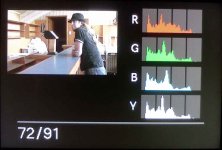
The line always appears in the same portion of the screen. As far as I can tell, it usually occurs when one part of the frame is under exposed or one part is over exposed. The shot above I have a hunch exhibits it because of the dark doorway. This particular shot was exposed correctly. (I will post the histogram below). Has anyone experienced this problem? Are there ways around it - other than shooting everything within say 3 stops of dynamic range?
Thanks in advance
I've read a lot of forum posts about a similar band on the GH2, but the similar GH1 posts seem to deal with banding in the sky and FPN, both of which I've encountered and figured out how to shoot around.
The line always appears in the same portion of the screen. As far as I can tell, it usually occurs when one part of the frame is under exposed or one part is over exposed. The shot above I have a hunch exhibits it because of the dark doorway. This particular shot was exposed correctly. (I will post the histogram below). Has anyone experienced this problem? Are there ways around it - other than shooting everything within say 3 stops of dynamic range?
Thanks in advance
Attachments
Last edited: