Speaking of Streaming - Affordable Ways for Wireless Camera Streams?

Hello,

I have been trying to put together a streaming package for my services as a one man band. I have an Atem Mini, laptop, (will get a hotspot device), cameras and some long cables with 1 SDI to HDMI converter. This can handle a fair amount, but I think the product would be improved if I had the ability to operate a camera with a wireless feed, either POV or handheld. But, But, it needs to be affordable! I know people want things streamed but at the one man band level, they do not want to pay that much for it.

1) Cell Phone - I downloaded an app called IP Webcam. It is supposed to take your cell phone video feed and let you access it through a network. I tried it and could not get it to work. My setup would be going through the laptop so does anybody know if this would apply? Sort of a local intranet between the phone and the laptop. Latency might be poor though.

2) Hollyland wireless HDMI - ~$500-$600 Signal seems strong but latency is 1/2 second+ and the framerates go to even numbers. (probably does not matter). Still a bit pricey but maybe if I knew some work was there.

I am ok running wires around but venues are often not. So I think wireless is needed. Any other ideas on how to tackle this?

Thanks.
 
Hello,

I have been trying to put together a streaming package for my services as a one man band. I have an Atem Mini, laptop, (will get a hotspot device), cameras and some long cables with 1 SDI to HDMI converter. This can handle a fair amount, but I think the product would be improved if I had the ability to operate a camera with a wireless feed, either POV or handheld. But, But, it needs to be affordable! I know people want things streamed but at the one man band level, they do not want to pay that much for it.

1) Cell Phone - I downloaded an app called IP Webcam. It is supposed to take your cell phone video feed and let you access it through a network. I tried it and could not get it to work. My setup would be going through the laptop so does anybody know if this would apply? Sort of a local intranet between the phone and the laptop. Latency might be poor though.

2) Hollyland wireless HDMI - ~$500-$600 Signal seems strong but latency is 1/2 second+ and the framerates go to even numbers. (probably does not matter). Still a bit pricey but maybe if I knew some work was there.

I am ok running wires around but venues are often not. So I think wireless is needed. Any other ideas on how to tackle this?

Thanks.

I use Wirecast Pro and a laptop and Wirecast Go with the new iPhone 11 Pro Max works very well as a
wireless camera source (this is assuming you have high speed internet of course.) Latency is maybe 2
or 3 frames. I've also got the Hollyland 300 and it works nicely as well. Again with the caveat of 2 or
3 frames of latency. Kind of depends what you are using it for. In live sports you'll never notice.
As a close up on a singer, doing live music you very well may notice. As a wide shot or reverse shot
for a live conference, again no one will be able to tell. So it really depends on what you are going to use
the wireless shot for....
 
Thanks for your replies. As usual, many thorns. The Amimon looks like a solid solution but it does not transmit audio and the batteries are 8-26v, not 5v for USB powering. Still solid but this makes the device a little more targeted and not 'many birds with one stone'.

Phones seem to need an internet connection to operate any camera output. I am checking on a Chromecast type thing that might not need an internet connection but this is probably limited in reception range. But, I probably most often need one room, line of sight. Will keep on checking around. I am an Andriod user and might consider buying a new phone like a Pixel 3a if this use can be sorted out.

Thanks for any more suggestions!
 
This is probably not a solution for you but I'll just pass on the information for anyone who may need it. Due to Covid restrictions on meeting sizes and lock down regulations I have had increased inquiries for streaming in our neck of the woods. Twice now we have used a Sony Z90's and an NX80 with v2.0 software which allows wireless streaming straight from the camera body with no additional hardware. You can also operate the cameras with Sony's Content Browser Mobile app if so desired. This app also allows jam sync for time code between the cameras. It's all very straight forward and simple. The first clip is Adorama's quick Z90 wireless tutorial and explains the setup procedure. The second clip outlines the TC sync function and camera control using the Content Browser app. For talking heads, conference podium work etc these little cameras do an amazing job. We have only used it with YouTube but Sony claim the cameras will work with most online streaming platforms. Haven't tested other platforms yet so can't verify that statement. With YouTube no problems.

Chris Young

https://www.youtube.com/watch?v=TVQo3TKRmec

https://www.youtube.com/watch?v=as9UY5KM9iA

This last one is a brief Sony overview.

https://www.youtube.com/watch?v=BXF5_aq5XsA
 
I can tell you from a little experience that relying on wireless for the uplink for live streaming is really frustrating.
We charge $1,000.00 per day to bring our own wireless and a webcast engineer to real time monitor and problem solve.
Having an Ethernet hookup and your client's IT department at your beck and call is really what is needed. Wireless is just
unreliable. Fine for streaming your kids soccer game to FB live. But for paying clients, risky, risky.

Adding in more wireless for cameras on top of that, possible but adds even more risk. The latency issues can be a bear to troubleshoot and correct for.
 
Thanks for your replies. As usual, many thorns. The Amimon looks like a solid solution but it does not transmit audio and the batteries are 8-26v, not 5v for USB powering. Still solid but this makes the device a little more targeted and not 'many birds with one stone'.

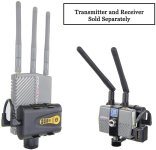
Sure. I'll just add for info in case others may find useful--Camera Motion Research makes a suite of products to make the Connex system more user-friendly. They have a kit of two batteries and charger for $99. Batts are quite small, roughly same size as transmitter, and last 5 hours.

7152NJpwp2L._AC_SL1500_.jpg

The lack of audio is nothing that can be worked around, sure. Would you rely on onboard audio from a given camera in a live production like that? Concerns about handling noise etc...and what if the handheld camera goes down?
 
This kind of outlines the struggle I am having with this route. I know this is the future of our industry. People have less and less attention span for watching what we make these days. So the instant aspect (at least for event work) seems to be a hook. I agree with Dan and Charles, risk and proper tools. I hate it but I am getting a sense this needs to be done and getting out in front of it and getting some expertise is in store. I just hate pre-buying a lot of gear in hopes that work shows up.

I was going to purchase a 4g hotspot for $60 that would at least allow one to find the best reception in an area instead of one's phone. Anyway, I appreciate the input and hopefully we can keep the conversation going.
 
Buy the Newtek NDI camera app for your phone and use OBS or Vmix streaming software on your laptop. Both support NDI encoded low latency video feeds from wired or wireless sources. No network configuration required. As long as NDI camera sources are on the same network with the streaming software it will automatically detect them and you can assign them to a virtual production switcher input. NDI IP decoders to HDMI video/audio out to work with your ATEM mini run about $500 each, but the OBS software is free and you won't need the ATEM for that. You need a robust Wi-Fi network dedicated to your use for this to work reliably. We have EERO mesh network WAPs around the house that handle Netflix UHD HDR streams of 65mbps very well. I've tested NDI video via my iPad using the app and Vmix software on this network and it works fine.
So you might want to add a couple of EERO WAPS to your shopping list for setting up your own wireless networks. They also act as a router if there is a fast wired network with internet access available at the venues you can use. Might have reliability issues in locations with heavy existing wi-fi coverage, but setting up ad hoc mesh networks at locations that don't have WiFi coverage can work pretty well. Three EERO's cover our two acre property with about 150 feet between the master router at the house and the remote unit in the studio.
 
Last edited:
Thanks. I found this yesterday but realized the Newtek NDI app for Andriod was pulled in the fall. So this seems to be an Apple only product as of now.

What I am confused about is if I have the NDI app on a phone and have the camera active, can the signal be sent over a wifi network or does it need a wifi network + internet to work?

I think only one wireless filming device is needed, phone or small camera. Probably often on a gimbal.
 
NDI works over any local wired or wireless Ethernet network (assuming enough network bandwidth). You would only need internet to upload to a streaming service or cloud storage for access outside of your local network.
 
Thanks. Do you know how this works with normal IP cameras? Can they function over a wireless network without the internet? I just do not have good luck with anything networking based.
 
Back
Top