
Navigation
Install the app
How to install the app on iOS
Follow along with the video below to see how to install our site as a web app on your home screen.
Note: This feature may not be available in some browsers.
More options
You are using an out of date browser. It may not display this or other websites correctly.
You should upgrade or use an alternative browser.
You should upgrade or use an alternative browser.
F5: Sony Raw Viewer vs. Blackmagic Resolve
- Thread starter Admit One
- Start date

Admit One
Active member
Yes. Both were with ACES.Did you process the Resolve clip with ACES?
Cheers.
Admit One
Active member
And I though Resolve was the way to go, until this. Unless they straighten this out, they're out...ACES is definitely the way to go with the raw footage.
Cheers.

Nate Weaver
Veteran
And I though Resolve was the way to go, until this. Unless they straighten this out, they're out...
Cheers.
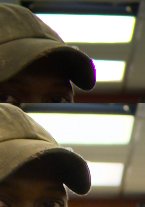
Wait, so the top shot is Resolve?
Been working a lot with ACES/Resolve, haven't seen anything like this EXCEPT with old camera firmware, but that was XAVC material, not raw.
Please forgive, you had the IDT and ODT in Resolve set correctly?
You should contact one of the Resolve team about this, maybe on the CC board. They really care about this stuff, and they will never see it over here on this forum.
[edit: I just noticed you said F5, not 55. I wonder if the more Rec709 targeted color filter array on the F5 sensor is part of why this is happening. I would bet lunch that the ACES IDT for Sony raw is designed for the sensor CFA on the F65 and 55]
Admit One
Active member
Yes.Please forgive, you had the IDT and ODT in Resolve set correctly?
Could be, but that seems a streatch. The pixels on the F5 and F55 are all in the same place.[edit: I just noticed you said F5, not 55. I wonder if the more Rec709 targeted color filter array on the F5 sensor is part of why this is happening. I would bet lunch that the ACES IDT for Sony raw is designed for the sensor CFA on the F65 and 55]
Cheers.
Admit One
Active member
That's what I thought at first. To do that, it would seem the Raw Viewer would need to know the lens characteristics. But it's not just purple fringing. The lights above show multicolored aberrations.Hmm... looks like some form of chromatic aberration correction to me. Maybe look into whether the raw viewer is automatically applying chromatic aberration correction, and whether Resolve offers a similar feature?
Cheers.

Grug
Veteran
That's what I thought at first. To do that, it would seem the Raw Viewer would need to know the lens characteristics. But it's not just purple fringing. The lights above show multicolored aberrations.
Cheers.
I see cyan and green fringing in the lights above, purple on the brim of the cap. All three of those tend to correctable (to an extent) with chromatic aberration correction tools (in still photography programs at least) without the need for specific lens characteristics.
I can't think of another style of correction tool that would address those aberrations in the way they appear to have been handled by the raw viewer.
Nate Weaver
Veteran
Could be, but that seems a streatch. The pixels on the F5 and F55 are all in the same place.
Cheers.
Given that one is global shutter, one is not, I have a feeling that they're much more different than Sony lets on.
Admit One
Active member
Well, it seems that either a different (not so good) de-Bayer algorithm is being used by Resolve or lens correction is being applied by Sony. I'm not sure which.I see cyan and green fringing in the lights above, purple on the brim of the cap. All three of those tend to correctable (to an extent) with chromatic aberration correction tools (in still photography programs at least) without the need for specific lens characteristics.
I can't think of another style of correction tool that would address those aberrations in the way they appear to have been handled by the raw viewer.
I've ordered Vegas 12, and will see if it produces similar results. Unfortunately, at the moment, none of my other raw processing programs can decode Sony's raw format.
Cheers.
Grug
Veteran
Well, it seems that either a different (not so good) de-Bayer algorithm is being used by Resolve or lens correction is being applied by Sony. I'm not sure which.
I've ordered Vegas 12, and will see if it produces similar results. Unfortunately, at the moment, none of my other raw processing programs can decode Sony's raw format.
Cheers.
Well happy hunting! Keep us updated if you find out the explanation.
Nate Weaver
Veteran
Well, it seems that either a different (not so good) de-Bayer algorithm is being used by Resolve or lens correction is being applied by Sony. I'm not sure which.
I've ordered Vegas 12, and will see if it produces similar results. Unfortunately, at the moment, none of my other raw processing programs can decode Sony's raw format.
Cheers.
I wish you would post it on the Resolve forum. They fix things VERY fast as soon as they know about it, and about 4 people from Blackmagic including the lead engineer read the forum daily.
Admit One
Active member
I did.I wish you would post it on the Resolve forum. They fix things VERY fast as soon as they know about it, and about 4 people from Blackmagic including the lead engineer read the forum daily.
Cheers.
Nate Weaver
Veteran
Rad. Peter Chamberlain won't sleep on it. I saw it in the BM forum.
I just realized this is a more extreme version of something I saw a couple months ago. Raw only, not on XAVC. It didn't have the color fringes, it was more of a colorless CA-ish bloom with a 1pixel hard edge, so abrupt it was clearly software generated.
I do now think you're right. It's not just F5 raw. 55 too. Sorry I discounted ya.
I wish I knew why Juan Salvo doesn't like ACES though. I get really great results out of it with 55 material. Red, not so much.
I just realized this is a more extreme version of something I saw a couple months ago. Raw only, not on XAVC. It didn't have the color fringes, it was more of a colorless CA-ish bloom with a 1pixel hard edge, so abrupt it was clearly software generated.
I do now think you're right. It's not just F5 raw. 55 too. Sorry I discounted ya.
I wish I knew why Juan Salvo doesn't like ACES though. I get really great results out of it with 55 material. Red, not so much.