Sony FX30: an aps-c FX3

Well my FX30 arrived today. First thing I did after unpacking was to put the Sony NP-FZ100 battery in (that came in the same box) and turned it on = nothing!

So then I put an extra (also genuine) Sony battery in that I had bought and again turned it on = still nothing!!!

It wouldn't even turn on with the mains charge cable plugged into the camera!

Now I've had Sony cameras since the early 2000s and never had this! So a quick Google search told me that, unlike almost everyone else, Sony ship their batteries for these types of small cameras almost (or completely, as in my case) EMPTY of charge (not the usual 40-60% that most camera batteries ship with)...Panic over!!!

So, 4 hours later, with the mini USB-C charge cable plugged into the FX30 (and it turned off - so the battery will actually charge) I now have one of the two batteries fully charged. And of course the FX30 works! So now I'm charging the second battery...and yes, with a battery with decent charge in the camera I can now power up the FX30 from the mains cable as an alternative.

Run out of time today (and this week due to work, and other, commitments) and I don't fancy getting to know the camera right now with it tethered to a very short mains cable so I'll just fully charge both batteries and look at it again as and when I have time at the weekend, maybe!

Anyway, thought I'd quickly post this here, mainly to save anyone else having a worrying few minutes thinking that they have received a dud/dead FX30 and/or batteries!

Also, since (I think unlike the FX3?) the FX30 does not ship with any external battery charger, I realise now that I'm going to need to buy one (and probably a third Sony NP-FZ100 battery - no idea yet how long these batteries will run for in the FX30). The Sony battery charger, single slot, is £85 in the UK - a bit steep - but I think I will probably go for that. I'm worried about dodgy cheap chargers destroying genuine batteries and/or catching fire, unless someone can strongly recommend a brand they trust from proven experience?

Thanks in advance for any info.
 
Just received an FX30. Lots of questions popping up. One serious issue: The camera's screen turns off when an HDMI monitor is connected. Seriously? Is there a work around ... please!
Thank you, team. ... =mark=
 
This commonly happens with some cameras. Some will allow both, some don't.

Some will only allow both when recording normally, and some screens will only shut off when exporting higher specs such as 4:2:2 (over 4:2:0 internal recording).

Some may say it's one way they limit the camera for the price.

No workaround unless you clearly see one (in the menu or through regular camera operation).
 
Just received an FX30. Lots of questions popping up. One serious issue: The camera's screen turns off when an HDMI monitor is connected. Seriously? Is there a work around ... please!
Thank you, team. ... =mark=

if it's like the fx3, I believe you can fix this in the menu under HDMI or external output options in order to keep the camera's screen on. can't remember exactly where
 
Hi everyone, read Mknobil's worrying post as I was on a train back from Norwich to home tonight. My FS5 has this annoying "feature"/limitation

However, although I'm tired after a long day, I can CONFIRM that it's possible to have display on both the FX30 LCD and my Blackmagic Vidoeo Assist 12G HDR, even when I press record on the FX30 (with my FS5 the LCD then goes black, apart from camera info data). Not so with the FX30. :)

I will look at it again when I'm less tired/have time to work out what settings I used to get this... but rest easy, it can be done! :cool:
 
Hello FX30 team. For sunny outdoor shooting, Is anyone using a loop on the little fold out screen? What is the best solution considering you also need access to the touch screen? Is an EVF the only way to go? Any recommendations? any mounting wisdom? Thank You !! =mark=
 
Thanks in advance for any info.

I've been using two of these Nitecore USN4 Pro chargers for over two years now, and so far they have been bulletproof with my genuine Sony FZ100 batteries. I haven't tried the Nitecore batteries, though. The fact that they can charge two batteries simultaneously is useful. Good battery status info on all aspects of the battery charge state keeps you up to date. If using a Fast USB charger, the charger can then drop into "Quick Charge" mode, which definitely speeds up your turn around time. All in all, I have been very happy with them. 5*****s from me.

Chris Young

 
No, what I'm saying is that even if the cameras are synced via time code, that doesn't mean that each frame is exposed at the exact same millisecond. There can be a slight difference in exposure timing but still be within tolerance for audio sync. But this technique calls for combining multiple images, and if they're even just a little offset from each other, the result will be blurry

This has always been the case in time code locking in studios and on OBs. Example. If in a simple three camera shoot, Cam #1 is the master TC clock and other cameras are cable jammed to that. All cameras jammed to #1 will be exactly 1 frame behind in clock value. Same if you are using house sync TC. But in that case all cams TC will be the same as the external TC reference was common to all the cams. Before slaved cams can write a TC value, they have to be able to read what that incoming TC value is before they can replicate the same code. Back to the three cam scenario in post. Normally you will pull the lead camera back one frame to have correct sync between sources. This of course does not account for TC drift over a period of time when using the jam and disconnect method. If jamming and then disconnecting, the recommended time to stabilize a camera's internal clock to an external lock code is ten seconds.

If you are really stuck, and you need fairly accurate sync for post when cameras have to be a distance apart, try the following. With mirrorless cams, it's quite easy. Just line them up side by side. Try and start them all off on the same free run time code as close in time as possible, from 00:00:00:00 or time of day. Once they are all up and running, grab your phone and take a photo or a short video shot of the rear screens of all the cams, with their running screen time code displays in the shot. In post for syncing, just use the following TC calculator to work out the offsets for each video source on the timeline tracks. This doesn't obviously take into account any drift between cameras over a period of time, but it gets you an accurate start point. IF, a big IF. If you can grab all cameras together at the end of a shoot and take an end shot of their collective screen TC displays, you will then have an idea of how much drift you have had between cameras. At least this informs the editor of any foreseeable drift issues likely to be encountered in post.

Like many other editors, I have Pluraleyes for syncing unreferenced cameras and recorders. Though, trying to work with Pluraleyes with Resolve can be very problematic. What I have found to be the quickest and most accurate post sync method using sound for lining up time coded, non time coded, un-synced and unreferenced cameras and recorders is to use Syncaila 2. Sync in seconds! Two years in with it and can't live without it in this day and age of unreferenced cams and audio recorders. As long as your NLE can export and import an FCP 7 v5 XML file, Syncaila 2 will save you countless hours on really problematic video/audio sync jobs when you don't have TC to sync with.

Of course on shorter, simpler jobs the old hand-clap or phone/camera flashgun clapper method works quite well.

Chris Young

Even does Key Code for film guys

http://www.michaelcinquin.com/tools/timecode_keykode

 
Just received an FX30. Lots of questions popping up. One serious issue: The camera's screen turns off when an HDMI monitor is connected. Seriously? Is there a work around ... please!
Thank you, team. ... =mark=

As Abe suggested. More than likely, not knowing for sure, as I haven't even seen an FX30 yet. Have a look under the SETUP menu for EXTERNAL OUTPUT and then look for HDMI Info. Display. If that is set to ON, you will most likely have a black screen on the camera and your menus will be viewable on the HDMI out. Set that to OFF, and then you should have vision on the camera screen and on the HDMI out. BUT! If you try playing back a clip, the camera screen will blank to black, and you will only have vision on the HDMI out. A pain, but there it is.

Chris Young
 
I've been using two of these Nitecore USN4 Pro chargers for over two years now,

Thanks! Just ordered it (around £25-30 in the UK, depending where you buy it, WEX was the cheapest).

Had a very quick play around again with my 7-inch Blackmagic Videoassist 12G HDR and the FX30 last night. In all recording formats I could get an image on the Videoassist and it remained even when I pressed record. The only glitch I saw was when I selected a HEVC format, as the Videoassist did not like recording from the FX30 when it's set to that format - but it still displayed the image on pressing record regardless, just with a warning symbol.

I have to say I'm pretty impressed with the FX30 from what (little) I've seen of it so far. I find it incredible that it's now possible to buy such a small, superbly capable camera for just £1,750 (as I get the VAT, a purchase tax, back as I'm a registered VAT business). When I started out professionally as a corporate videographer over 14 years ago (with an EX3, my first "proper camera") you had to pay a fair wack for capabilities and images that were far short from what everyone now expects/takes as a given! Sure, that was a camera more suited for different types of shooting. I now use my Sony PMW-300, bought in January 2014 as it's replacement, for those jobs that need fast, reliable capture in run-n-gun scenarios - but all the same.

One other, I think potentially pleasing thing that I have noticed with my FX30. The nature or "look" of the noise - when it does appear.

Let me start by saying I think the FX30 is very good in low light (sure, a full frame FX3/A7III is still going to be the current class leader). But when noise does appear, it's of a very fine texture and not blocky or "unattractive"..in fact, a little bit like film grain!

Sure, the last S35 camera I bought was my FS5 back in November 2015 - sensor and codec developments must have come a long way in the last 6-7 years - but that has quite ugly noise in the shadows in low light scenarios, even when using tweaked picture profiles. It's actually been a great camera for me but, of course, uses a thin 100Mbps 4.2.0 codec in 4K. The FX30 is capable of far higher bit rates and much better 4.2.2 4K codecs, including All-I. perhaps it's this that's making for a more amenable noise "look"???...or is it something to do with the higher resolution sensor downsampling to 4K perhaps???

Just wondering if other new FX30 owners have noticed this and as to why this might be?

Really busy so won't have much "play time" this week (again...) but hey ho!
 
Bought a Sony Zeiss 55mm F1.8 off a UK eBay seller for just under £400. It arrived today and is exactly as seller described, basically in boxed, mint condition. As it's a full frame lens it's been bought as a super sharp, fast portrait lens when on S35 cameras like my FS5 and new FX30. I plan on using it for tight in talking head stuff mostly on the FX30 with eye tracking enabled. Onwards and upwards! :D
 
Last edited:
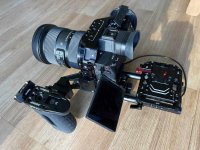
Hi guys, hope this is the best place to post this. Like many of you I bought an FX30 at launch and I've been blown away about just how superbly good and feature rich a (relatively inexpensive) camera it is. I bought mine without the XLR handle as it was a bit of a "dip your toe in the water to see if it's worth further investment". I was originally after a FX6 as an upgrade to my much used FS5 but gave up trying to get one - demand has now eased I hear. I thought I could always buy the FX30/F3 XLR handle later if it was...or perhaps just an FX60 - if one ever appears!

Anyway, I did decide to go for the FX3/FX30 XLR handle and was then shocked by just how much extra Sony are charging for it (when not part of the "kit") from reputable UK suppliers such as CVP etc. No problem, I thought, I'll pick one up on eBay as I'm sure many buy the full kit and then decide they don't need/want it.

OK, so that's the background.

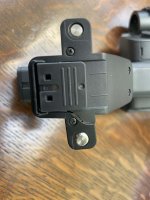
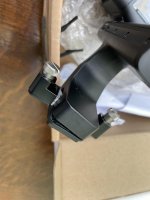
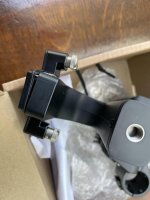
Saw one recently (brand new) on eBay for a sensible price and bought it. Anyway, it arrived today - broken! Sure, it was not very well packed at all (very tight fit in the box with hardly any padding around it) and UPS must have knocked or put some weight on the box at some point during transit. It might have survived if it was packed how I would have shipped such a thing - but of course that was outside my control. Basically it's now totally unusable. I have contacted the seller and he seems very responsive to trying to sort this out - so we'll see what happens now.

However, I was really surprised at just how easily it seemed to break and how fragile it seems to be at such a critical point - the base/mounting area to the camera! This left me wondering. I see all sorts of really heavy monitors (and lots of other heavy gear) attached to these handles on FX3 and FX30s on social media groups etc. Surely, this is a recipe for disaster if it's so weak and flimsy at this critical point of contact with the camera?

My message, be warned!!!!

Why, oh why, did Sony design the thing so poorly?

So, I'm guessing there are already many broken FX3/FX30 XLR handles out there. Now my question to those of you with the handle - What's your experience of the robustness of it, or not???

Thanks for any insights.
 

Attachments

  • IMG_9417.jpg
    IMG_9417.jpg
    53.5 KB · Views: 0
  • IMG_9426.jpg
    IMG_9426.jpg
    39.9 KB · Views: 0
  • IMG_9427.jpg
    IMG_9427.jpg
    45.3 KB · Views: 0
Last edited:
For the same price or less you can purchase a cage, handle and mic shock mount.

While the handle is light and convenient it isn't durable like you discovered. In addition the mic mount also doesn't provide handling noise protection and isn't removable. It's also very expensive for what you get. I also find a top handle less useful than a side handle because most common use it to film people where you want the camera held at eye level where the top handle is best for low angle shots.

This is my a74 rig but you can do the same for the fx30.

Sony A7IV rig sm.jpg - Click image for larger version  Name:	Sony A7IV rig sm.jpg Views:	0 Size:	122.3 KB ID:	5701748
 
Back
Top