FS5: Sony FS5 Raw Recording in S-Log and image has colour baked in

darcymu

Member
Hi

Over the weekend I was shooting raw to an atomos inferno. I was shooting in s-log 2 and the
on the screen it looked flat but I downloaded the footage the image is not at all a flat and has
colour baked in.

Not sure what I missed but I can't seem to figure out why it is doinh this. My picture profile
on the FS5 is set to PP7. I did shoot a few weeks ago with everything the same and those
images came out like they were shot in s-log.

Thoughts?

Darcy
 
my magic ball says you are in FCPX and the LUT was embedded automated.

If my magic ball is wrong you should give us some more information for example how you viewed the downloaded footage, if "on the screen" means on the inferno on playback etc..
 
The Inferno can also record LUTs (bake in color) if you were using one to preview the image and accidentally activated that option (doubt it since you said it looked flat, but maybe possible).
 
i think the magic ball is incorrect.

here are the details.
shooting on an FS5 and recording to an Atomos inferno. I had pp7 selected and it looked flat on the Inferno. I don't have many LUT's so I was just viewing in Rec709. I was trying the few LUT's that I have but only to see how the image looked. When I was recording, I stayed in Rec709.

When I viewed them both in Quicktime and Premiere, I am getting a non-flat image. During playback on the inferno, the image did as well look flat.

I did shoot an A7s ii as a second camera and used the same pp7 and these images came out as a flat image.
 
I'm assuming ProRes RAW? It definitely sounds like a software issue.

Premiere could be automatically applying a LUT (as mentioned above), and maybe something is happening with QT as well.

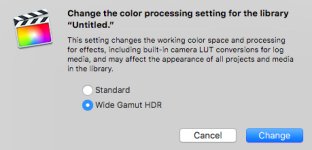
Maybe a color space issue? (FCPX setting below.)

How about uploading a native clip?

FCPX.jpg
 
Actually don't think ProRes RAW has support in Premiere yet (if ever), but IDK for sure.
 
Trying to figure out how to upload a clip and image to this page but somehow it is not letting me.

I have shot with 4k and s-log already and did get the proper image. This is just recent that it has done this to me.
 
It's difficult to troubleshoot without physically being able to work with your footage and seeing all of the clips from each shoot, but there is really not many things that could have occurred here.

If you didn't bake-in a LUT - and it's not a software issue (same computer with same software was used before) - and it's not a camera setting user error - then the only other possible thing I can think of is you shot ProRes on the first shoot (or any other time) and ProRes RAW on this recent shoot, and I believe Adobe does not support ProRes RAW at this time.

So maybe Premiere (just guessing) may import the ProRes RAW footage but it's not letting you view it how it's supposed to be viewed.

Regular ProRes S-Log1/2/3 should look how it's supposed to look (flat)...just how you saw it.

There's also CinemaDNG but you said you opened the footage in QT and last I checked you couldn't open a CDNG file sequence in QT (you can with JPEGs and other formats).

---

Just saw your Vimeo clip...it's a compressed, low-res H.264.

Also, what is the file format on the SSD? Can you confirm it's .mov?

Can you upload a file straight from the SSD somewhere? Google Drive? (You can't do it here.)

I or anyone with FCPX can at least confirm if it's ProRes RAW, and possibly show you flatter footage (if applicable).
 
Last edited:
Trying to figure out how to upload a clip and image to this page but somehow it is not letting me.

I have shot with 4k and s-log already and did get the proper image. This is just recent that it has done this to me.


load it on your dropbox or similar and post the link here
 
Here is a very short clip that was not so large. Yes, the other file was compressed as I exported it from Premiere as H264.

https://drive.google.com/file/d/1A34YjWeDvnSTt-B1K0obRAmmz2RnINxM/view?usp=sharing

I will do a reset on my camera as well.

Here is a copy of the properties from one of the clips.


"File Path: /Volumes/LWong Working APR18/William Music Video/FOOTAGE/DAY 1/FS5 4k/DM256A_S001_S001_T003.MOV
Type: QuickTime Movie
File Size: 15.23 GB
Image Size: 4096 x 2160
Frame Rate: 23.976
Source Audio Format: 48000 Hz - 24 bit - Mono
Project Audio Format: 48000 Hz - 32 bit floating point - Mono
Total Duration: 00:04:22:11
Pixel Aspect Ratio: 1.0

QuickTime Details:
Movie contains 1 video track(s), 1 audio track(s), 0 closed caption track(s), and 1 timecode track(s).

Video:
There are 6299 frames with a duration of 1001/24000ths.

Video track 1:
Duration is 0:04:22:17
Average frame rate is 23.98 fps

Video track 1 contains 1 type(s) of video data:

Video data block #1:
Frame Size = 4096 x 2160
Compressor = Apple ProRes 422
Quality = Most (5.00)

Audio:
Audio track 1 contains 1 type(s) of audio data:

Audio data block #1:
Format = 24 bit - 4 channels
Rate = 48000 Hz
Compressor = in24

Timecode:
Timecode track 1 contains 1 type(s) of data:

Timecode data block #1:
Start Time = 08:50:33:12
Reel name =
 
I know it's a different camera and system, but maybe it's still helpful.

When I shoot RAW on FS700 to O7Q recorder, I set camera to Slog2. But if you view the individual CDNG images on a finder window on my operating system (outside of any editing or coloring software) they appear as linear RAW, saturated, contrasty and such. Perhaps something similar is happening?
 
Premiere doesn't yet support ProRes RAW. As you see in your clip properties posted, it's reading it as if it were ProRes 422.
 
As we wait, I'd like to show you what user error in software may look like:

I downloaded a sample ProRes RAW clip from 'filmplusgear'.

If I don't change the FCPX settings when viewing the file it looks like this by default. Once I change to the correct settings, it looks like this.

Before

Before.jpg

After

After.jpg
 
Back
Top