
Navigation
Install the app
How to install the app on iOS
Follow along with the video below to see how to install our site as a web app on your home screen.
Note: This feature may not be available in some browsers.
More options
You are using an out of date browser. It may not display this or other websites correctly.
You should upgrade or use an alternative browser.
You should upgrade or use an alternative browser.
Sony F35 Codex M Recorder Complete Setup
- Thread starter Samana76
- Start date
Hello everyone,
It's strange that you all had issues with the color channels being swapped. I color corrected these dpx in Resolve with no problems whatsoever. I also CC'd the shots in Scratch and Nuke, however those programs cannot read 12bit dpxs, so I converted them to 16bit dpx via the Codex Desktop Transfer Station, which, again, it does on the fly. Something might have happened during the zip compression or the uploading to the server, although that seems really strange.
x Sandbox I think Scratch for me is simply a personal preference. Objectively it is a much smaller programs (only 200 MB) and simply flies on any machine. I was using it without any issues grading 1080p and 4K Red footage on a 1st gen Microsoft Surface Pro, which isn't a particularly powerful machine. It is also very quick to use, organize clips, create versions of a clip, and is super fast in playback and rendering. That said, it is exclusively dedicated to grading. The editing of clips is cumbersome and you cannot do any stabilization or other processes to the video. I really like it, though. Maybe it's my inexperience with Resolve, but I find Resolve slower overall, not only in playback and rendering, but also just to get into grading a clip and also the controls themselves. I just don't like it. Unfortunately using Scratch means I need to convert the dpx to 16bit, which mean 30% larger files. In fact they go from about 9MB per file to 12MB.
I was supposed to shoot a speed ramping shot and some wavelet compression shots as well this past weekend, however I have been too busy with work and have not had a chance yet. I apologize for promising to post shots and then letting it drag for a few weeks. So without promising when, I'll just say that as soon as I get a chance I will do these tests and post them here.
Good night everyone.
Igor
It's strange that you all had issues with the color channels being swapped. I color corrected these dpx in Resolve with no problems whatsoever. I also CC'd the shots in Scratch and Nuke, however those programs cannot read 12bit dpxs, so I converted them to 16bit dpx via the Codex Desktop Transfer Station, which, again, it does on the fly. Something might have happened during the zip compression or the uploading to the server, although that seems really strange.
x Sandbox I think Scratch for me is simply a personal preference. Objectively it is a much smaller programs (only 200 MB) and simply flies on any machine. I was using it without any issues grading 1080p and 4K Red footage on a 1st gen Microsoft Surface Pro, which isn't a particularly powerful machine. It is also very quick to use, organize clips, create versions of a clip, and is super fast in playback and rendering. That said, it is exclusively dedicated to grading. The editing of clips is cumbersome and you cannot do any stabilization or other processes to the video. I really like it, though. Maybe it's my inexperience with Resolve, but I find Resolve slower overall, not only in playback and rendering, but also just to get into grading a clip and also the controls themselves. I just don't like it.
Unfortunately using Scratch means I need to convert the dpx to 16bit, which mean 30% larger files. In fact they go from about 9MB per file to 12MB.I was supposed to shoot a speed ramping shot and some wavelet compression shots as well this past weekend, however I have been too busy with work and have not had a chance yet. I apologize for promising to post shots and then letting it drag for a few weeks. So without promising when, I'll just say that as soon as I get a chance I will do these tests and post them here.
Good night everyone.
Igor
Last edited:
Thanks for making this thread - I think it was important to have the Codex discussed and demonstrated in the detailed manner it has here.
If the F35 is a Ferrari of cameras, then you're thread here helps to answer the question "What would it be like with Pirelli P Zeros?"
I have a question about the desktop transfer station. Does it require buying additional software to make it function? It seemed like Codex had various tiers of performance for that - but maybe I was confused.
As to the color channels swapping - it did it with every program I had on hand that could read the dpx files. Don't know why.
Also, were these files you uploaded the 12-bit or 16-bit dpx? Nuke had no trouble reading them here - except for the channel issue.
Shake on the other hand was worthless.
I was a little surprised to see Lightwave 3D import them ok. But it's always been a bit of a swiss-army knife when it comes to reading and writing various codecs.
Here's a before and after of the bathroom. The image never tore up -
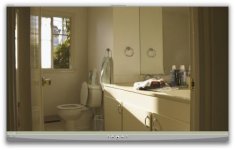
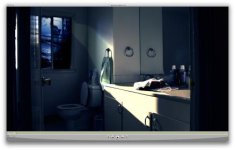
If the F35 is a Ferrari of cameras, then you're thread here helps to answer the question "What would it be like with Pirelli P Zeros?"
I have a question about the desktop transfer station. Does it require buying additional software to make it function? It seemed like Codex had various tiers of performance for that - but maybe I was confused.
As to the color channels swapping - it did it with every program I had on hand that could read the dpx files. Don't know why.
Also, were these files you uploaded the 12-bit or 16-bit dpx? Nuke had no trouble reading them here - except for the channel issue.
Shake on the other hand was worthless.
I was a little surprised to see Lightwave 3D import them ok. But it's always been a bit of a swiss-army knife when it comes to reading and writing various codecs.
Here's a before and after of the bathroom. The image never tore up -
Last edited:
Wavelet compression, ramping and other tests
Wavelet compression, ramping and other tests
Hello everyone,
So last Sunday I went to do some test shots with a friend of mine to capture some high contrast environment shots as well as Codex wavelet 8:1 compressed and ramping shots.
Below you will find links to the various clips and single dpx images to download and play with. I also uploaded quick color corrected shots to youtube and did a little edit of some of the shots. You will find links below.
CC was done quickly in Scratch and I did not color match the shots; it was just a quick test, mostly to test the quality of the wavelet compressed files of the Codec Onboard recorder as well as to do some ramping shots to share here.
Here is some information regarding the equipment used and Camera and Codex setting:
F35:
All shots except the silhouette one are 10bit 444 24fps.
Ramping shots are 10bit 444 48fps with initial fps set to 24.
Silhouette shot is 12bit 444 at 24fps.
Shutter is 180 degrees.
Ramping shots are set to automatically adjust shutter to compensate for speed change. Therefore at 48fps shutter is 360 degrees.
Codex:
Silhouette shot recorded at 12bit 444 uncompressed dpx.
All other shots except wavelet compressed one (see below) are 10bit 444 uncompressed dpx.
Wavelet compressed shot is 8:1 compression at 10bit 444. When shooting compressed (compressed options are from 3:1 to 8:1) 12bit recording is not available, only 10bit 444 or 10bit 422 are available.
Color Corrected in Scratch
Lenses:
Red Pro Zoom 18-50 T3 at f16
Carl Zeiss Biometar Jena 120 f2.8 PL mount at f16
Filter:
Tiffen IRND Full Spectrum 1.2 when needed
Here are some CC’d screen grabs:


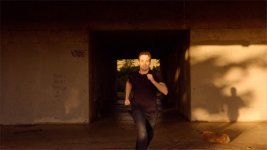

Download a wavelet 8:1 compressed sequence (500 MB) or single images (1MB each):
www.igorbertolucci.com/codex/10bit444compressed8to1.zip
www.igorbertolucci.com/codex/10bit444compressed_01.dpx
www.igorbertolucci.com/codex/10bit444compressed_02.dpx
www.igorbertolucci.com/codex/10bit444compressed_03.dpx
Download CC’d jpg images and original uncompressed dpx images (9MB each):
www.igorbertolucci.com/codex/Girl.jpg
www.igorbertolucci.com/codex/Girl.dpx
www.igorbertolucci.com/codex/Running.jpg
www.igorbertolucci.com/codex/Running_01.dpx
www.igorbertolucci.com/codex/Running_02.dpx
www.igorbertolucci.com/codex/Running_03.dpx
www.igorbertolucci.com/codex/Silhouette.jpg
www.igorbertolucci.com/codex/Silhouette.dpx
www.igorbertolucci.com/codex/Structure.jpg
www.igorbertolucci.com/codex/Structure.dpx
See the ramping feature from 24fps to 48fps:
http://youtu.be/cW_X1K_6hAI
http://youtu.be/pQNhycQKvG8
Here is a little edit of the various shots I took that day:
http://youtu.be/p0GTI_Ny_3Y
View the single clips:
(If you see a little green horizontal line in the image, it is just a little Scratch glitch do to user error. It is not the Codex that recorded the image with the glitch.)
http://youtu.be/wvhcyPShv7I
http://youtu.be/GDvNrXbWT0s
http://youtu.be/YcQ3rgSk9G4
http://youtu.be/501xu3BT1Vc
http://youtu.be/yj5I5LrNUkQ
http://youtu.be/I1Vsl8MFUCI
http://youtu.be/SRUjBWKO7nk
http://youtu.be/VkSOcI_jiQo
http://youtu.be/yN0MSn1nfDE
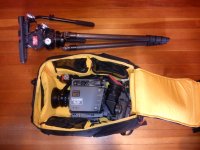
Finally here is how I packed everything I needed for the day. Everything except for the tripod and matte box fit neatly in my Kata backpack:
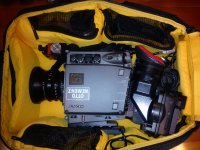
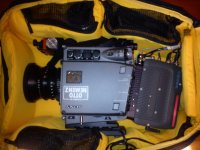
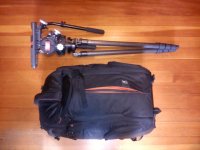
Enjoy!
Cheers,
Igor
Wavelet compression, ramping and other tests
Hello everyone,
So last Sunday I went to do some test shots with a friend of mine to capture some high contrast environment shots as well as Codex wavelet 8:1 compressed and ramping shots.
Below you will find links to the various clips and single dpx images to download and play with. I also uploaded quick color corrected shots to youtube and did a little edit of some of the shots. You will find links below.
CC was done quickly in Scratch and I did not color match the shots; it was just a quick test, mostly to test the quality of the wavelet compressed files of the Codec Onboard recorder as well as to do some ramping shots to share here.
Here is some information regarding the equipment used and Camera and Codex setting:
F35:
All shots except the silhouette one are 10bit 444 24fps.
Ramping shots are 10bit 444 48fps with initial fps set to 24.
Silhouette shot is 12bit 444 at 24fps.
Shutter is 180 degrees.
Ramping shots are set to automatically adjust shutter to compensate for speed change. Therefore at 48fps shutter is 360 degrees.
Codex:
Silhouette shot recorded at 12bit 444 uncompressed dpx.
All other shots except wavelet compressed one (see below) are 10bit 444 uncompressed dpx.
Wavelet compressed shot is 8:1 compression at 10bit 444. When shooting compressed (compressed options are from 3:1 to 8:1) 12bit recording is not available, only 10bit 444 or 10bit 422 are available.
Color Corrected in Scratch
Lenses:
Red Pro Zoom 18-50 T3 at f16
Carl Zeiss Biometar Jena 120 f2.8 PL mount at f16
Filter:
Tiffen IRND Full Spectrum 1.2 when needed
Here are some CC’d screen grabs:
Download a wavelet 8:1 compressed sequence (500 MB) or single images (1MB each):
www.igorbertolucci.com/codex/10bit444compressed8to1.zip
www.igorbertolucci.com/codex/10bit444compressed_01.dpx
www.igorbertolucci.com/codex/10bit444compressed_02.dpx
www.igorbertolucci.com/codex/10bit444compressed_03.dpx
Download CC’d jpg images and original uncompressed dpx images (9MB each):
www.igorbertolucci.com/codex/Girl.jpg
www.igorbertolucci.com/codex/Girl.dpx
www.igorbertolucci.com/codex/Running.jpg
www.igorbertolucci.com/codex/Running_01.dpx
www.igorbertolucci.com/codex/Running_02.dpx
www.igorbertolucci.com/codex/Running_03.dpx
www.igorbertolucci.com/codex/Silhouette.jpg
www.igorbertolucci.com/codex/Silhouette.dpx
www.igorbertolucci.com/codex/Structure.jpg
www.igorbertolucci.com/codex/Structure.dpx
See the ramping feature from 24fps to 48fps:
http://youtu.be/cW_X1K_6hAI
http://youtu.be/pQNhycQKvG8
Here is a little edit of the various shots I took that day:
http://youtu.be/p0GTI_Ny_3Y
View the single clips:
(If you see a little green horizontal line in the image, it is just a little Scratch glitch do to user error. It is not the Codex that recorded the image with the glitch.)
http://youtu.be/wvhcyPShv7I
http://youtu.be/GDvNrXbWT0s
http://youtu.be/YcQ3rgSk9G4
http://youtu.be/501xu3BT1Vc
http://youtu.be/yj5I5LrNUkQ
http://youtu.be/I1Vsl8MFUCI
http://youtu.be/SRUjBWKO7nk
http://youtu.be/VkSOcI_jiQo
http://youtu.be/yN0MSn1nfDE
Finally here is how I packed everything I needed for the day. Everything except for the tripod and matte box fit neatly in my Kata backpack:
Enjoy!
Cheers,
Igor
Last edited:
kassimnorris
Active member
WOW!!! Thank you so much for posting the links and all of the DPX files....The footage looks amazing!!
Hi Igor,
Thank you for being one of the pioneers of 12bit and taking the time to share your findings and clips. Much appreciated!
I also use scratch and have been using the ACES workflow. There is indeed more information in the highlights...check out this grade of the girl
http://jokami.net/cine/girlaces.jpg
You can see the difference in the branches...
Now that 12bit is easily accessible via the O7Q, I can't wait to start shooting 12bit myself as well as the rest of the f35 fam!
Cheers!
Thank you for being one of the pioneers of 12bit and taking the time to share your findings and clips. Much appreciated!
I also use scratch and have been using the ACES workflow. There is indeed more information in the highlights...check out this grade of the girl
http://jokami.net/cine/girlaces.jpg
You can see the difference in the branches...
Now that 12bit is easily accessible via the O7Q, I can't wait to start shooting 12bit myself as well as the rest of the f35 fam!
Cheers!
Hi Jo,
It's my pleasure to share what I can with the wonderful community.
Soon I'll be posting shots that really show how much more information is available to extract in the highlights. I was blown away by some of the shots.
I've been experimenting with ACES in Nuke, but have not yet tried in Scratch. Nuke is great for the incredible amount of control you have over a shot, but is not so convenient for color correcting and grading a series of shots. I thing Scratch is the best software for that. I would love to hear your procedure in using the ACES workflow in Scratch.
Thanks in advance.
Cheers,
Igor
It's my pleasure to share what I can with the wonderful community.
Soon I'll be posting shots that really show how much more information is available to extract in the highlights. I was blown away by some of the shots.
I've been experimenting with ACES in Nuke, but have not yet tried in Scratch. Nuke is great for the incredible amount of control you have over a shot, but is not so convenient for color correcting and grading a series of shots. I thing Scratch is the best software for that. I would love to hear your procedure in using the ACES workflow in Scratch.
Thanks in advance.
Cheers,
Igor
Just letting people know that Michael Ferguson, the sales representative for Otto Nemenz, is looking to sell the last remaining Codex Recorders, wet docks and Data packs (mags) and has lowered the price for each item. He says ONI has only 3 wet docks left. He is selling the 512GB mags for $250 each, 256GB mags for $150 each, and the Codex Onboard M Recorder for $1000. The F35 wet docks can be purchased for $500 each, but only with the purchase of mags or an M recorder.
I am posting this up for him here as a favor. I think the prices are quite reasonable and anyone looking to put together a setup like mine should jump on this before the Recorders, but mostly the wet docks, become impossible to find. Michael's contact email is michael@systemassociates.tv
If anyone has any questions about my setup, please write them here.
Cheers,
Igor
I am posting this up for him here as a favor. I think the prices are quite reasonable and anyone looking to put together a setup like mine should jump on this before the Recorders, but mostly the wet docks, become impossible to find. Michael's contact email is michael@systemassociates.tv
If anyone has any questions about my setup, please write them here.
Cheers,
Igor
If anyone has any questions about my setup, please write them here.
Cheers,
Igor
Igor!
You have done so much with this thread. Awesome!
I hope I can continue this journey!
So I picked up a lot of 3 wet docks that was sure to be scrapped at a recycler here in LA. They all belonged to Clairmont Camera, and have the part number CDX-P055. I managed to get 12-bit directly out from connection 1&2 straight into my 3GM. And switching to to 10-bit 422 as well, I never got any warning screens at all.
Could it be the that this was a later module designed to handle 12-bit out of the camera?
C
Archduk3
Great find! I have the same one now: CDX-P055. I have it connected to the Codex Onboard Recorder so I can get 12-bit 444 at 24p and 10bit 444 at 50p (you need to use all four connections to be able to get 444 at 50p). With this dock I get the same warning screen, "Unsupported Format", as with the Otto Nemenz one I had before. Do you have the messages on the viewfinder set to WRN? (see attachment).
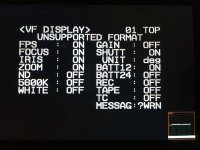
I also have an Aja Hi5-3G which accepts two HD-SDI connections and converts it to HDMI. Like you, I am able to get the 12-bit 24p out of the camera, but get the same warning message as when the Codex is connected. This should be normal because the camera thinks the VTR is connected, which is only be able to record 10-bit, however the camera is outputting 12-bit, hence alerting that that format is incorrect for the VTR.
Cheers,
Igor
Great find! I have the same one now: CDX-P055. I have it connected to the Codex Onboard Recorder so I can get 12-bit 444 at 24p and 10bit 444 at 50p (you need to use all four connections to be able to get 444 at 50p). With this dock I get the same warning screen, "Unsupported Format", as with the Otto Nemenz one I had before. Do you have the messages on the viewfinder set to WRN? (see attachment).
I also have an Aja Hi5-3G which accepts two HD-SDI connections and converts it to HDMI. Like you, I am able to get the 12-bit 24p out of the camera, but get the same warning message as when the Codex is connected. This should be normal because the camera thinks the VTR is connected, which is only be able to record 10-bit, however the camera is outputting 12-bit, hence alerting that that format is incorrect for the VTR.
Cheers,
Igor
Last edited:
Archduk3
Great find! I have the same one now: CDX-P055. I have it connected to the Codex Onboard Recorder so I can get 12-bit 444 at 24p and 10bit 444 at 50p (you need to use all four connections to be able to get 444 at 50p). With this dock I get the same warning screen, "Unsupported Format", as with the Otto Nemenz one I had before. Do you have the messages on the viewfinder set to WRN? (see attachment).
View attachment 141955
I also have an Aja Hi5-3G which accepts two HD-SDI connections and converts it to HDMI. Like you, I am able to get the 12-bit 24p out of the camera, but get the same warning message as when the Codex is connected. This should be normal because the camera thinks the VTR is connected, which is only be able to record 10-bit, however the camera is outputting 12-bit, hence alerting that that format is incorrect for the VTR.
Cheers,
Igor
I of course do not have a EVF to test right now...which makes me sound like and idiot now already. I was going to pick one up soon.
So you are saying that as long as I can live with the error message, I am still getting 12-bit? That's great news!
Question is, does the Codex-M still trigger with the internal REC button, or do you have to push it on the codex itself?
C
Last edited:

I can as well. The codex functions fine and trigger recording works with the Codex, its just the annoying "Format Unsupported" message that you cant get rid of.
Hi guys,
Yes, even when it is set to 12-bit, and the F35 viewfinder states "unsupported", I can confirm that the F35 REC button still triggers the Codex recorder via the GPIO connection.
I have the wet dock from Clairmont camera that only has one cable coming out of the plate.
Could you guys confirm if that is the GPIO that is the skinnier cable, or if it is the power cable.
C
Can you post a picture? Its been a while but I believe the wet dock has 4 sdi, 1 power and 1 GPIO.
I was talking to Birnbaum about this and seems mine only has Power. No GPIO. So....if anyone is selling theirs
C
Samana has his F35 for sale with the wet dock. Years ago when I bought codex (buried in the big thread) I went to BandPro and they had a large quantity of the “dry dock” for codex. I couldn’t figure out the purpose other than being limited to 422 10-bit or needing the if box.
That's right. I have my F35 with wetdock (with the GPIO connector) for sale in the marketplace section. I just reduced the price to, probably, the lowest an F35 has been offered. Cheers
Don't really have the dough to fork out for a whole new kit. However spoke to Birnbaum and seems I could convert my dry-dock to a wetdock with some elbow grease and a soldering iron
Samana has his F35 for sale with the wet dock. Years ago when I bought codex (buried in the big thread) I went to BandPro and they had a large quantity of the “dry dock” for codex. I couldn’t figure out the purpose other than being limited to 422 10-bit or needing the if box.
The dry dock still spits out full 12-bit last time I checked, but gives us the option for 4:4:4 for the codex M....last time I checked.
C