F3: Sony F3 Resurrection - The New Chapter

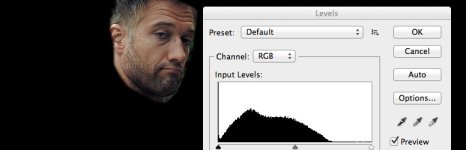
I know the different race may mean you want it to peak a little lower but here we can see that this shot the face has a pathetic little range of tone.. and is therefore 'wooden', you can also 'smell' that the file is about to break, but of course its been through a few gens of compression.
facetonal3.jpg
 
Last edited:
Just to provide some objection, the lighting is completely different in this frame vs the still from your DSLR.

With the frame of the actor in the car he is in complete shade and there is no supplementary lighting (although maybe some fill I used) acting as a pointed source that would yield higher falloff which in turn would also help create deeper shadows and more specularity as seen in your DSLR still frame. Also the shot in the car is practically a pure profile shot, so it's somewhat difficult to get any depth with his face.

But I do think your test of contrast is a valid one and helps to explain the "wooden look" (love that term BTW) and my image/footage is only 8-bit so it'd be great if others on the thread could provide some stills from 10-bit 422 or even RGB 444 as the F3 is capable of it.
 
Last edited:
Not all shoots can we hit our expectations - a car in midday is a challenge to all of us.

But IMO satisfying images will have a great range of tone on the face (as demoed by my still).

The tone is created either through 'lighting' or through doing a secondary in post.. or both or doing a hard primary in post and letting the tops fly off the scope

Im not saying I could have shot your scenario any better with the tools you had at your disposal.. just demoing the ideal tonal range (when you are shooting a 6kraw14bit camera!) verses 'wood' - in fact your image is not even that wooden compared to many milky shots I see :)

S
 
Yes I completely agree.

If that shoot had a budget I might have actually netted the entire background to bring it down, and/or had a big HMI through diffusion to give more shaping and generous tones / specularity on the face.

This is why in all reality it does not only come down to what a camera can or can not do, and why many of us are continously intrigued in how in might be possible to maximize the look of our images both through good shooting/lighting and post workflows.

What's really too bad, and hopefully other readers will start to appreciate, is the kinds of image quality we're after is not easily achievable without a lot of work all around.
 
Well to some extent yes - the camera counts - because with post time and a fat codec you can bring out detail with secondaries.

This is the great skill to master - minimising time/resources on set without creating a post nightmare!

All I want from 10bit is really to get from where I thought I was on set to where I actually expected to be.. to 'replace' HMI one is going to need to go raw

For shots like that Im very exited by my new Dedo Dled4.0 which could be put in the the car or on the bonnet in 10seconds.. but that is a different story.

S
 
Well when I say "camera" I probably should be more specific and include details surrounding codec, bit-depth, and encoding methods... all of which combined or separately can make an overall difference in getting a 'fat negative'.

I think you, Yoclay, and myself agree however that RAW is king but comes with a price when it comes to video. As for 10-bit slog, which theoretically holds as much information as comparable to say 12-bit linear RAW, well for me at least the jury is still out if it's any good and as many here know I continue to have some ounce of confidence that through advanced post workflows (ie. ACES, IDT/ODT, linearizations, etc..) that "more" with these Sony F3/5/55 cameras are likely possible without having to resort to the AXS-R5.

Someone said earlier there is no real magic about it, but I am of the strong belief there is and that together we can work on cracking this "Davinci Code". (no pun intended but that is a bit funny)
 
Last edited:
I have a project during this year and am using both F3 and FS100. With the most recent footage from the F3 I tried one of the LUTs in PP CC made to match Arri cameras and to my surprise it looked great straight up.

View attachment 86434
View attachment 86435

First one is s-log and second one with just the ArriV3 LUT applied (AlexaV3_K1S1_LogC2Video_Rec709_EE). As I exposed just under when the highlight warning comes up on the F3 it was maybe a bit hot but even so came out punchy and nice looking.
 
Osslund,
did you go from slog to cineon (arri log) using the macgregor lut first?

I really like your project, is it the one you have some "chapters" on your site, right? ;)
 
I used nothing but the AlexaV3_K1S1_LogC2Video_Rec709_EE LUT in Premiere Pro CC.

When I'm done with the edit this material will also be part of my project and added to my channel (chapters if you may call it that).
 
Try in Resolve, using the macgregor slog to alexa LUT as input LUT and then the AlexaV3_K1S1_LogC2Video_Rec709_EE LUT as a LUT node...

It should be much more balanced, now it's too punchy.
 
I know the used LUT results in a punchy image, to punchy even maybe. On the other hand I had the footage just a tad hot. I found that just adding a Fast Colour filter in PP before the Arri LUT made it easy to fine tune.
 
Lately on my F55 I've been using the Sony LC709A LUT like crazy which is basically what I call Sony's "Alexa clone" LUT. You can read more about it on the Revenge-of-the-Film-Emulation-LUTs-on-the-Sony-F55 thread.

After loving this LUT so much, earlier in July I created a modified (highly experimental) version of this LUT meant to work with the original slog. I actually posted the LUT in the F35 section since we were talking about new vision color film LUTs.

Well today I found a frame grab posted by Paul Christopher using this slog->LC709A LUT on some Sony F3 footage - WOW it is very filmic and just looks absolutely fantastic, so I wanted to update this old F3 Resurrection Thread and may some of you continue to get perhaps even more mileage out of this fantastic and underrated camera. Paul's original post is here.

attachment.php

You can download the LUT from the first post on this thread.
 
Last edited:
Always open to new ways to tame the old F3 SLOG files.
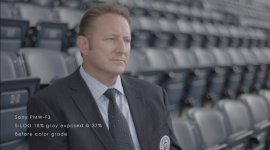
Shot this doc a couple years ago, it's still in the edit faze so it's still ungraded.
I grabbed some footage, read the entire thread, tried everyone's methods and some of my own.

I'm still "tuning" my eye, so to speak. If this screams "wooden" or "Sony colors" please say so.


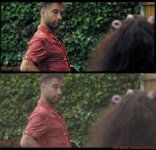
Sons of Ben before.jpgSons of Ben after.jpg

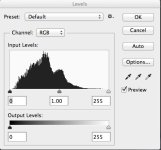
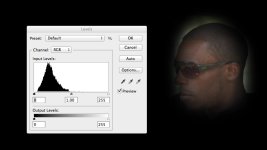
Here's what the levels are reading on the corrected grade, isolated to the face only:
Face Levels.jpg

Thanks.
 
Quite like this one - Cine1, By using offset I was able to bring some punch in the face, I could easily use a secondary to recover the hair..

grab1a.jpg
 
Bill.

I think your image is still a bit flat the trouble with curves is that it is hard to steepen out the flattening of the top of the S curve

You could try

A positive offset value to bring the whites right in, then pull the blacks down with -ve lift, and then do whatever to create a look..

S
 
I have just got an F3 and grabbed a superquick shot to test the slog to cineon and the cineon to kodak LUT. After inserting the LUTs I did a layer (in speedgrade) that operates before the LUTs and adjusted the levels so that the shadows and highlights were matching in levels from the original clip, since i like to see the DR when I start to grade. Then i desaturated the shadows and highlights a bit and created a slogtokodakDRdesat.look that I can apply directly inside premiere.

The great thing about this is that premiere can render this effect so quickly that I can play it realtime on my 2012 macbook. I think the workflow works very good for a quick and easy startingpoint and especially for documentary work.


Screen Shot 2015-02-01 at 22.26.26.jpgScreen Shot 2015-02-01 at 22.26.38.jpg
 
Nice to hear your workflow stockstad. If you use Sony Vegas, or want to try it, it supports ACES workflow for Sony slog that is quite good to use.
 
Last edited:
That sounds cool but for now I will try and stay within the adobe suite because of the time you save working this way. Maybe for a few proper projects it would be worth it going into ACES.

The good thing about slog is that compared to slog2 and 3 its actually quite good for internal 8bit. Seems to work well without banding when you apply reasonable grades. The only problem is with a lot of motion, and the 10bit prores has got nicer grain and a bit less noise. Starting to love the look of this camera already!
 
Back
Top