

starcentral
Veteran
Below is full copy extract from my blog http://cinetiny.com/nsR5zlrP
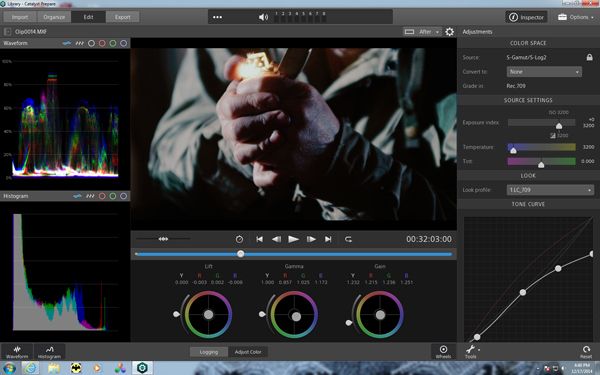
I had a chance to test drive Sony's Catalyst Browse and Catalyst Prepare this month. Catalyst Browse was released by Sony on September 30th, 2014 and is completely FREE to use and download. Catalyst Prepare was released about a month later and costs $199 USD. The versions I tested were Catalyst Browse 1.0.3 build 338 for PC and Catalyst Prepare 1.0.2 build 207 also for PC. PLEASE NOTE; V1.1 were released after I completed my review so some new additional features have been included and some of my findings with respect to “issues” may no longer be valid. I’ve since included an addendum at the end of my post.
Anyone familiar with digital "developing" software such as Adobe Lightroom (for RAW stills), REDCineX (for video footage shot on RED), as many other software packages which perform similar functions, will quickly appreciate you'll be able to do with your footage shot on the Sony CineAlta line of cameras.
Both versions of Catalyst can be extremely useful to preview your dailies and further "de-log" your footage shot in S-Log by either converting to a traditional Sony gamma; 709(800), HG8009G33, HG8009G40, or by applying one of four default Sony Look Profiles (Sony's 4 published LUTs: LC-709, LC-709A, Slog2-709, Cine+709). This really gives freedom to more shooters who might have otherwise been afraid of recording in native S-Log, or were baking in Looks or Gammas to avoid dealing with S-Log afterwards.
One really great advantage of using the Catalyst series of software is if Exposure Indexes were used during shooting. The software will preserve that information so later whoever is looking at the footage will know it was over or underexposed intentionally. At present data Davinci Resolve does not do this but in future updates or versions I suspect Black Magic Design will adapt to make use of the metadata much like they have done with RED R3D files.
Using a combination of sliders and wheels both versions allow you to perform some basic color adjustments currently limited to: saturation, exposure, color temperature, tint, curves, lift, gain and gamma. Both versions will also allow you to transcode your clips with or without the color adjustments into many popular video codec formats including AVC/ACC MP4, DPX, OpenEXR, and XAVC. ProRes as an option on MAC. Exporting with the DNxHD codec is only capable in Catalyst Prepare and only Catalyst Prepare allows you to transcode into a variety of resolutions ranging from Internet 360p to 4K 4160 x 2048 60p.

[size=+2]Other differences between Browse and Prepare:[/size]
"Catalyst Browse" as clearly stated in the name, is quite specifically meant more for "Browsing" footage and this FREE version is limited in functionality such as the ability to batch export or apply different color adjustments to different clips.
"Catalyst Prepare" offers exporting to various resolutions, batch exporting capability, and you can apply separate color adjustments to individual clips if desired. This is great incase you know there are some clips where you need to make specific adjustments separate from the reset of the clips - for example you rated the camera ISO higher or lower for the purpose of over or underexposing, or maybe it was just an accident.
One catch with Catalyst Prepare is by default it may prompt you to import and copy all of the clips to your hard drive which you may already have on your hard drive. I talked with Sony about this and they have instructed that if the files are already copied or otherwise present on the system, go to Organize and select Folder-->Add Existing. That folder will be added as a Source and you can transcode or copy from there withoput having to do an Import.
[size=+2]More features:[/size]
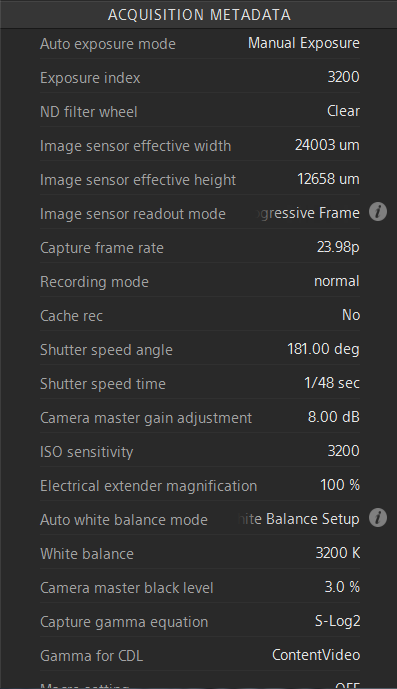
I should mention the metadata window which contains everything you would expect; frame rate, gamma, ISO camera setting and Exposure Index, ND filter setting, shutter angle, shutter speed, color temperature, db gain, camera master black level, time/date, and more!
Other features I found while testing the software were customizable video scopes (waveform, RGB parade, histogram), anamorphic support (x1.3, x2), zoom, x or y flip, the ability to import/export color adjustments into ASC-CDL or 3D LUT.
[size=+2]Missing:[/size]
I've put together a short list for Sony on their forums of what I recommend be implemented in future updates to make this software even more powerful. Mainly; highlights recovery slider, multi-undo/redo, more granular levels of adjustments to color control and the ability to type values in manually if desired, "resets" for all the separate color adjustments (currently global), method to delete nodes created via tone curves interface.
[size=+2]Addendum:[/size]
[size=+2]Catalyst Browse[/size]
Browse 1.10:
Added a Vectorscope tool to the Adjust Color workspace.
Added support for multifile transcoding when all source files use the same source settings.
Added support for reading DNxHD clips.
Added support to combine to one file when copying a spanned AVCHD clip.
Added support for reading SD MPEG-2 clips.
Added support for writing XDCAM EX clips to SxS memory cards.
Added support for transcoding to interlaced XAVC formats.
Added the Transcode button to the Adjust Color workspace.
Added Brightness and Contrast sliders to the Adjust Color workspace.
Added support for reading Apple ProRes 422 files (Mac only).
Added support for showing source clips from the Media Browser. Select a file, click the File button at the bottom of the Media Browser, and choose Show in Finder (Mac)/Show in Explorer (Windows).
Added support for showing additional metadata values in the Media Browser.
Fixed a bug that could prevent color correction settings from being applied to all clips in a clip list.
Browse 1.1.1
Added Japanese and Simplified Chinese language support.
Fixed a bug that prevented some unsupported files from displaying their unsupported status correctly in the Video Preview (Mac only).
Improved image quality for files transcoded to XAVC format.
Browse 1.2
Added support for transcoding to XDCAM HD and HD422 formats.
Added support for transcoding to long-GOP MPEG-2 formats.
Added support for transcoding to SStP format.
Added support for transcoding to XAVC Intra formats using the Sony XAVC encoder. Presets are now labeled to indicate whether they use the Sony or MainConcept encoder.
Added 720p and 1080i presets for transcoding to XAVC format.
Added 720p and 1080i presets for transcoding to Apple ProRes format (Mac only).
Added support for transcoding clips between the mark in/out points of the source clip.
Added support for copying a snapshot of the current frame to the clipboard.
Added support for adding, deleting, and editing essence marks.
Added support for sequentially previewing multiple selected clips.
Added support for scaling the video preview in the Adjust Color workspace.
Added support for HiDPI displays when running under Windows.
When adding clips to a clip list, subclips now inherit title and description metadata from the source clip.
Browse 1.2.1
Updated Japanese and Simplified Chinese language support.
Fixed a bug that could cause 4K clips shot on the Sony F5 camera to incorrectly display an error icon in Catalyst Browse.
Fixed a bug that could cause the application to incorrectly state that installation was successful when attempting to install to a disk with insufficient space.
[size=+2]Catalyst Prepare[/size]
2.0 What's New
Notable fixes/changes in version 2.0
Added presets for exporting Apple ProRes clips (OS X only).
Added support for XDCAM PD proxy files when browsing PDW-700, PDW-800, and PDW-850 flash memory.
Added support for copying a snapshot of the current frame to the clipboard.
Added support for adding, deleting, and editing essence marks.
Added support for sequentially previewing multiple selected clips.
Added support for scaling the video preview in the Adjust Color workspace.
Added support for HiDPI displays when running under Windows.
Added audio channel configuration controls to the Summary tab in the Inspector.
Added audio channel tools to the Summary tab in the Inspector to allow you to load and save channel-configuration presets or copy channel assignments and paste them to multiple selected files.
Thumbnail images now reflect color correction settings.
Fixed a bug that could cause the application to crash when canceling an import operation.
Fixed a bug that could cause the application to freeze when exporting a storyboard to Adobe Premiere on a computer with a French or German operating system.
Fixed a bug that could cause transcoding to fail when the source media resolution did not match the target resolution.
Fixed a bug that could cause incorrect timecode values when transcoding an SD clip to an HD format.
Fixed a bug that prevented some unsupported files from displaying their unsupported status correctly in the Video Preview (OS X only).
Fixed a bug that could cause the Grade in drop-down list in the Options menu to be empty when you first start the application.
Improved image quality for files transcoded to XAVC format.
Catalyst Prepare 2.0 is a free upgrade to owners of Catalyst Prepare. If you purchased and registered any previous version of Catalyst Prepare, a new Catalyst Prepare 2.0 serial number will be created in your My Account profile on sonycreativesoftware.com.
For online registration, just log in on the registration web page after starting Catalyst Prepare 2.0, and the serial number will be preselected for you.
For offline registration, log in to the web site from another device and find your serial number (https://www.sonycreativesoftware.com/myaccount/mysoftware).
Version 2.0 serial numbers will also be provided to registered owners via e-mail.
Features in version 1.0
Catalyst Prepare is the fast, simple, reliable path from camera to post.
In Import mode, you can browse your computer for media files that you want to import to your media libraries.
In Organize mode, you can browse and organize the clips in your media libraries.
In Edit mode, you can preview media, mark in and out points, and apply color correction.
In Export mode, you can export clips to additional volumes or devices and transcode files.
Notable fixes/changes in version 1.2
Added support for rendering to XDCAM HD and HD422 formats.
Improved performance for previewing RAW video.
Notable fixes/changes in version 1.1
Added a Vectorscope tool to the Adjust Color workspace.
Added Brightness and Contrast sliders to the Adjust Color workspace.
Added support for reading Apple ProRes 422 files (OS X only).
Added support for exporting DNxHD clips.
Added support to combine to one file when copying a spanned AVCHD clip.
Added support for reading SD MPEG-2 clips.
Added support for writing XDCAM EX clips to SxS memory cards.
Added support for transcoding to interlaced XAVC formats.
Added support for showing additional metadata values in the Media Browser.
Fixed a bug that prevented the application from reading some files recorded by the PXW-FS7 camera.
Fixed a bug that could prevent color correction settings from being applied to all clips in a clip list.
www.sonycreativesoftware.com/catalystbrowse
www.sonycreativesoftware.com/catalystprepare
I had a chance to test drive Sony's Catalyst Browse and Catalyst Prepare this month. Catalyst Browse was released by Sony on September 30th, 2014 and is completely FREE to use and download. Catalyst Prepare was released about a month later and costs $199 USD. The versions I tested were Catalyst Browse 1.0.3 build 338 for PC and Catalyst Prepare 1.0.2 build 207 also for PC. PLEASE NOTE; V1.1 were released after I completed my review so some new additional features have been included and some of my findings with respect to “issues” may no longer be valid. I’ve since included an addendum at the end of my post.
Anyone familiar with digital "developing" software such as Adobe Lightroom (for RAW stills), REDCineX (for video footage shot on RED), as many other software packages which perform similar functions, will quickly appreciate you'll be able to do with your footage shot on the Sony CineAlta line of cameras.
Both versions of Catalyst can be extremely useful to preview your dailies and further "de-log" your footage shot in S-Log by either converting to a traditional Sony gamma; 709(800), HG8009G33, HG8009G40, or by applying one of four default Sony Look Profiles (Sony's 4 published LUTs: LC-709, LC-709A, Slog2-709, Cine+709). This really gives freedom to more shooters who might have otherwise been afraid of recording in native S-Log, or were baking in Looks or Gammas to avoid dealing with S-Log afterwards.
One really great advantage of using the Catalyst series of software is if Exposure Indexes were used during shooting. The software will preserve that information so later whoever is looking at the footage will know it was over or underexposed intentionally. At present data Davinci Resolve does not do this but in future updates or versions I suspect Black Magic Design will adapt to make use of the metadata much like they have done with RED R3D files.
Using a combination of sliders and wheels both versions allow you to perform some basic color adjustments currently limited to: saturation, exposure, color temperature, tint, curves, lift, gain and gamma. Both versions will also allow you to transcode your clips with or without the color adjustments into many popular video codec formats including AVC/ACC MP4, DPX, OpenEXR, and XAVC. ProRes as an option on MAC. Exporting with the DNxHD codec is only capable in Catalyst Prepare and only Catalyst Prepare allows you to transcode into a variety of resolutions ranging from Internet 360p to 4K 4160 x 2048 60p.
[size=+2]Other differences between Browse and Prepare:[/size]
"Catalyst Browse" as clearly stated in the name, is quite specifically meant more for "Browsing" footage and this FREE version is limited in functionality such as the ability to batch export or apply different color adjustments to different clips.
"Catalyst Prepare" offers exporting to various resolutions, batch exporting capability, and you can apply separate color adjustments to individual clips if desired. This is great incase you know there are some clips where you need to make specific adjustments separate from the reset of the clips - for example you rated the camera ISO higher or lower for the purpose of over or underexposing, or maybe it was just an accident.
One catch with Catalyst Prepare is by default it may prompt you to import and copy all of the clips to your hard drive which you may already have on your hard drive. I talked with Sony about this and they have instructed that if the files are already copied or otherwise present on the system, go to Organize and select Folder-->Add Existing. That folder will be added as a Source and you can transcode or copy from there withoput having to do an Import.
[size=+2]More features:[/size]
I should mention the metadata window which contains everything you would expect; frame rate, gamma, ISO camera setting and Exposure Index, ND filter setting, shutter angle, shutter speed, color temperature, db gain, camera master black level, time/date, and more!
Other features I found while testing the software were customizable video scopes (waveform, RGB parade, histogram), anamorphic support (x1.3, x2), zoom, x or y flip, the ability to import/export color adjustments into ASC-CDL or 3D LUT.
[size=+2]Missing:[/size]
I've put together a short list for Sony on their forums of what I recommend be implemented in future updates to make this software even more powerful. Mainly; highlights recovery slider, multi-undo/redo, more granular levels of adjustments to color control and the ability to type values in manually if desired, "resets" for all the separate color adjustments (currently global), method to delete nodes created via tone curves interface.
[size=+2]Addendum:[/size]
[size=+2]Catalyst Browse[/size]
Browse 1.10:
Added a Vectorscope tool to the Adjust Color workspace.
Added support for multifile transcoding when all source files use the same source settings.
Added support for reading DNxHD clips.
Added support to combine to one file when copying a spanned AVCHD clip.
Added support for reading SD MPEG-2 clips.
Added support for writing XDCAM EX clips to SxS memory cards.
Added support for transcoding to interlaced XAVC formats.
Added the Transcode button to the Adjust Color workspace.
Added Brightness and Contrast sliders to the Adjust Color workspace.
Added support for reading Apple ProRes 422 files (Mac only).
Added support for showing source clips from the Media Browser. Select a file, click the File button at the bottom of the Media Browser, and choose Show in Finder (Mac)/Show in Explorer (Windows).
Added support for showing additional metadata values in the Media Browser.
Fixed a bug that could prevent color correction settings from being applied to all clips in a clip list.
Browse 1.1.1
Added Japanese and Simplified Chinese language support.
Fixed a bug that prevented some unsupported files from displaying their unsupported status correctly in the Video Preview (Mac only).
Improved image quality for files transcoded to XAVC format.
Browse 1.2
Added support for transcoding to XDCAM HD and HD422 formats.
Added support for transcoding to long-GOP MPEG-2 formats.
Added support for transcoding to SStP format.
Added support for transcoding to XAVC Intra formats using the Sony XAVC encoder. Presets are now labeled to indicate whether they use the Sony or MainConcept encoder.
Added 720p and 1080i presets for transcoding to XAVC format.
Added 720p and 1080i presets for transcoding to Apple ProRes format (Mac only).
Added support for transcoding clips between the mark in/out points of the source clip.
Added support for copying a snapshot of the current frame to the clipboard.
Added support for adding, deleting, and editing essence marks.
Added support for sequentially previewing multiple selected clips.
Added support for scaling the video preview in the Adjust Color workspace.
Added support for HiDPI displays when running under Windows.
When adding clips to a clip list, subclips now inherit title and description metadata from the source clip.
Browse 1.2.1
Updated Japanese and Simplified Chinese language support.
Fixed a bug that could cause 4K clips shot on the Sony F5 camera to incorrectly display an error icon in Catalyst Browse.
Fixed a bug that could cause the application to incorrectly state that installation was successful when attempting to install to a disk with insufficient space.
[size=+2]Catalyst Prepare[/size]
2.0 What's New
Notable fixes/changes in version 2.0
Added presets for exporting Apple ProRes clips (OS X only).
Added support for XDCAM PD proxy files when browsing PDW-700, PDW-800, and PDW-850 flash memory.
Added support for copying a snapshot of the current frame to the clipboard.
Added support for adding, deleting, and editing essence marks.
Added support for sequentially previewing multiple selected clips.
Added support for scaling the video preview in the Adjust Color workspace.
Added support for HiDPI displays when running under Windows.
Added audio channel configuration controls to the Summary tab in the Inspector.
Added audio channel tools to the Summary tab in the Inspector to allow you to load and save channel-configuration presets or copy channel assignments and paste them to multiple selected files.
Thumbnail images now reflect color correction settings.
Fixed a bug that could cause the application to crash when canceling an import operation.
Fixed a bug that could cause the application to freeze when exporting a storyboard to Adobe Premiere on a computer with a French or German operating system.
Fixed a bug that could cause transcoding to fail when the source media resolution did not match the target resolution.
Fixed a bug that could cause incorrect timecode values when transcoding an SD clip to an HD format.
Fixed a bug that prevented some unsupported files from displaying their unsupported status correctly in the Video Preview (OS X only).
Fixed a bug that could cause the Grade in drop-down list in the Options menu to be empty when you first start the application.
Improved image quality for files transcoded to XAVC format.
Catalyst Prepare 2.0 is a free upgrade to owners of Catalyst Prepare. If you purchased and registered any previous version of Catalyst Prepare, a new Catalyst Prepare 2.0 serial number will be created in your My Account profile on sonycreativesoftware.com.
For online registration, just log in on the registration web page after starting Catalyst Prepare 2.0, and the serial number will be preselected for you.
For offline registration, log in to the web site from another device and find your serial number (https://www.sonycreativesoftware.com/myaccount/mysoftware).
Version 2.0 serial numbers will also be provided to registered owners via e-mail.
Features in version 1.0
Catalyst Prepare is the fast, simple, reliable path from camera to post.
In Import mode, you can browse your computer for media files that you want to import to your media libraries.
In Organize mode, you can browse and organize the clips in your media libraries.
In Edit mode, you can preview media, mark in and out points, and apply color correction.
In Export mode, you can export clips to additional volumes or devices and transcode files.
Notable fixes/changes in version 1.2
Added support for rendering to XDCAM HD and HD422 formats.
Improved performance for previewing RAW video.
Notable fixes/changes in version 1.1
Added a Vectorscope tool to the Adjust Color workspace.
Added Brightness and Contrast sliders to the Adjust Color workspace.
Added support for reading Apple ProRes 422 files (OS X only).
Added support for exporting DNxHD clips.
Added support to combine to one file when copying a spanned AVCHD clip.
Added support for reading SD MPEG-2 clips.
Added support for writing XDCAM EX clips to SxS memory cards.
Added support for transcoding to interlaced XAVC formats.
Added support for showing additional metadata values in the Media Browser.
Fixed a bug that prevented the application from reading some files recorded by the PXW-FS7 camera.
Fixed a bug that could prevent color correction settings from being applied to all clips in a clip list.
www.sonycreativesoftware.com/catalystbrowse
www.sonycreativesoftware.com/catalystprepare
Last edited:


