Sony A7SIII = $3500, 10-bit 4K120p internal, 16-bit 4K60p RAW out

It does seem to be on the fill side. The a7SIII seems to bring it out more (or the other camera's 8bit compression and color science under represents it). Not a huge thing at all. I am just a green freak when it comes to skin tones. Green tint is main thing I have been tracking while I watch a7SIII footage as some videos have it big time and some have none.
 
I finally caved and bought a sony 28-135.

Has anyone else been flying that lens on a gimbal? And if so, what controller are you using to trigger the zoom? It seems like there are a few options.

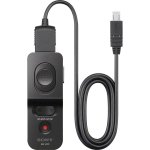
I guess this will work with the A7Siii as it works on all other A7 series cams. Don't expect hi speed zooms though but it does work. I can confirm it also works with the 18-110mm though not listed here as this unit came out before the release of the 18-110. Basically any controller conforming to standard Sony LANC control protocol will work with this Movcam adapter.

Chris Young

https://www.newsshooter.com/2015/06/03/movcam-sony-a7s-lanc-control-cable-released/

a7s_lanc_01-600x450.jpg
 
Thanks for posting Abe. It is tough to judge since DXVUser kills uploaded jpgs. The a7SIII shots look more alive from a skin tone point of view. Both look nice. I do see some green sneaking in on the a7sIII images though.

Agreed a hint more green in the A7Siii but that could well be down to the difference in lenses. There again on a different Caucasian skin tone you may find the balance reversed. It really depends on the skin tone green content vs the way a lens interprets the RGB balance in the skin tone involved.

Downloading the images supplied I found a very close comparison when the 7Siii had Yellow shifted towards Red by a couple of points with both Yellow saturation and lightness lowered by 4 points. Likewise Red was shifted towards Magenta 2 points but had it's lightness lifted by 28 points. Green was not touched. I've always found adjusting Green in skin tones generally has too much of a major global effect so I always like to adjust the Red / Yellow levels, hues and lightness around the Green as they have a much more subtle and finer adjustment feel and sensitivity. All bye the bye though. Nothing wrong with the 7Siii image at all. I could live with it very easily! :)

Chris Young

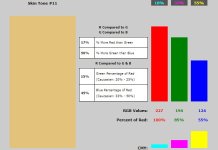
Check the skin green levels on this page. This range of skin tone balances has always given me an idea where to start if I have a particular skin tone giving me issues. I can quickly refer to the Red vs Green vs Blue values of a given skin tone which then in turn guides me in the right direction to start adjusting.

http://www.photokaboom.com/photogra..._correction/skin_tone/1_skin_tone_samples.htm

Skintone #11.jpg
 
I guess this will work with the A7Siii as it works on all other A7 series cams. Don't expect hi speed zooms though but it does work. I can confirm it also works with the 18-110mm though not listed here as this unit came out before the release of the 18-110. Basically any controller conforming to standard Sony LANC control protocol will work with this Movcam adapter.

Chris Young

https://www.newsshooter.com/2015/06/03/movcam-sony-a7s-lanc-control-cable-released/

View attachment 141233

thanks Chris - I remember you mentioning this

any familiarity with using the Sony remote commander for the same purpose?

https://www.bhphotovideo.com/c/prod..._vpr1_remote_control_with_multi_terminal.html

1361778917_925709.jpg

the advantage would be a lighter footprint on my gimbal handle and no need for an adapter. and no need for me to use up or buy another fs7 handle or other lanc controller. i just wonder if it can vary the zoom speed. i think it can, although maybe the lens only has 2 speeds to begin with?
 
thanks Chris - I remember you mentioning this

any familiarity with using the Sony remote commander for the same purpose?

https://www.bhphotovideo.com/c/prod...pr1_remote_control_with_multi_terminal.ht ml

View attachment 141235

the advantage would be a lighter footprint on my gimbal handle and no need for an adapter. and no need for me to use up or buy another fs7 handle or other lanc controller. i just wonder if it can vary the zoom speed. i think it can, although maybe the lens only has 2 speeds to begin with?

Yes sir but not on an A7. Only on X70, Z90 and a PXW-Z150 on which they worked fine within the limitations of their design. As you say, sort of a two speed type feel about them. Smooth enough but no real potential to do a real slow creep in.

BTW. Have you tried this yet? Was curious about shooting 4K 50/60p with APCS lenses. A work around using between 1.3 and 1.5 Clear Image Zoom to crop. Quite surprised at the results. Was just wanting to see other peoples observations on the plausibility of this workaround???

Chris Young

 
I haven't tried clear image zoom yet.

So, you used the FS7 handle with the lanc adapter on an a7 with a 28-135 and you were pleased with the results? That's what you recommend?
 
I’m seeing readout times for all the pixels in the video frame of around 8.5 ms for this camera.

Does anything comparable get close? The Panasonic GH5S at ~11.5 ms, I guess (not full-frame). Anything else?
 
The R5 in low-quality 4K is 9.6 ms according to CineD. But 15.5 ms in high quality 4K or 8K modes.

Ursa mini pro 12k is around 8 ms I think in 8K mode. Of course, Komodo is global. But those are not mirrorless hybrid cameras
 
I guess this will work with the A7Siii as it works on all other A7 series cams. Don't expect hi speed zooms though but it does work. I can confirm it also works with the 18-110mm though not listed here as this unit came out before the release of the 18-110. Basically any controller conforming to standard Sony LANC control protocol will work with this Movcam adapter.

Chris Young

https://www.newsshooter.com/2015/06/03/movcam-sony-a7s-lanc-control-cable-released/

View attachment 141233

Pretty awesome.
 
I haven't tried clear image zoom yet.

So, you used the FS7 handle with the lanc adapter on an a7 with a 28-135 and you were pleased with the results? That's what you recommend?

Hmm Mr. A! You are putting me on the spot with "recommend." I wouldn't go as far as saying recommend. All I can say is yes it works. Whether it works to your satisfaction depends on what you expect the performance level to be. Myself having come from and having been spoiled by B4 zooms with 22x lenses capable of one second crash zooms down to thirty second creep zooms with a very subtle and even programmable zoom servos I find anything else "functional" but not necessarily anything to get over excited by.

Failing anything anything else for sure I find the Movcam Lanc adapter to be better than no control at all. For interviews it's okay for me. For a quick zoom re-frame on the 28-135 I've used the manual zoom ring though one has to remember it's not actually physically coupled to the internal elements so does lag somewhat. The 18-110 on the other hand does have a true mechanical zoom connection so crash zooms are possible on that lens. BTW. That's what led me to ask if you have tried the 4K 50/60p Clear Image Zoom quality on the 7Siii. If the quality in 4K 50p using Clear Image works well then that will be ideal for me to use with the mechanical zoom control of the 18-110. Also I will add that the best servo control for both the 28-135 and the 18-110 seems to come from the FS7 handle servo zoom. Though I've been informed by people who's judgement I trust that the FS5's servo zoom handle delivers similar results to that of the FS7.

Chris Young
 
My 28-135 came in earlier today but I couldn't test it until now. I can already tell that we're going to be friends. It seems more or less solidly built but it's pretty lightweight for what it is, mercifully. It's an imposing lens, which is not a good thing for my fly-on-the-wall shoots but will be a good thing for client-facing shoots.

What's cool is that you can control the zoom with the smartphone camera control app (Imaging Edge Mobile). There is a T and W button on-screen. The speed is fixed and you can set what speed to use in camera (there are 8 steps). The slowest is almost a creep zoom. A little too fast but pretty slow. The fastest is nowhere near a crash but you can definitely cross the full range in a second or so. I would probably set it to a 3 or 4 speed if I could only choose one speed for reframing during doc b-roll shooting.

I have ordered the Movcam lanc cable but it won't be in stock for weeks. I'm eager to see what that's like with the FS7 handle.

I just tried clear image zoom in the mode where it picks up at the end of the telephoto zoom range. There is a pause as it switches from optical zoom to digital zoom, so there doesn't seem to be a way to smoothly incorporate that extra 1.5x magnification into an optical zoom move.

I didn't make a test recording - would you like me to do that?
 
I dont feel that differently towards the A7SIII than I did towards the S1. It just has a couple extra features I wanted.

I don't think that a Panasonic or canon camera would have looked appreciably better here. Maybe BM? Dunno. Tho the R5 has a nice texture and a lot of detail without looking sharp.

But honestly I fully anticipate that my clients will be blown away. Good enough for me

I showed some of the 85 wide-open gimbal shots to my 2nd shooter on the day and he said, "wow. These days wedding films look like cinema." Which offended me a little because I thought I had previously showed him some cinematic stuff. But the point is that you would need a really great AC to pull off some of this focus pulling. And the cameras can handle high contrast low light scenes. Etc

Do you still have the S1H?
 
I had the S1, not the S1H, but I sold it before buying the A7SIII. Why do you ask?

If you had kept it, I was wondering what the reasons might be to have the Fs7+A7s3 and the S1, but you've sold it, so that answers that.
 
My 28-135 came in earlier today but I couldn't test it until now. I can already tell that we're going to be friends. It seems more or less solidly built but it's pretty lightweight for what it is, mercifully. It's an imposing lens, which is not a good thing for my fly-on-the-wall shoots but will be a good thing for client-facing shoots.

What's cool is that you can control the zoom with the smartphone camera control app (Imaging Edge Mobile). There is a T and W button on-screen. The speed is fixed and you can set what speed to use in camera (there are 8 steps). The slowest is almost a creep zoom. A little too fast but pretty slow. The fastest is nowhere near a crash but you can definitely cross the full range in a second or so. I would probably set it to a 3 or 4 speed if I could only choose one speed for reframing during doc b-roll shooting.

I have ordered the Movcam lanc cable but it won't be in stock for weeks. I'm eager to see what that's like with the FS7 handle.

I just tried clear image zoom in the mode where it picks up at the end of the telephoto zoom range. There is a pause as it switches from optical zoom to digital zoom, so there doesn't seem to be a way to smoothly incorporate that extra 1.5x magnification into an optical zoom move.

I didn't make a test recording - would you like me to do that?

Sorry I think you misunderstood what I was chasing after. I have no desire to use the Clear Image zoom as a zoom function. Just to set it between 1.3x and 1.5x depending on the coverage of the S35/APSC lens used to record 50/60p 4K. Yes if you could try a Clear Image zoom at say 1.5x ahooting 4K 50 or 60p I would be very interested in your observations for sure. I think Clear Image zoom may disable eye focus from what I have heard so that would be good to know as well. Thanks in advance.

Chris Young
 
Sorry I think you misunderstood what I was chasing after. I have no desire to use the Clear Image zoom as a zoom function. Just to set it between 1.3x and 1.5x depending on the coverage of the S35/APSC lens used to record 50/60p 4K. Yes if you could try a Clear Image zoom at say 1.5x ahooting 4K 50 or 60p I would be very interested in your observations for sure. I think Clear Image zoom may disable eye focus from what I have heard so that would be good to know as well. Thanks in advance.

Chris Young

I'll take a look at that - but can it really shoot 4K with a crop? Is it upscaling?

The whole sensor is barely more than 4K and you get down to 3840 pixels wide with a 1.1x horizontal crop of the sensor (which is where it shoots 4K120p)
 
Back
Top