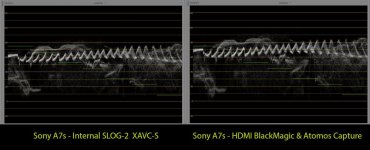
Sony A7s DESTROYS it's own SLOG-2 gamma curve over it's HDMI port

Cliff Totten

New member
Hi folks,


It's true, Convergent Design spotted this and posted that the A7s "breaks" it's SLOG-2 gamma curve on it's HDMI port.


Here is what happens:


1.) Record a SLOG-2 internal XAVC-S file.
2.) Record via HDMI to any recorder that you have.
3.) Compare both files on a scope...you will see that the SLOG-2 gamma curve has been stretched and "damaged". (compared to internal file's "proper" curve on the scope)


The HDMI recorded files will have higher contrast and will c lip both the highs and the lows faster than the internal "true" SLOG-2 recordings. (ie. 80 IRE in camera and internal file becomes 90 IRE on HDMI port...10 IRE becomes 0 IRE on HDMI)

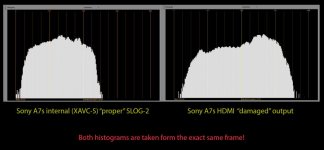
Histogram comparisons clearly show a huge difference between what is recorded internally and what is displayed out of it's HDMI port.

This is a serious problem that affects all recorders attached to the A7s HDMI port. I don't know if this is a Sony "bug" or if it's an intentional "cripple" to keep TRUE SLOG-2 trapped inside it's internal 1080 codec.


I'm looking for more testers out there. Anyone else with an A7s willing to try this on their recorder camera?


Check out the scopes. Everything above 20 IRE shifts (stretches) up...below 20 IRE shifts (stretches) down.

Sony needs to fix this right away. They have never stated that the HDMI port was crippled to REC709 or that what you see on the monitor is NOT what is really being output.
 

Attachments

  • Histogram.jpg
    Histogram.jpg
    43.2 KB · Views: 0
  • Together.jpg
    Together.jpg
    70.6 KB · Views: 0
Someone at IBC should try to ask some Sony representative and ask about this, if they are aware of it and if so, if there's plans to do something about it.
 
Not 100% convinced by this, what was the post workflow? This kind of clipping and stretching could be a workflow issue. It's been a while but i A/B'd O7Q DPX files with the internal XAVC files and didn't notice anything amiss.

I wonder if the XAVC is being stretched into legal range whereas the HDMI is full range. The XAVC is YUV and HDMI output can be RGB or YUV.

The lone point at the end of the curves show the 'not really 14 stops' in play.

Some more information is needed about what was tested and we can duplicate it perhaps

cheers
Paul
 
Here's a quick comparison

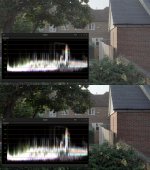
top in xavc, bottom is prores out of the HDMI port, both in the latest Resolve (because that opens xavc directly)

The XAVC container shows the log range squeezed between 16-235, but you can see the top and the bottom.

The bottom shows prores, i had to gain it down because it recorded super whites and resolve sticks those above 100%. But when you gain it down you see the same clipping as the XAVC version and also the same shadows. It's just that it is distributed in the ProRes container as full range. But nothing has clipped in this example.

I guess a follow on question is: we know the XAVC is YUV and in the conversion to RGB are we seeing full range data? In other words because we can see that the Slog2 signal is distributed better in the ProRes version does that mean there is more fidelity from the HDMI. This is a very difficult thing to test for.

Of course there are several steps in the test that could change the image. The HDMI -> O7Q ProRes module and then how a particular application chooses to decode that. If it clips superbrights then you'll see data missing.

a7hdmi.jpg

FWIW i did the same with DPX vs XAVC will look at that in more detail next.

So again, we need to know more about the test and conditions to see if there's something going on...

cheers
Paul
 
Here's a quick comparison

top in xavc, bottom is prores out of the HDMI port, both in the latest Resolve (because that opens xavc directly)

The XAVC container shows the log range squeezed between 16-235, but you can see the top and the bottom.

The bottom shows prores, i had to gain it down because it recorded super whites and resolve sticks those above 100%. But when you gain it down you see the same clipping as the XAVC version and also the same shadows. It's just that it is distributed in the ProRes container as full range. But nothing has clipped in this example.

I guess a follow on question is: we know the XAVC is YUV and in the conversion to RGB are we seeing full range data? In other words because we can see that the Slog2 signal is distributed better in the ProRes version does that mean there is more fidelity from the HDMI. This is a very difficult thing to test for.

Of course there are several steps in the test that could change the image. The HDMI -> O7Q ProRes module and then how a particular application chooses to decode that. If it clips superbrights then you'll see data missing.

View attachment 91332

FWIW i did the same with DPX vs XAVC will look at that in more detail next.

So again, we need to know more about the test and conditions to see if there's something going on...

cheers
Paul

Yup, definitely an overall contrast difference. The shadows look like they are being stretched downward too.

Can you post a histogram comparison? Waveform is great but the histogram reveals an even more dramatic shift between the two.

Thank you so much for your time!

CT
 
Yup, definitely an overall contrast difference. The shadows look like they are being stretched downward too.

This seems to be just a full levels issue. Prores is being recorded at 0-255 and XAVC-S at 16-235. Both have the same data but NLE's will clip the whites and blacks (also stretch the histogram) with the 0-255 material. Resolve gets to it fully.

So basically everything is ok? Test by bringing down the superwhites in your NLE (premiere -> fast color corrector -> inputs to 16-235 (or was it outputs?))
 
It's a great observation that you guys have. I suppose the next question is: Has the original curve itself been changed? When the 16-235 form XAVC-S is stretched back out to 0-255 over HDMI...is it stretched in a "linear" way? Has the "curve" been maintained? (just "proportionally" stretched to 0-255)

CT
 
Repost from a thread in the NEX sub forum:

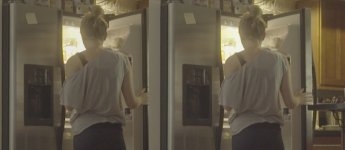
Here's a side by side. After lowering whites/raising blacks and dropping saturation a bit, you can see that the dynamic range is identical (fridge interior) [PS this was shot @ 12,800 because I was testing low light noise at the time]

a7s.jpg
 
As far as I can see there seems to be a little more noise (and a tad darker lows?) on the left picture (dark area on the fridge and her booty). Which one is which?

At least that is what I did clearly see, when I recently compared 2 of my shots in Vegas. The HDMI version definitely had a lot more noise in the dark areas! Actually it was a scenery with a quite a lot of very dark areas (silhouettes)...and this supposedly superior recording was completely ruined for me.

In my eyes this is absurd and not acceptable.

Anyone else noticed this? Any tips, maybe I simply did not go the right way...?
 
Last edited:
One is mapped 16-235 and the other is mapped 0-255, but it is the exact same data. Remap and you will see they match. I imagine the truncated mapping on the internal recording is so that it will fit with the consumer XAVC-S recording, but not sure why they didn't just leave this for the output as well. Even still, simply remap either one and you will see that all the data is still there. Just make sure your external recorder is capable of capturing the full range of 0-255. There are ways that the Odyssey7Q could truncate, which we are correcting for the upcoming firmware update.
 
As far as I can see there seems to be a little more noise (and a tad darker lows?) on the left picture (dark area on the fridge and her booty). Which one is which?

At least that is what I did clearly see, when I recently compared 2 of my shots in Vegas. The HDMI version definitely had a lot more noise in the dark areas! Actually it was a scenery with a quite a lot of very dark areas (silhouettes)...and this supposedly superior recording was completely ruined for me.

In my eyes this is absurd and not acceptable.

Anyone else noticed this? Any tips, maybe I simply did not go the right way...?

In my experience HDMI to ProRes always shows more noise than an internal codec, but only because compression reduces the apparent noise in the original, untouched image. If you decide to raise the shadows, the ProRes noise remains grainy while the highly compressed footage becomes blocky.

Grainy noise is much easier to fix via Neat Video than blocky hell.
 
Mitch and Ryan, thank you guys a lot and sorry for coming back so late. You helped me cope with this issue, everything is working fine now.

BTW a JPG might not be the most appropriate medium to judge noise. But one thing is for sure: I do see it here and it helped me solve my problems.
 
Back
Top