
Navigation
Install the app
How to install the app on iOS
Follow along with the video below to see how to install our site as a web app on your home screen.
Note: This feature may not be available in some browsers.
More options
You are using an out of date browser. It may not display this or other websites correctly.
You should upgrade or use an alternative browser.
You should upgrade or use an alternative browser.
Sony A7 improvised shot
- Thread starter rawfa
- Start date

stefanhuberfilms
Veteran
looks great!

rawfa
Veteran
The truth is this was completely improvised, with natural light and direct audio and the musician only had like one hour to shoot. I used the best audio track and then synced all the video tracks over it, but since we weren't shooting over a playback track, all takes had a different duration (from 2.30min to 5min), so I ended up having to use some takes with blown highlights because they were the only ones that synced.
What is the "16-235 thing"?
From what I've read the issue with aliasing/moire affects the A7R, not the A7. So far I have no complaints, but I didn't do any extensive testing.
To be honest it was a real pleasure shooting with the camera. Great EVF, audio levels bars, audio control, audio output, no overheating issues.
Erik Wittbusch
Well-known member
Hi,
nice video!
The A7 has bigger problems with moire/alaising than the A7R. The footage that I saw, was a little on the shuttering side when movements were involved but really sharp with a nice DR.
Thanks for posting!
nice video!
The A7 has bigger problems with moire/alaising than the A7R. The footage that I saw, was a little on the shuttering side when movements were involved but really sharp with a nice DR.
Thanks for posting!
rawfa
Veteran
Hi,
nice video!
The A7 has bigger problems with moire/alaising than the A7R. The footage that I saw, was a little on the shuttering side when movements were involved but really sharp with a nice DR.
Thanks for posting!
I really don't want to turn this thread into a VS thread, but would you care to substantiate your comment? I've seen a comparison between the A7/A7R/Mark III and the MarkIII had way more issues with rolling shutter. Also, the A7R has no optical low-pass filter, which has been said to influnce moire in a bad way. I'm just asking because I really haven't had any issues and I'm curious.

Samuel H
Major Contributor
eoshd posted a comparison showing worse aliasing/moire in the A7 than in the A7r, which would be entirely possible in video mode, since how much of the sensor you read and how you process it is more important than whether the camera has an OLPF or not
but maybe he was using different settings
http://www.eoshd.com/content/11380/new-sony-a7-a7r-rx10-exclusive-hands-look-video-quality
The "16-235 thing" is a color space management issue. Many Sony cameras record full range (0-255), which appears wrongly when loaded into some editors (e.g. Premiere), that treat it as 16-235 footage. If this is happening with your camera and editor, adding a levels filter so that output levels are set to 16 and 235 will improve the highlights dramatically. For my NEX-5N, on bright skin tones, it's like day and night: this gives me one extra stop of DR, and a much nicer rolloff.
On Premiere, you'd do this by adding a Fast CC filter and setting output levels at 16 and 235. Alternatively, you can add a curve that's actually a straight line with just two points: one that raises the black level, and one that lowers the higlights. Something like this, but not so strong:
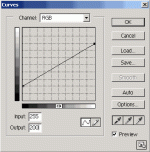
You can use the waveform: you want to change your image so nothing goes over 100.
but maybe he was using different settings
http://www.eoshd.com/content/11380/new-sony-a7-a7r-rx10-exclusive-hands-look-video-quality
The "16-235 thing" is a color space management issue. Many Sony cameras record full range (0-255), which appears wrongly when loaded into some editors (e.g. Premiere), that treat it as 16-235 footage. If this is happening with your camera and editor, adding a levels filter so that output levels are set to 16 and 235 will improve the highlights dramatically. For my NEX-5N, on bright skin tones, it's like day and night: this gives me one extra stop of DR, and a much nicer rolloff.
On Premiere, you'd do this by adding a Fast CC filter and setting output levels at 16 and 235. Alternatively, you can add a curve that's actually a straight line with just two points: one that raises the black level, and one that lowers the higlights. Something like this, but not so strong:
You can use the waveform: you want to change your image so nothing goes over 100.
Last edited:
photochris
Well-known member
To the OP, nice video, the pentax lenses are so nice.
This vid shows a pretty good comparison of the A7, A7r and 5d3 with regards to aliasing and moire: http://www.cinema5d.com/?p=22118
This vid shows a pretty good comparison of the A7, A7r and 5d3 with regards to aliasing and moire: http://www.cinema5d.com/?p=22118
Erik Wittbusch
Well-known member
I really don't want to turn this thread into a VS thread, but would you care to substantiate your comment? I've seen a comparison between the A7/A7R/Mark III and the MarkIII had way more issues with rolling shutter. Also, the A7R has no optical low-pass filter, which has been said to influnce moire in a bad way. I'm just asking because I really haven't had any issues and I'm curious.
In theory you are absolutely right. I was hoping for the A7 too. But all reviews showed the A7 to have more issues with alaiasing/moire than the A7R...
Here's another "test", but in german...
http://www.slashcam.de/artikel/Test...-Zeitenwende-auch-fuer-Video---Testlabor.html
The "16-235 thing" is a color space management issue. Many Sony cameras record full range (0-255), which appears wrongly when loaded into some editors (e.g. Premiere), that treat it as 16-235 footage. If this is happening with your camera and editor, adding a levels filter so that output levels are set to 16 and 235 will improve the highlights dramatically. For my NEX-5N, on bright skin tones, it's like day and night: this gives me one extra stop of DR, and a much nicer rolloff.
On Premiere, you'd do this by adding a Fast CC filter and setting output levels at 16 and 235. Alternatively, you can add a curve that's actually a straight line with just two points: one that raises the black level, and one that lowers the higlights. Something like this, but not so strong:
View attachment 79751
You can use the waveform: you want to change your image so nothing goes over 100.
maybe steering a bit off topic - but do you know if this is (still ) the case in never versions of premiere (cs6 and cc)??.
I'm shooting a fs700 and although I heard of the issue I thought it had been solved already.. if not yikes :0
Erik Wittbusch
Well-known member
In my opinion there's nothing wrong with it.
If you record up to 255 you just have to bring down your levels into legal value (16-235).
That's more or less an extra benefit, that you can use all 255 steps within the 8bit limited codec.
If you don't want that, you can still use a REC709 limited picture profile with the FS700.
But then be prepared to limit your bandwith even more than it already is with AVCHD.
Samuel H
Major Contributor
Well, what's wrong is that the file doesn't include some metadata that the editor can understand, telling it that it is indeed 0-255 footage that should be brought back to 16-235. Other than that, yes, that's 16% more shades for each channel, and a 60% bigger color space in total. But I really hate myself when I realize that I forgot to apply the 16-235 correction and I have to redo all the color work for a project (so far it has only happened once but man was that painful). Plus, some people don't know about this and end up ditching the camera because they think it has awful highlights.
Erik Wittbusch
Well-known member
Very much true, but us FS100/700 and all the rest of 8bit codec camera users have to deal with this for years now.
If you plan to use the max range, you have to do your homework. Sadly, theres no other solution.
To do it the easy way, you still can use 5D2RGB and have the AVCHD full range reduced to ProRes REC709 range automatically before importing into your NLE. A lot of people do it this way without loosing the extra range in 8bit codecs.