Somebody with some time and a 3D program...

The test was somewhat of a success. I picked olny 100 frames to test because of the time factor in camera solving. The video is very very compressed, around 3MB so quality is very poor.

For better capture I sharpened the image. Normally the background video would be original, here it is also the same sharpened image. Just a test.
I also zoomed in on the frame a bit. I could not quickly determine the proper size of the cylinder or its orientation relative to the camera so I eye-balled it in. That is why it is slightly off axis from the bottle. (Again, normally a wrapped label would be used.)

Also interesting to note was the camera DID rotate with the bottle using just these rough targets.

But it does show it is possible.
The next step would be to prepare the bottle for better stabilizing and do a second test with your camera in your house. More of the shot you want.

Matt's fish tank idea give me another idea. A smaller tank placed partially into the water would allow the camera to be placed in the tank. Getting that waterline shot.

Maybe discuss the next step with Anhar as I think he wants to crack it. He will likely need the raw footage you shoot for best results, but maybe not.
Anyways it's worth proceeding. But still will be time consuming.
I'll check back in later.


http://s179.photobucket.com/albums/w289/TheRaptor365/?action=view&current=test_5comp2.flv


/ It would be nice to replace the bottle completely with a CG one after the capture.???or partially replace? Just a thought.
 
That was very good! some slight sliding going on, but that is to be expected, I think the whole thing could be made better by doing two things:

(a) Less, bottle movement (very gentle movements) (bottle stabalizing)
(b) Measurng the bottle dimensions using a ruler for better more acurate modelling

(c) optional, make the label only go around 1/3 of the bottle.


Just had another thought, what about shooting this in a swimming pool? you would have lots of space then to frame the shot, you could even place a green screen (large) one submerged into the water just behind the bottle, this greenscreen could then be keyed out to make the Horizon/cloud background (to make it look like the bottle is the ocean, not a swimming pool!)


Three hours to solve! what matchmover are you using? have you tried using a supervised track (I know from experience) a shot like this could be tracked in under 20 minutues end to end (using PFtrack) and supervised trackers (semi-automatic process).

All in all good progress on the test.
 
The 3 hrs was due to solving 600 frames using an uncompressed avi.
Ultimately that crashed the program. Converting to a sequence of stills first (as I always do for other work) reduced the time to under 1 hr.

I have not spent alot of time with motion capture so this was just a standard capture with default settings. Someone else like yourself needs to take it from here. I don't have the time to give it my full attention right now.

Better tracking dots are needed. A less angled and closer shot would help.
And what you suggested.

The main point was to see how the bottled behaved and the effects it had on tracking. I think from that point of view the test went well and warrants another test.

Onward.
 
Woow, what a service:beer:

I think It really could work if I see this!!!

I've got the sea a just around the corner, that's no problem, so a sink isn't really necessairy...

I'm curious for the results! If this works I could film one outside at the real sea!

The waves are a bit bigger there, so that might be a problem, and because it's important that you don't see any land, I'll have to find a place with an 'empty view', and a littlebit smaller waves. But I think I know the right spot...

With what program did you track it? AE?
 
I used Boujou 3. I also have the free Voodoo but not sure how to use some of the features. I think Anhar is better at it than me so I think he'll be working on the next shot with you. There's no point in working anymore on this last one.
Need a new test using the information we've gathered so far.

We've been discussing it here so I'll wait for him to reply and you guys can decide what kind of shot to set up. In the event he needs the raw footage, one of you will need access to an ftp for up/downloads capable of handling 2 gig per month I'm guessing. The uncompressed files get big. Around 1MB per frame.

Also just wondering if there is a time frame to have this completed in?
Also what kind of camera will you be using?(Not a big deal, just wondering.)

Oh, the link for the first test is in my post #21 at the top of the page.
Don't be put off by the poor video quality and the test cylinder splipping off axis.
As I've said it was just a preliminary test.
 
Not sure if this is crazy or if you guys want to get this crazy. But if you are worried about too much rotation then you could do something like this:
Floating_Bottle.jpg


The stick would need to be pretty wide 2 inches (20 mm) and secured heavily/tightly so it wouldn't rotate.

Another way to do this a little easier is to have a friend holding the stick down below (or off to the side with an extention arm of some sort) and bobbing the bottle up and down manually.
 
That's a pretty good rig Jeremy. Probably the most stable and still allow vertical bobbing.

-------------------------
My recommendations so far for rigging the bottle. (Jeremy's is good too)

The Label:

1/ Cut out a piece in the shape of the label from an aluminum pop can.
That way it won't change color when wet. Make sure it can wrap all of the
way around the coke bottle.

2/ Spray paint the back of this metal plate bright red. I'll explain in a moment.

3/ When dried, spray paint the other side bright green. This will be the front.

4/ When that is dry, use some bright yellow model paint and paint some
small dots all over the label. Not too busy and not too small.
Those will be the motion tracking targets.

-The green label will allow chroma keying the original footage over the CG label.
That will eliminate irregularities on the outer edges due to model alignment irregularities.

-The Red because a) The original Coke label is red and b) it is a different primary color
than green preventing chroma keying the back of the label.

/[Marine paint would be my first choice as it is less prone to cracking when the label is bent.]

The bottle:

1/ Epoxy glue 2 pieces of fishing line to the bottom of the bottle of opposite ends.
For example the 3 & 9 oclock positions. These will anchor the bottle and stabilize its
sideways rotation. Weigh the ends with something and spread the anchors apart
like an upside down V.

2/ Add some weight into the bottle itself like small screws. This will help stabilize the
forward rocking.

Camera angle:

Prefreable with as low as possible angle on the front shot.

-----------------------
You can probably start on that. I think Anhar would agree with the label setup
anyways. But it has to be stabilized somehow.But not rigid right?
However you rig up the bottle can you post a shot so we can see it?
If your feeling really ambitious you could always shoot a test out in the
sea, post it and we'll see if anything needs changing.

--------- edit
I'm leaning towards Jeremy's rig.
 
Last edited:
Hallo!

Sounds very good.

With "painting the back red", you mean really the backside I guess, or do you mean the 'inside' of the can?


Well, in fact there is a time limit. 2June The film has its première, so than it should be totally finished. But because of all the little things that should be done af the film is 'finished' (perfection the sound, colors, dissolve some little problems, etc.) I hope I can be ready a bit earlier.
To give some kind of scedual: This week en next week, my work is paused (other things to do), except for checking this tread of course!
But after that week (starting Avril 14th), it really starts. Than I could take the shot, and upload it and stuff.

That uploading is a bit of an issue i'm afarid. I've got no kind of server. I know someone who might help me. I'll ask him, and you'll hear from me about that later.

I'll shoot it with my Pana DVX100Be. I think there an other point of interest: I've got a europian version, a PAL version. That's first, not NTSC but PAL, and second: the framerate is 25P, not 24P. Is that a problem for you guys?

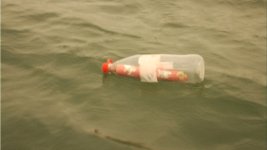
Below a picture from the bottle. This frame is from a take that is shot before the idea of the titles inside the label (so the position of the bottle in the water is wrong, and the camera-angle also, it isn't even sharp), but you can see how the bottle looks like.
 

Attachments

  • Bottle.jpg
    Bottle.jpg
    354.2 KB · Views: 0
Those video formats will not be a problem. 25p is fine. 60 p would be best but file size and render time would increase accordingly. (I'm used to DVX100 footage).

Also the camera must be on a tripod or otherwise fixed so it does not introduce its own motion. No need for it to move anyways.

You won't need to up/download anything until you've posted a test photo or video that we can check to see if it looks good. Then proceed to upload.

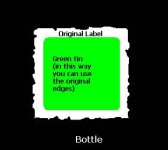
Here's a quick shot of the idea I had for the label. The original coke label on the left. The tin label cut from a can on the right.
The front of the tin label is green with the tracking dots. The other side (the side without any print) is red.


coke_label_tin.jpg


Also:
1/ While shooting it will help to measure the diameter of the coke bottle where there label wraps around. (Cut up a second bottle to get the measurement.
2/ Measure the horizontal distance from the camera center to the bottle.
3/ estimate the vertcail distance from the water line to the vertical camera center.
Those measurements may help in the capturing process.


My anchor idea may not be the best. There were several suggestions including holding it and faking the bobbing. I'll leave that to you to experiment to find the best method.

/edit
Also several parts of the editing process could be handled by different people.
One could do the capture, one the cg footage and another to do the final chroma keying.
 
Last edited:
OK, Just to show you that another option is the all CGI route, this is a test frame from the animation (the sea has a gentle motion, with realistic ripples, the bottle moves realisticlly with the waves);


Test Frame:

message_in_bottle.jpg


PLEASE note, this frame alone took over 15-20 Minutes (and this was not the highest setting), if you want this CGI route, I can't gurantee that I will do it (time contraints). I may consider it if I was paid, but as you have said yourself your budget is small scale indie.
 
I was wondering where you were. That looks A1 Anhar. Well done.
I'm guessing the final size would be a bit smaller. 720x480 up to 873 x 480 I suspect. Check with Casper. If that would speed up render time.
 
Wow man! That CGI looks absolutely wonderfull! I'm really impressed! Pffiiew!
You'll understand that it would be perfect if you would do this. But of course I do understand what I'm asking. And than things like de message inside the bottle will take even more work, I think (you could use the example bottle from the photo I've uploaded). So indeed, if you ain't got the time, you ain't got the time... But it lóóks perfect, haha!
And indeed, I'm not a very rich man (unfortunately), so I'm afraid that way ends, but about what kind of prices are we talking? To get an idea...

When i've tested the shot, I'll upload some stills, and I will use the tin-label. Good idea. For the movement of the bottle, I'll do some tries.
 
Hey Casper, PM me about prices we can discuss in more detail. (you can give me an idea about how much your budget is)
 
Before I'm gonna run the test, I've got one more thing to check: As you see in the frame of the floating bottle, you see that the label isn't nice and thight at the edges. The white, paper label is scratched.

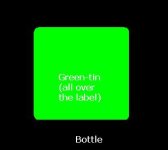
Is it better to just use the tin instead of the whole label, or should I past it inside the edges, so that you can just use the edges from the original.
(see below for the example:)
 

Attachments

  • Original edges.JPG
    Original edges.JPG
    10.3 KB · Views: 0
  • All over label.JPG
    All over label.JPG
    6.6 KB · Views: 0
If you have not already placed the tin onto the label, can you take a still photo of the original label for future reference? May be able to use parts of that with photoshop when constructing the cg label background so it matches as close as possible. If you don't have a still cam just take a few closeup frames with the dvx.

Also your credit roll ,when you do it, should have either a black or white background so that an alpha channel can be made later to print the video onto the cg label.
So...If white print and black background is used, that will become the alpha channel, then the colors inverted to produce black print on the label. In theory the colors can be adjusted to produce any color text at that point. Even a different video as a text texture.
Whatever you have in mind. White on black would be best to work with.
 
If you have to make some of the elements in 3D do it all 3D...water, bottle, and note (photoshopped texture mapped on)

It's a simple scene to model and render out in max or maya, but to use live action water it becomes a very complicated composite.
 
Give me a shout when your ready Casper. If no-one wants to do it, I'll give it a go. I find this shot interesting. I'd like to try regardless.

/As for compositing it is only a three step process. The ONLY concern is the capture. If that goes well then the rest is just multi-pass. In theory it could be done in almost (1.3X?) the same amount of time as it would take to build and render the CG water and bottle given the shot being done properly. BUT, the key is 'realistic' as possible.
I perfer cg as a last resort when it comes to sfx. I guess I'm old school that way.
And I notice the big shots dont comment around here so it's up to us noobs to do and figure this out for ourselves.
 
Last edited:
Back
Top