Some questions about movies with the A7s, especially for fireworks

A7s_user

Active member
I've just got my A7s. I use it with an adpater by Novoflex.de, which allows me to use Nikon lenses and modify the aperture. I've bought a Nikon 18-35mm G ED - FF lense for the A7s.
I want to use this combi for filming only of large scale fireworks displays. I did this the last 5 years with a Sony EX1R, which deeply catches even very bright, metal burning colors the same way, it gets light and thin golden effects. Of course I regulate iris permanently during the shows.

Yesterday I've tested it on Pyronale in Berlin with 3 big shows. The results are disappointing, at the very beginning. As the EX1R with its 3CMOS is almost perfect just with setting the correct WB STD GAMMA in Picture Profiles, the A7s is not with the same WB.


  1. What exactly is the difference between programm "P" and "Movie"? I can set the same parameters like shutter, WB (I use fixed WB), ISO, video formats and data rate. So, where is the difference to film in "P" or "Movie" with same settings? Yesterday I just filmed in "P" programm.
  2. I see the resulting difference between Picture Profile "off" and "PP1" (which uses Move Gamma aso.). But what Gamma, what detail, which other settings is "off"? Of course I will try, what looks better, but I would like to know, what "off" means. I've tried PP1 yesterday, its a bit paler than "off", but gives no better results for fireworks.
  3. Although the A7s chatches most colours fine (the dark once like blue, violett and othe non-metall colors), especially on bright Barium green is much to pale. On the EX1R greens look like perfect traffic light greens, with rich deep Barium color - on the A7s its just light and pale. Of course it deepends on how much metall (eg. magnesium) is used for the bright stars, but its bad anyway. Of course intense reds, but even other metall colors like yellow and rosa are slighty better.
    Where would you look to improve the colors of metall burning colors (very bright), especially green, in the picture profiles? Is there a way? Or do I simply need a 3CMOS?
  4. I filmed with lense open, which is around f4 at the focal length I used. ISO 800 is good for most effects, 1600 or even 3200 is much too sensitive. Bright stars will immediatly overexpose, with all the smoke glooming in the sky. I need it neutral, not artificial colored and glooming. I tried 1600 with f8 or more (adpater allows me to modify aperture), but I don't have the perfect mixture. ISO 800 is to dark for light golden effects and the scenery (night sky) is just black, ISO 1000-1250 seems to be better, but ISO +1600 would be better for gold... I have to try more.
  5. With the EX1R I do film in 1080/50i with 1/50 shutter for non-stuttering movements of the fast stars and effects. Furthermore its Blu-ray standard (50p is not and is not available on the EX1) and 25p is not as smooth. So, for the A7s, what would be best? 25p with shutter 1/50? Or 1/25 to have more blurring? I tried both and am unsure. Of course 1/25 has much more exposure.
    Any other way to "blend" 25p to avoid stuttering movements? I've tried 1080/50p, but the results are horrible. The video simply looks out of focus, soft, "smeary", not clear and sharp. 4K on the shogun will 25p only too. So it would be better to have 25p for both resolutions.

So, any hint is welcome and highly appreciated. I have another huge show this evening. Especially about the "P" or "Movie" programms and the Picture Profiles for much richer bright Barium colored greens.

Thanks in advance.
 
If you're trying to get good results out of the camera, you may want to put together your own profile. I would start with a gamma curve like Movie, Still, or Rec.709, and then use REC.709 color mode for maximum color out of it. Adjust your knee manually since you dont want it pulsing when the lights go bright then dark, and you can crush blacks with the black gamma and black levels.

Keep in mind a lot of people are reporting clipped blues with really bright blue lights, and ultimately the A7s may not be a good camera for what you're trying to capture.
 
@Demistate
Thanks a lot for your great input! As I come from the EX1R, which does fireworks colors almost "out of the box" perfectly (using STD3 Gamma), this stuff is totally new to me. I will read more, and more - but in the beginning its just so complex in overwhelming. So your starting help is best, one could to. Unfortunately fireworks displays are not that often, so I have no possibility to trial and error very often.

May I therefore ask for little more hints, what maybe could be a good starting point, please? Via PM would be great too!


  • Got that with gamma curves and color mode - thanks!
  • Knee I would change from "Auto" to "Manual" 85%, Slope 0. I've read the value 85% somewhere for XDCAM by Alister Chapman, so used that value as starter. Too much? Hope this will "darken" very bright metall powder burning colored stars, so the very highlights in the picture.
    Funny is: yellows and oranges are working extremely good with A7s, even though their pyrotechnic mixture is somehow close to greens, which make the biggest problems (too bright in center of star, too pale greenish halo/aura)
  • I am lost at the moment, when you speak of crushing blacks. I can set black gamma from "middle" to "wide" and "narrow". I assume I should try "narrow"? Black Gamma Level is 0, go to +7 or -7 or between?
  • Black Level I would try -1 or little more. Right direction?

I was shocked when you mentioned clipping of blues. I will see, what's going to happen. Since even F5 and maybe the to be announced F7 uses one 4K-CMOS only, I am afraid I have to go that way. Only the PMW-300 has RGB-3CMOS and exchangable lense, but its too expensive (with wide angle lense) and no 4K...

Last question: is filming in program "Manual" exactly the same as in "Movie manual"? Will the sensor be read out the same way? In "Manual" (photo) one has the advantage of two focussing enlargments, in "Movie" there is only one. I need the 2-step-focussing in the darkness...

Thanks in advance for any further hint?
 
Manual and Movie Manual should be the same. If you have a waveform monitor that is the best for seeing what each adjustment does. As for fireworks testing, I would film some bright multi-colored LED lights outside at night to give you an idea of what colors look like. Also take a RAW photo of your scene to get an idea of what your scene could look like, as you could adjust the raw settings in photoshop/lightroom to get an idea of what you could achieve.

Knee adjusts the highlight rolloff, I would be very careful of lowering it too much as you can make white appear grey if you go too far, and it looks pretty bad. Keep it at manual, , 100% and slope it down maybe -2 to start.

Black gamma is for adjusting how far you want to see into dark areas, More than likely you'll want to keep this at 0 since you're trying to focus on just bright fireworks.

Black level should probably be around -2 if you want zeroed out blacks. Again, a waveform monitor will help tremendously here.

If you can't get a waveform monitor for your HDMI camera, try recording small bursts and say out lout what you're adjusting. Take the files back in and look at them on your NLE with the waveform monitor open. You'll see what each setting does to the image and you'll be able to dial in a better profile for what you're trying to film.
 
I used to record large scale fireworks displays over in america (www.secac.com) and I have looked at a bit of A7s footage of fireworks. I do not own an A7s but the footage looks like the other sony single chip cameras I have in terms of color rendition.

The single chip CMOS cameras have trouble on fireworks because the IR rejection on the green and blue pixels is not nearly as good as on a camera like the PMW-EX1 or PMW-EX1R. What is happening with greens and golds is that because the stars are radiating a lot of IR, there is too much light making it to the red pixels and this is washing out the saturated greens and golds if you use the default color matrix. To get good greens and golds you must use a custom color matrix that accounts for the IR leakage. I do not think the A1S can do a custom color matrix where you adjust how the sensor outputs get turned into primaries in the video signal but the FS100 and all of the EX1R series do.

To set the color matrix correctly you need a source of color that radiates a similar amount of IR as the fireworks. A light emitting diode (LED) will not work because this is a spectral color (single wavelength) with no IR in it. Small incandescent Christmas lights work better as they produce a spectrum of colors and send out a bit of IR but they are not perfect for getting the yellow/gold just right. When I am setting up a color matrix for fireworks I spend an hour or so with a string of 8+ different colors and get things close then I switch to novelty birthday candles (brandname is Color Flame) which produce colored flames for a few minutes and tweak the last little bit.

In my experience getting the green, yellow, gold and reds into the right hue and saturation is the most difficult part of setting up a camera's profile but you can do this in the basement. Every change you make to the color matrix slider is going to affect all of the colors mentioned.

The blues are pretty easy because they are so different in chroma from green and purple/magenta that you can steer them into place without affecting the other colors much. Also, in a pinch, you can fix the blues in post-production with a secondary color corrector and it will look pretty good. This is not true for the greens, golds and reds. If they are not done right in camera, you are in trouble because the important color information is just gone.

I know of no fireworks capable of producing enough blue to saturate the blue channel of a camera. It is almost always the red channel that clips on a red firework. The blue lights clipping effect on blue LEDs is a different phenomena.

The black levels and gammas need to be set for the type of background you have. A cityscape behind the fireworks and a dark sky need fairly different black-levels and gammas. You can get a good idea of how to set the knee using the christmas lights. Close up on them an adjust the knee until you get a pleasing balance between the filament and surrounding environs. The knee setting is a matter of taste in fireworks though if you plan on recording a lot of shows where smoke is coming at the camera or just hanging around in a cloud around the fireworks, you may want to tweak the knee more steeply than on a perfect clear night with black sky.
 
@Dustin,

thank you so much for hooking in and providing so many detailed infos. I've just read it fast but will check/overthink everything in detail. Thank you! I will probably contact you by PM. BTW, of course I know you/your website from my own PGI/AFN times.

Meanwhile since my first post I've spent a lot of time to find the best settings for the A7S for fireworks. With the very first help from Demistate (thanks again) I managed to solve my starting understanding problems and could film several big fireworks displays. I'm pretty confident with the settings now, I know what everything is doing, but am not satisfied. You are right when you describe the colors. I managed to improve it a little with the settings of the color depth, but its far from perfect.

But besides these "small" things with the colors, there is an absolute no go with probably all Sony single chip camers: bright reddish colors, which contain a very little bit of orange, like typical calcium based blinking stars, fully change to absolut unacceptable, intensive, very bright pure orange color. Its so bad, that even the smoke behind, which is lit be the stars, changes to bright pure orange. Incredible, unusable. It seems that it does not depend on brightness or color clipping. It even happens with not that bright small stars, where I could not reduce exposure more. But of course its very dramatic with bright metal fuel burning comets - which contain eg. calcium salts. Before, I was thinking of buying an FS7 for 4K, because I love the e-mount to use with some Nikkor wide angle lenses. But after finding out this problem (and I am not able to remove it in post without touching the other golds and reds in the scenes), I won't. I am pretty sure, its the same on the FS7. Afterwards, I saw the problem on the consumer AX100 and CX700. It's everywhere on Sony one chip sensors.

So, probably I will change to PXW200 to retire my EX1R (although besides the codec and frame rate its almost the same) - which is absolutly great regarding natural fireworks colors. I really want and will go 4K, but it seems that there is not even the slightest rumor for a 4K 3CMOS sensor/cam (best would be with e-mount) from Sony. Why Sony? Because the EX1R is wonderful and I never succeded as well with Panasonic or Canon cams for fireworks...
 
Last edited:
FS7 has completely different color science. It will look different for sure.

But if you love the cinegammas on the EX1 - why not use them on the A7s too.
Knee and black gamma are different and far from being natural.

Try the cinegammas first before you change to another camera. I loved the EX-1/3 too, but
with my FS7 I am able to shoot in much darker locations and with much more DR than ever before.

It needs some experience to get back to natural from those crazy SLog footage and maybe the 8bit-footage from the A7s is not made for this.

My advice again: Try the cinegammas!
 
Thanks Erik, I've tried SLog2 after reading Alisters Blog about it. No chance for fireworks. I've spent 3 days in color correction with Adobe and LUTs and Resolve Light, but it seems to be far away from useable to me.

I DO use Cinegamma for fireworks, I tried everything. Its better, but the main problem with the "intensive orange" shift at some yellowish red colors is not related to any gamma or other setting. Its just there, even reproducable with LEDs indoors. There is a cyan shift in greens and blues too, but its not that destroying.

There was a first test video of the FS7 somewhere here in forums, showing a sun glow. Of course, total different situation, but that showed that it very probably will happen on FS7 too.
 
I don't think the SLOGs and the like are going to help as the main problem is with the color matrix and not the
luminance transfer function. There just isn't enough bits in the two color channels to be able to fix the problems
later in post. Feeding the A7S into an external recorder with 10 bits might make it possible to simulate a different
color matrix but I've found that for fireworks it is just better to get the colors right in camera and do subtle tweaks
in post.

If I had an A7S laying around I might try a tiffen T1/2 filter on it and see if that cuts some of the IR leaking into
the green channel and pulling everything orange. You will need to reset the white balance to be white again on
white fireworks and see if things look any better. I have never been able to use the T1 filters because of the light
loss and my sony single chip cameras are light-starved on fireworks. An A7S would not be light-starved on
fireworks even with a full T1 filter on it and a decent lens. With the T1/2 filter the resulting chroma signal might look
better straight off the camera and it is probably more correctable in post production.

The principle advantage of the FS7 is that it has an adjustable color matrix for just $8,000. Frankly, if the CX700 had
an adjustable color matrix it would be an incredible camera for amateur fireworks. Still would want something like an
EX1R or FS7 for professional work. I used a fleet of EX1's with severe color matrix adjustments to compensate for the
EX1s IR problems.
 
By chance I've found this video. Its a simple comparison between Sony AX100 and BMC4K. The "sharper" image is by the Sony AX100. The very first shot with the red lights seem to illustrates the Sony sensor problem perfectly. The reflections of the lights show the correct red color. The lights itself are intense orange colored:

https://www.youtube.com/watch?v=GCH5WZ6KlNI

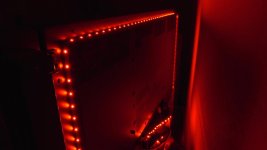
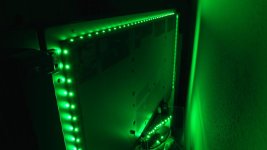
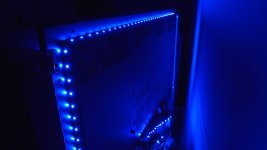
And here are 3 frames out of my A7S showing some RGB LEDs I've glued behind my TV. Gamma is Cine4, colormatrix ITU709, everything else is standard. Although one can slighty modify the orange and cyan shift (see the reflections of the LEDs on the TV-frame) with different gamma, matrix and othe settings in the camera, the main problem always exists (the frames a scaled and compressed heavily, how to change?).

I will buy and try a Tiffen T1 and see, if it changes anything. Thanks a lot for the hint!
 

Attachments

  • red.jpg
    red.jpg
    27.9 KB · Views: 0
  • green.jpg
    green.jpg
    38.5 KB · Views: 0
  • blue.jpg
    blue.jpg
    31.1 KB · Views: 0
The Tiffen T1 with its slighty greenish color, blocking far reds from 680nm, just reduced a little of the shift, maybe 10% - but after color correction to remove the greenish tint it seems to be almost the same.
So, this was a hope, thanks a lot, but no solution.

If I only would know, if the Sony FS7 can be tweaked within the camera, to avoid that highlight shifting... Any ideas?
 
I think you are talking about the sony primary color highlight shifting that is common in nearly all sony cameras? Interestingly SLOG1/2/3 tends to fix this in almost all cameras, but in the a7s does not totally fix it. In the A7S the issue is significantly minimized by turning PP-off and using Standard or Neutral creative style. Of course then you lose a bit of DR in the low end as creative styles all have crushed black gamma/level compared to cinegammas. Otherwise there is unfortunately no way to completely remove it but do not use ITU709 as it seems the worst in that gamma and matrix. Slog2 has it the least, followed by Cinegammas, and for matrix it seems to be minimized in SGamut the most, followed by Movie. I'd recommend just pointing at an RGB ramp (http://avfoundry.com/VideoEq/AVF-RGBCMY-Ramps-720.png) and overexposing it and experimenting with which CS or PP you want to use. If you use that method the issue is very easy to see and reproduce and test.

In the FS7 just use SLOG3 and an Sgamut of some kind and that should avoid highlight color shifts altogether.
 
Thank you Noah for helping with your deep knowledge!

I've tried to use creative styles "Standard" and "Neutral" (and all others) weeks ago, after I had found your hints regarding the blue/violet-LED-problem. I tried it today again to be sure.

Result: NO creative style really (without PP) decreases the effect I am talking about. Red LEDs are always heavily shifted towards orange, depending on the angle the LED or its reflection is cought by the camera. Same with the shift of the green and blue LEDs towards cyan. Its always happening when the light hits the sensor in a not too flat angle (so holding the camera a little above the LEDs) and within its reflections on the black TV frame.

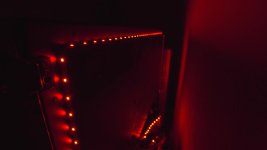
Second test: using again Slog2 and SGamut matrix in PP (eg PP7, standard values). On the first check the shifting has gone, the reflections do not show hard bright cores like in other PPs, so do not the LEDs. But, after applying the LUTs by Alister Chapman for the A7S (the 709 LUTs similar like the filmic LUTs) with Lumetri filter in Premiere, its again the same. Full and annoying color shift towards orange of the LEDs (depening on their angle in front of the camera) - but less/no in the reflections on the TV frame (probably because of the reduced brightness):

C0015.jpg

Moreover: applying the fast color correction filter to the clip, pulling the hue fully to green, the former orange shift is now perfectly cyan - as it would be by filming a green LED without applying color correction.

So, I am really new to that topic, but for me it simply looks like as if the sensor/image processing of the A7S (and the CX-series as well as the X70 and AX100 and...) has that problem, unsolvable, uncorrectable. Every try I had ends in the same look, with deep orange or cyan color shifts at intense bright colors. I would love that someone tells me, that I am wrong and the problem can be solved by doing this or that, really...


Ohhhh, I really beg for a new Sony 3CMOS 4K sensor!
 
Back
Top