Some of my C4D work...

triplej96

Veteran
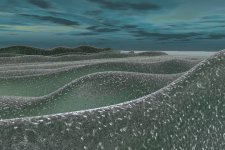
Well here is one screen grab. I made an ocean in C4D but haven't figured out how to animate realisticly. I will post a couple of other scenes soon. Gosh this progam is fun! I used a plane, deformer forumla, wind to make the ocean and a cheen shader. I've only been using C4D for a week or less so I'm very new to it still. Any help and criticism is very appreicated.
 

Attachments
  • Ocean Still.jpg
    Ocean Still.jpg
    160.6 KB · Views: 0
Last edited:
I believe it was maya, XSI and not sure of the others.

My partner uses CD4, I use maya (well at least try to). I do it for fun, as you it's addicting. :Drogar-Dolar(DBG):
 
I had a thread previously about a city I was building well I rehauled it completely. Still have a lot I mean a lot to do on it like texture for example...
 

Attachments

  • My new City.jpg
    My new City.jpg
    17.9 KB · Views: 0
moutainrender.jpg
 
Looking good. That city is going to look great once the windows are in.
I like the ocean. Generally oceans are done by assigning a material to a plane.
Noise is apllied in the displacement channel and subpolygon displacement turned on.
 
different ocean using Cloth and oil rig

Oilrig.jpg
 

Attachments

  • NewOcean with ClothPhys.jpg
    NewOcean with ClothPhys.jpg
    27.3 KB · Views: 0
Last edited:
Whatever that rain-hits-water effect is, your getting that moziac pattern due to aliasing. Probably due to being tiled at too low a value.
Another fix would be to change your antialias settings but that would affect the entire scene so I'd try the former.

For a couple of weeks at 3D I'd say your off to an impressive start.
But dont forget to keep the dust off that dvx though. :)
 
Whatever that rain-hits-water effect is, your getting that moziac pattern due to aliasing. Probably due to being tiled at too low a value.
Another fix would be to change your antialias settings but that would affect the entire scene so I'd try the former.

For a couple of weeks at 3D I'd say your off to an impressive start.
But dont forget to keep the dust off that dvx though. :)

Thanks Raptor means a lot comming from you! Gosh I do need to dust of the dvx soon! Yeah I can see the moziac pattern big time. How can I tile it at higher value thanks raptor. This 3d stuff can be addicting!

Josh
 
Last edited:
Is it possible to send me a scene file with only the part in question? and not the rain, mountains and so forth?

//Otherwise, is this a procedural texture? There are a few variables including the projection.
I'd rather have a look to see but off the top try re-scaling the Length X & Y values in the material tag.
If it's procedural and does not work I'd have to have a look rather than guess.
 
Last edited:
Is it possible to send me a scene file with only the part in question? and not the rain, mountains and so forth?

//Otherwise, is this a procedural texture? There are a few variables including the projection.
I'd rather have a look to see but off the top try re-scaling the Length X & Y values in the material tag.
If it's procedural and does not work I'd have to have a look rather than guess.


Hey raptor sorry to get back to you late but I will send you a scene file!

thanks
Josh
 
Rather than cubes it's better to count polygons. In C4D which I think you're still using, is to right click the object in the Object Manager and select Object Information.

Modelling wise it could be done with 1 cube. Then Structure->Bevel the edges.

I was also looking for the split where the case opens. You could bevel the middle edge loop, cut a new center and adjust some vertices.

Looks convincing except for the opening part though. Nice reflection too. Not sure what you did there with the blurring but looks good.
 
Thanks Raptor for the comments and helpful info as usual! Yep, I'm still using C4D for sure it is my 3D app of choice. I checked the info I'm using 21,718 polygons. I so new with the whole modeling from scratch aspect but it is a lot of fun no doubt! I will have to try that one cube aproach.

I actually did make a split for the opening but forgot to post it I will upload that pic in a second!

For the reflections I made a mateiral for the floor and made it reflective and played around with the settings to get that blur fall off effect.
 
Last edited:
Back
Top