FS7: Solo shooters: how do you manage your data and backup on set?

Clermond

Veteran
for the first time I ran out of cards on a shooting day and even more, I had three upcoming shootings the next three days. I ingested everything into a FCPX library and made a backup of the cards via HEDGE on two external hard drives. But I admit at the end of the third day I wasn't sure if I had a double backup of all data. I like to find a system of making notes which shot is on which media. A system which is stress proofed and works without assistant. I started with a self-made paper with lists and checkboxes. Is there an app for that?
 
I have a portable powered USB hub for my Macbook Pro so that I can have three hard drives hooked up as well as the card reader. The computer, hub, readers, drives are all set up somewhere convenient to the shoot so that all I have to do is walk over, put the card in the reader, hit go on Hedge and wait for it to give me confirmation that all is well. I have four 128g cards for my camera, so at any given moment something can be getting dumped to the hard drives while I'm shooting. I always dump to three drives because I'm not comfortable with the thought of not being very redundant with my data backups.

It just has to be very routine that the second that card is full (or soon thereafter) that you walk it over to your mindless Hedge (or similar) backup system.

One improvement I've considered to my system would be to have the backup drives be SSD drives in order to increase speed. I would also add that once I backup the data to my primary edit system that I consider those portable hard drives as "fair game" to be erased without hesitation. That way I don't have a bunch of little hard drives running around not knowing whether it's safe to erase or not.

As for an app, I'm not sure, but you could always make a feature request to the folks at Hedge given that you're already a user. I think they're doing great work!
 
Simple answer is to get more cards. But I have also been in the same situations, dumping cards while driving between locations.

I have 5 cards that are labelled (ABCDE).

If I have to dump on the same day, I use separate folders for each. I make sure I have a "A" folder on my main drive / backup before returning "A" to the cam to format (and labelling it A2).
Keeping A,B,C,D,E,A2,B2,C2 directories helps when looking at the cards to know what has been dumped/not dumped/backed up. If needed, I keep a note on my iPhone of what each card was.

Obviously I'd prefer to not have to dump and format during a shoot day (ever), but at least keeping them organized this way relieves a bit of stress. Nothing worse than looking at two identical cards (that aren't labelled with anything) and wondering if they've been backed up!

Another option (depending on the project/schedule ) -> Hire someone to manage media. Give him/her cards and they don't give them back to you until they are fully backed up (and let them deal with the 'mental mess'). Costs far less than telling a client any footage has been lost!
 
I never do a backup on location anymore. Always at the end of the day back at home or the hotel. Too many close calls. Cards are cheap to rent so just load up. I find using small portable hard drives a PITA to use so I went with Sony's 6TB portable RAID drive. Super fast and easy to use and can be daisy chained with Thunderbolt. Once I get back home I'll back them up to my archive drives.
 
I don't have an app for your note-making. You also mentioned you had run out of memory cards, so this might help with that....

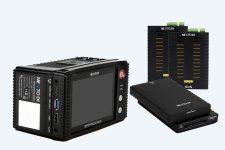
I was dumping cards to a laptop on location and decided to find a better way. I just didn't like the idea of bringing my main editing laptop on car trips and was afraid sooner or later I'd damage a USB port with the cables sticking out and the XQD reader inserted. I got the NEXTO DI Bridge. I installed two 2.5 WD Blue 1TB drives (model WD10JPVX) into the unit. On location, I just pulled full cards from the FS7 and dumped them to the NEXTO, which saved all files onto both drives for a backup. It's possible to plug in a third USB 3.0 drive and have it write to all three at once. With those drives, it took 19-23 minutes to dump a 128GB card. I could dump 9 cards on a single battery charge of the NEXTO. I pulled the 1TB SSD drives from my monitor/recorder to see what difference that made. These were two Samsung PRO 1TB SSDs (part number MZ7KE1T0BW). Download time was about 12 minutes. HDDs cost me $124 each and the SSDs cost me $424 each when I got them. Rather than buy more SSDs, I decided to stick with the HDDs and buy a total of four 128GB XQD cards. That NEXTO has solved my issues with dumping and backing up my cards, and it doesn't involve a laptop or any more cables.

https://www.bhphotovideo.com/c/prod...nsb_25_xqd_storage_bridge_nsb_25_modular.html
 

Attachments

  • NEXTO DI BRIDGE.jpg
    NEXTO DI BRIDGE.jpg
    73.2 KB · Views: 0
The Nexto is obviously an elegant solution. I used to use an earlier version for SxS cards, and was always happy with it.
However I haven't upgraded to the latest incarnation- so I'm still using computers and drives.
Start by being organized -- I start by naming all my cards (even if the names are as basic as XQ_A / CF_AA / SD_BBB / etc) Also label (and name) your hard drives, and create folders for all your cards in advance on the hard drives (for all the cards you think you'll shoot.)
Before shooting, make little tape labels for each card that's in a camera. The labels for the cards in the cameras get placed on the cameras, and will then follow (stay with) the cards as they go through the transfer process. Color code your two (or more) hard drives which will be receiving the data. Get colored Sharpies that match the colors of the hard drive color codes. Each time you transfer a card to a specific drive put a mark on the card labeling tape using the receiving drive's color. If you're really organized, the first mark can be a 'minus' sign - then when you've verified that the data on the drive matches and is playable the minus sign can become a plus sign. Since the label tape stays with the card, you can then check its status at a glance.
I also tend to set things up in a linear left-to-right fashion - untransferred items to left of transfer system, partially transferred cards in center, fully transferred on right.
Though I'm seldom working as an OMB, in addition to shooting I'm often the one doing all the transfers - often for 3 or 4 cameras - so the organization system has to be easy since often transfers start early in the day and continue almost continuously - taking little 30 second breaks between takes to start xfers...
Whenever possible I set up where the system will not need to move!!! I really don't trust myself to try to do xfers with the computer sitting in the passenger seat as I drive to a new location.
 
Shotput Pro creates an "ingestion report" which could be the notes you are looking for.


I operate like an AC would, even when I am solo shooting. I label each card on the side of the camera, when the card comes out of the camera, the label comes off of the camera and goes over the cards contacts. When that card is ingested, the label must be removed because it is over the contacts. I place it on the card reader while ingesting, and when finished going to both drives, that label is then reapplied to the card, but not covering the contacts.

This helps me know which card was where, and at what stage it is in. If i grab my ruggard case and there are cards with labels, I can quickly say "ah yes, card 3, that one has been double backed up already and is good to format" - without any worry.


Also, when I copy from card to drive, I do the same for the second card. Card to drive - never drive to drive (somewhat obvious but ya never know)
 
I was thinking of an app to log camera / card / backup drives / copy / formatted cards etc

Its called a DIT.. :).. if you or your clients want it.. employ one and put your rate up.. for me personally sage advice I got when going from tape to cards.. always have enough cards for a full day.. I would think 99% of all cock up,s like formatting un backed up cards are when people are doing it during the shooting day.. I don't even want to think about that.. down loading in cars between locations etc.. accident waiting to happen.. and it will..
 
Last edited:
Thanks for all your advice!

A DIT would be great but then I am not a solo shooter anymore. Also I have mixed still photo and video project and I want to cover the Canon and Pentax Media too. This is what I did considering your advice and my aspects: I bought more cards and 2 additional 3TB hard drives for card back up only. I printed an excel based grid sheet with lines and rows of camera / card / subject / date / scenes / Library / checkbox bu / back up drive / date when done / date when card re-formatted. I ran a test at a shooting for the last two days and it's a starting point from which I will go on. Off course it's very important to stay on this task with permanence and to avoid scenarios like you describes of copying cards on the back seat of a car. Many thanks for your input.
 
I use Hedge. It couldn't' be easier. I've even trained producers to use it...

What would be nice, particularly on travel/OMB jobs would be to leave the laptop at home and use an iPad or phone app for back up. Come on developers...
 
I use Hedge. It couldn't' be easier. I've even trained producers to use it...

What would be nice, particularly on travel/OMB jobs would be to leave the laptop at home and use an iPad or phone app for back up. Come on developers...

I use Hedge too.
I was in contact with Paul from Hedge because in the beginning FCPX didn't see the back ups as an archive. They fixed it in one of the recent updates. Nice people doing a great job!
 
Back
Top