FS7: SMM SLog2 Vs Slog3

morgan_moore

Major Contributor
My studio shoot today finished on time giving me a few spare minutes to do a quick 2 vs 3 test.

Setup One.

Wide Dynamic Range scene

Two coloured buckets, One in shadow. The back wall has a fresnel.

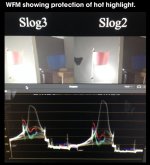
For both profiles I closed the iris until the fresnel spot was not blown (using no lut on WFM)

Setup Two

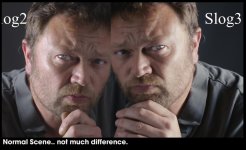
A quick selfie, exposed 'fat' with no clipping.

--

Conclusions?

a) Choice of LUT is clearly important - they don't really match, neither is good or bad but they don't match - I would not want to shoot multi-cam with a 2 and 3 cameras together.
b) neither is rubbish for a scene of normal dynamic range (the portrait)

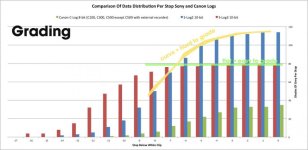
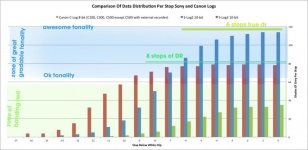
My interpretation of the sony data distribution image which suggests that 2 will have more fidelity but be a bit less good for shadow digging, IMO stands up.

1) Im not sure which portrait is nicer (id expect 2 to be nicer as more data points are allocated to the skin range),

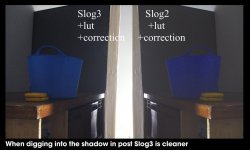
2) the one thing that is clear is that my 'shadow dig' correction (11second), is clearly better with SLog 3
slog_comment.jpg
 

Attachments

  • slog_comment2.jpg
    slog_comment2.jpg
    52.1 KB · Views: 0
My conclusion simplified?

If you are shooting in a situation were you might have to dig deep into the shadows in post go for SLog3.

S
 
Portrait.. cant see any difference that would not go away with a different lut choice or grade.

edit maybe Slog 2 wins on a bit more stuff in the highlights cheekbone (as expected)

self_2.8.1.jpg

Shadow Dig.. here 2 is clearly weak? (as expected)

dug_2.4.1.jpg
 
First of all, thanks for taking the time to setup some tests and post the results.

I apologize if I don't fully understand what you've done here but you have a style of writing in shorthand that makes it difficult for me to follow a lot of your posts. :-)

Are you applying the same LUT to both flavors of S-LOG?
What LUT(s) are you applying?
Are you doing these tests in Resolve?
In your opinion, are any of the shots intended to represent a nice final image? If so, which one(s)?
 
Based off of these pics alone, I like 3, because it has more contrast, it's not as "flat" and "open" as the 2 images.
 
I apologize if I don't fully understand what you've done here but you have a style of writing in shorthand that makes it difficult for me to follow a lot of your posts. :-)

Im better with a camera than a pen.

Are you applying the same LUT to both flavors of S-LOG?
What LUT(s) are you applying?
Are you doing these tests in Resolve?


Im using resolve.
For Slog 2 I applied the default Slog 2 LUT
For Slog3 I applied the default Slog 3 Lut (not the LC version)


In your opinion, are any of the shots intended to represent a nice final image? If so, which one(s)


The portrait was 'well lit' (aka within a reasonable DR) and should IMO make a nice final image straight from camera with the application of the default LUT appropriate to the chosen camera profile.

The only post I did was apply the LUT and do an exposure compensation.

It is up to you to judge if that is a nice image.

So I am (afaik) doing the official route to a nice image and then leaving the viewer to decide if it is nice.
My opinion is that it is adequate and could be graded to be nice.
The ideal situation is that no further action would be needed, one might get that from an Alexa/Varicam.. maybe.

In the wide dynamic range situation 'two buckets' I have set a 'complex' scene, that is beyond the parameters that one would hope to shoot. Two buckets is therefore a 'stress test'

But might be presented with in 'real life' such as a scene in a forest or a corporate shoot in midday sun.

In that scenario I protected my highlights and attempted to recover my shadows in post.

I do not think a shot of two buckets is nice or any way aesthetically pleasing.

I do not own any formal DR testing equipment and also think that using colours rather than a grey scale is more showing of the camera.

Clear as mud?

S
 
Last edited:
To understand my or anyone else's methodology one probably needs to 'think' the same way about shoots.

I will try and explain how I think. Usually I am trying to deliver a decent image to the client with a fixed amount of resources. I am not shooting birds on the wetlands when the light is nice.


In a small setup such as an INT interview, I would hope to control the scene DR so that it is 'reasonable' (aka 6 stops?) - with full control one could shoot a baked 709 look or use log and apply a LUT.. both should get you to the same place with minimal or no effort in post beyond the application of a LUT.


Sometimes clients present scenes that cannot be controlled with my lighting package. Maybe they want to be interviewed in front of their office sign outside in the full sun while the sign is in deep shade and the interview must happen now. In that situation I would protect my highlights and be aware that the image might need to be 'rescued' by pulling secondaries in post. In that scenario the writing on the sign.

I want to know how far I can pull the file in post.

S
 
In terms of my exposure methodology one may be able to see by evaluation of the WFM (if you download the file and put it in resolve) that in the bucket test I retained the highlights of the spot on the wall, fully ETTR that portion of the image - that gave me a 'fixed' exposure on the blue bucket that was deep in shadow.

bucket.jpg

S
 
Last edited:
The last two pictures seems to be not compareable. It is quite evident that the slog3 picture is more overexposed. Compared to the slog2 footage.
 
I exposed both images as bright as I could while not blowing the hotspot in the image which is the hump on the waveform - you can see neither clip as the hump has not flat top.

Where the highlights are put defines where the rest of the image sits.

You may not like this approach but it is logical to me.

The pic with the wfm is an iPhone snap from my phone so you should not judge the image brightness there.
 
I will try and explain how I think. Usually I am trying to deliver a decent image to the client with a fixed amount of resources. I am not shooting birds on the wetlands when the light is nice.

Where does this misconception come from that I never light anything? You may be surprised to learn that formal sitdown interviews for shows such as 60 Minutes, Dateline, 20/20, high-end corporate productions, documentaries, etc. are are what I am hired to shoot most often. That is almost all of my work. The wetlands, airshows, and other outdoors stuff I tend to post here is usually just for fun and (it turns out, quite lucrative) stock footage sales. And I don't do half-assed music videos or festivals.

Since I can't figure out what your point is with this thread, nor with the footage you've provided as examples, I will step away from the conversation.
 
Clearly a few threads as different people approach understanding the same "important" questio about our cameras in different ways.

It's only pixels :)

Doug posted "random" footage.

I did two shots side by side with the profiles - one shot with reasonable dr - another with an extreme dr.
 
Sam, I'm trying to understand the point of what your trying to show, but while I might be completely wrong, it seems to me that you are comparing ONLY SLOG2 and 3 when paired with the LUTs that Sony happens to recommend. But maybe you're only comparing the LUTs. After all if you used a more contrasty LUT on the SLog3 footage it might look much more like the SLOG2 shot. I for instance find the LC709A LUT way too flat for SLOG3 and have been using the one that Art Adams recommends ( even though he created LC709TypeA) created in LUTCalc based on the Varicam gamma. It pops more, but even that seems too bland for me a lot of the time.

Lenny
 
Len

Lc709 is a start point for grading it's not a finished lut - so it's kind of s half way point.

The luts I use are not really that relevant for the super important observation which is how one cannot dig into the slog2 shadows and "recover" them.

Yes a bit of tweaking (or a different lut) I'm sure the slog2 image could present deep blacks as the 3 did.

--

Broughtin -

To lower the ISO of the 3 portrait I used the gain slider - it's the tab past the wheels.

To do the shadow boost on both I used curves
 
To lower the ISO of the 3 portrait I used the gain slider - it's the tab past the wheels.

To do the shadow boost on both I used curves

That's exactly my problem with your test. By adjusting exposure this way you changed the shape of the curve (even by just using GAIN slider, not to mention you actually used curves to further tweak it...), and I can only guess that it was done individually for each shot. In other words, your skills in Davinci influence your opinion about the Slog2 and Slog3 curves more than the actual curves.
 
Back
Top