
Navigation
Install the app
How to install the app on iOS
Follow along with the video below to see how to install our site as a web app on your home screen.
Note: This feature may not be available in some browsers.
More options
You are using an out of date browser. It may not display this or other websites correctly.
You should upgrade or use an alternative browser.
You should upgrade or use an alternative browser.
SmallHD with EX-1 color match
- Thread starter Vatrik
- Start date

Duke M.
Veteran
Most modern monitors have auto color balance, but the old manual way was to run color bars through it, put on a dark blue gel (double the gels if you have to) and adjust blue bars to match. See also "blue gun".
It should look like this:
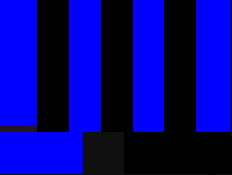
[Note that computer monitors and TVs do not handle color the same way.]
It should look like this:
[Note that computer monitors and TVs do not handle color the same way.]
Robert Ruffo
Well-known member
You'll have to do it by eye.

Zephyrnoid
Veteran
Hey Duke
I have a Matrox MX02 and matrox provides a barchart for calibration via Blue Gun (which is part of the MX02). I guess if I run every HDMI monitor through the process, they should be calibrated to one standard thereby matching each other. I do notice that because the RANGE of each monitor is different, there's never perfect sync.
I have a Matrox MX02 and matrox provides a barchart for calibration via Blue Gun (which is part of the MX02). I guess if I run every HDMI monitor through the process, they should be calibrated to one standard thereby matching each other. I do notice that because the RANGE of each monitor is different, there's never perfect sync.
Most modern monitors have auto color balance, but the old manual way was to run color bars through it, put on a dark blue gel (double the gels if you have to) and adjust blue bars to match. See also "blue gun".
It should look like this:
[Note that computer monitors and TVs do not handle color the same way.]


Bassman2003
Veteran
I don't know if you want the monitor to match the EX-1 LCD. I find the LCD to not be 100% accurate and you can not calibrate it effectively.
I good separate monitor should have better color rendition than the onboard LCD and your decisions should be based upon it rather than the camera's LCD.
I good separate monitor should have better color rendition than the onboard LCD and your decisions should be based upon it rather than the camera's LCD.
I have had the DP1 since it came out...had it upgraded to DP1x. I used it with the EX1 component HD output. I have had very little luck calibrating the DP1x for color. The flesh tones are somewhat "posterized." SmallHD thought the DP1x fix would solve issue, but it is still the same. Go to their website; they have a video showing how to get a full blue for adjusting bars. But, I still have had no luck getting a useful color rendition. In fact, I have spent time adjusting the EX1 LCD to match, by eye, our properly calibrated 17" Panasonic HDSDI monitor...EX1 LCD looks much better than DP1x. I wonder if DP1x had an HDSDI input, if that would produce a much better color rendition?