SmallHD 502 Hands On Review

I wish on the more expensive cameras they'd put higher quality on-board monitors. If I had to pay $17,500 for a C300 Mark II with a 1080p on board monitor or $16,000 for a 480p on-board monitor, I'd definitely choose the first. On a $1500 GH4 I can see the need to compromise on the built-in monitor, but not so much on the more expensive cameras. At least Blackmagic is starting the trend with on-board 1080p monitors. Hopefully it won't be too long before other manufacturers follow suit.
 
I wish on the more expensive cameras they'd put higher quality on-board monitors. If I had to pay $17,500 for a C300 Mark II with a 1080p on board monitor or $16,000 for a 480p on-board monitor, I'd definitely choose the first. On a $1500 GH4 I can see the need to compromise on the built-in monitor, but not so much on the more expensive cameras. At least Blackmagic is starting the trend with on-board 1080p monitors. Hopefully it won't be too long before other manufacturers follow suit.
I agree 100% It's ridiculous.
 
I wish on the more expensive cameras they'd put higher quality on-board monitors. If I had to pay $17,500 for a C300 Mark II with a 1080p on board monitor or $16,000 for a 480p on-board monitor, I'd definitely choose the first. On a $1500 GH4 I can see the need to compromise on the built-in monitor, but not so much on the more expensive cameras. At least Blackmagic is starting the trend with on-board 1080p monitors. Hopefully it won't be too long before other manufacturers follow suit.

Hell, look at the POS on-board monitor Panny gave us on our $40,000 P2 VariCams. It's so bad you damn near can't read the menus. And sometimes you actually can't. The difference between the Canon monitor that came with my C300 and the Panny/P2 monitor is like 1080 HD vs. B&W analog SD tuned in on rabbit ears at the fringes of the service area with someone running a mixer in the kitchen.
 
Yeah, I once shot on a $40k or so P2 Panasonic camera and it's perhaps the only shoot I've done so far where I felt very unsure if I got usable footage because I felt like I was flying blind in regards to focus and exposure, particularly exposure where the black and white LCD didn't do any good, there was no waveform, so I had to expose everything based on zebras, filming black people against bright sunlight outside for a run n' gun shoot. I suppose those who use those cams regularly got used to it and were able to get reliable footage out of it, I suppose.
 
Anyone having trouble getting an proper signal out of this monitor?

Im using it with the Sony F3 and the signal gets read as i instead of p, resulting in an low-res image with bad motion. I have tried every output-mode on the F3 and had contact with the SmallHD support without any success. The only mode that works in 720 50p out, but that is only half res.
 
This monitor looks really nice, but I'm waiting for the Blackmagic Video Assist monitor to come out before buying. Full HD, an external recorder that records to inexpensive SD cards for $499. Can wait to see them in the wild.

I always like reading your reviews Erik. Thanks.
 
This monitor looks really nice, but I'm waiting for the Blackmagic Video Assist monitor to come out before buying. Full HD, an external recorder that records to inexpensive SD cards for $499. Can wait to see them in the wild.

I always like reading your reviews Erik. Thanks.
Thanks!

I dont think the BMD Video Assist is going to be loaded with as many tools as the 500 series but it sure is a heck of a deal for what it is. BMD has a tendency to make things look like you are getting all the features then after you buy it it's lacking features you really need. They do this with the cards and converters all the time. It's a little annoying. I've been caught a few times.

Still it's a very good price for a combo monitor and recorder.
 
Firmware. FW

Simply I feel it is a bit fiddly... for a 40+ gloved idiot like myself, not the xbox generation

I would move towards edit and shoot modes and keep focus bash in as a selected option

I would also make the screens run 'round' 12341234 not 1234 and the back back back get back to 1

I could then set the thing up for instance..
LUT off WFM on (expose screen)
Lut on focus bash in (focus screen)
Lut on (shoot screen)

S
 
Yeah, I once shot on a $40k or so P2 Panasonic camera and it's perhaps the only shoot I've done so far where I felt very unsure if I got usable footage because I felt like I was flying blind in regards to focus and exposure, particularly exposure where the black and white LCD didn't do any good, there was no waveform, so I had to expose everything based on zebras, filming black people against bright sunlight outside for a run n' gun shoot. I suppose those who use those cams regularly got used to it and were able to get reliable footage out of it, I suppose.

Do you mean the VF? My issue is with the flip out LCD, not the VF. I've never really had problems with any of the VF's on my VariCam's(tape or P2). Were you shooting on a rental unit or an old unit? If so, the VF could have been past it's prime, because CRT's eventually go to crap. I did a shoot the other month for a client and it was with their 2700, not mine. Luckily I had all of my gear in my truck because I was supposed to be coming from another shoot with my gear to theirs. I had to pull my VF off my cam and use it on theirs because theirs was SO bad I could not see anything in focus. It was one of their shared cameras that has God-only-knows how many hours and has been used by probably almost as many people.
 
Thanks!

I dont think the BMD Video Assist is going to be loaded with as many tools as the 500 series but it sure is a heck of a deal for what it is. BMD has a tendency to make things look like you are getting all the features then after you buy it it's lacking features you really need. They do this with the cards and converters all the time. It's a little annoying. I've been caught a few times.

Still it's a very good price for a combo monitor and recorder.

I was also looking at the video assist but couldn't find a list of software features (false color, scopes, etc.) anywhere which seems a bit fishy. They are super vague about it. You would think that if they had all those things, they 'd be advertising them.

My older and cheaper monitor broke and I need something now, so I pulled the trigger on the 502 and I'm waiting for it in the mail now. If it wasn't so urgent for me, I would also consider waiting to see about the Video Devices Pix-E5. 5 inch, 1080p, 4K recorder, super rugged with gorilla glass, and hi bright IPS panel. All for $1400, just a bit more than the 502. It could be a total all in one but not shipping until the end of July according to B&H. Anyone have any thoughts/insights on it?
 
My older and cheaper monitor broke and I need something now, so I pulled the trigger on the 502 and I'm waiting for it in the mail now. If it wasn't so urgent for me, I would also consider waiting to see about the Video Devices Pix-E5. 5 inch, 1080p, 4K recorder, super rugged with gorilla glass, and hi bright IPS panel. All for $1400, just a bit more than the 502. It could be a total all in one but not shipping until the end of July according to B&H. Anyone have any thoughts/insights on it?

A quick comparison, based partly on the specs and partly on seeing a pre-release version at NAB:
Pix-E 5 weighs twice as much as a 502
Pix-E 5/7 record 4K in ProRes XQ up to 24fps (lower resolutions at higher frame rates)
IMO the Pix-E has the edge in the UI, by virtue of using touch and buttons, but not by a drastic margin.
The 502 with the Sidefinder looks nearly as nice as a Gratical.
Tough call, they both have a lot going for them, and they're both probably more durable than a Shogun.
 
IMG_8830.jpg

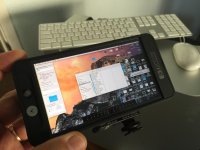
I had to move my Mac Pro upstairs and didn't set it up yet and of course I needed to get some files off it so I grabbed the 502 thinking if I just could see the desktop and get to Finder I could copy the video's I needed to a hard drive. It worked! Zooming into the desktop and panning around was so easy. The image looked really good too. I then played one of the videos and it also looked great. So cool I had to share.
 
So I have been using the 502 as my primary monitor on my shoulder mount C300 Rig, in an international adventure reality TV setting. It has been in almost every imaginable condition and stood up. I custom made a plastic corrugated sun hood for it, that seem to cut the glare, as I also have the screen protector. I have about 300 hours on the monitor. I find it to be WAY sharper, more color accurate, and balanced than the stock C300 monitor, which runs very cool (blue) in temp, but always using vectorscope to check color. I keep the stock C300 monitor on my rig to use the waveform, as I have contacted SmallHD, the grey waveform values on a black background are simply unreadable on the 502. In the future I hope for green or a selectable color.

My initial conclusions are that the 502 is a fantastic monitor, with great resolution and color. It is light-weight and runs all day off my Letus LP-E6 DTAP adapter. I love the peaking (on "2"). I use the zebras output from the C300, as the 502 and the C300 don't agree on what's 95% or 100%. Unfortunately, that is one of the only tools the C300 outputs via HD-SDI.

I have had a few issues, as I have heard some others have had as well. I have a intermittent green line that runs the entire height of the screen (entire width on previous version software), about 10 pizels wide. SmallHD is aware of this and looking into it.

My main issue is:
-We collectively need to develop a LUT that calibrates the monitor. There are no controls in the menus to adjust the picture. Out of the box the image is too saturated (slightly warm) and the blacks too crushed, as an easy look at PLUGE bars will tell you. SmallHD told me that I should use a probe and Lightspace to create a color correcting LUT. As I don't have access to these, I would like to inquire and or suggest a group buy of a 502 calibration. Once we bring one monitor to a shop, create a LUT, and distribute that LUT, all our monitors should essentially be calibrated, more or less. I'm aware this isn't a professional monitor, but I would feel more confident eye-balling frames if we could calibrate it.

I eagerly await responses.

FYI: I use to run a TVLOGIC 058 as my primary, and it was simply too heavy. Great picture though.

JJ

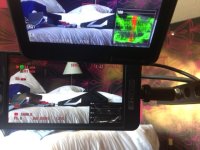
C300 Monitor vs 502. Canon much cooler, but way better waveform readability. Second pic in Haiti on location with the 502.
IMG_2695.jpg5D_E0018sm.jpg
 
Last edited:
sodering = make the connection hot enough to melt the solder without it touching the iron....

Cheers
 
What type of LP-E6 batteries do you use with your 502 ? Do you know if generic batteries work (Phottix, aboutbatterie, ChiliPower...) ?

With my DP6, my Panasonic Generic batteries don't work and I have to use real Panasonic batteries !

Thanks
 
Back
Top