SmallHD 502 Hands On Review

Erik Naso

Veteran
I picked up the SmallHD 502 from a group buy on REDuser. Saved 20% Nice! The 502 is a gamble in some was. We have a lot of choices in high quality monitors now. What sets the 502 apart is its high resolution, size and features. Lots of them.

Check out my hands on review HERE
 
I bought one as well - but had a glitch with the registration process you mentioned in your review (a bad trend, as you inferred) and since I needed it for a shoot the next day, rented a monitor and sent the 502 back.

I was impressed with the unit and would have liked to have had it on that shoot - although I too was concerned about the heat, since I intended to use it primarily with the Sidewinder when it becomes available. I sweat enough handholding hours at a time in sometimes stuffy environments - the idea of adding 111 degrees to that right in my face isn't appealing - I guess its going to be the Gratical after all.
 
I bought one as well - but had a glitch with the registration process you mentioned in your review (a bad trend, as you inferred) and since I needed it for a shoot the next day, rented a monitor and sent the 502 back.

I was impressed with the unit and would have liked to have had it on that shoot - although I too was concerned about the heat, since I intended to use it primarily with the Sidewinder when it becomes available. I sweat enough handholding hours at a time in sometimes stuffy environments - the idea of adding 111 degrees to that right in my face isn't appealing - I guess its going to be the Gratical after all.

I worry about the heat close to my face too. I'll get the Sidefinder when it's available and see how it goes. I also get warm when I work and having a hot viewfinder close to my face might not work.

I wish the update came out sooner however good on them for not taking very long with the promised features after releasing the 502 . I had two solid days with the V0.1. Could have used the VU meters and Waveform big time.
 
The monitor seems to have a lot of nice qualities, but I doubt I would ever buy a monitor that
does not have false color especially one that was priced at $1199.
 
Last edited:
The monitor seems to have a lot of nice qualities, but I doubt I would ever buy a monitor that
does not have false color especially one that was priced at $1199.
The 502 does have False Color. Here is a list of features some have already been added with the V1.0 update.

Software


[TABLE="class: t1"]
[TR]
[TD="class: td1"]Pixel Zoom (type)[/TD]
[TD="class: td2"]2x & 4x with smooth pan via joystick[/TD]
[/TR]
[TR]
[TD="class: td1"]Frame Guides[/TD]
[TD="class: td2"]Yes[/TD]
[/TR]
[TR]
[TD="class: td1"]DSLR Scale[/TD]
[TD="class: td2"]Canon, Nikon[/TD]
[/TR]
[TR]
[TD="class: td1"]Custom Scale[/TD]
[TD="class: td2"]Yes[/TD]
[/TR]
[TR]
[TD="class: td1"]Anamorphic De-Squeeze[/TD]
[TD="class: td2"]Yes[/TD]
[/TR]
[TR]
[TD="class: td1"]Image Rotate(Manual/Automatic)[/TD]
[TD="class: td2"]Yes[/TD]
[/TR]
[TR]
[TD="class: td1"]Image Flip (Manual/Automatic)[/TD]
[TD="class: td2"]Manual and Auto Flip[/TD]
[/TR]
[TR]
[TD="class: td1"]Cross Conversion[/TD]
[TD="class: td2"]Near Future[/TD]
[/TR]
[TR]
[TD="class: td1"]Focus Assist (Colors)[/TD]
[TD="class: td2"]Yes[/TD]
[/TR]
[TR]
[TD="class: td1"]Peaking[/TD]
[TD="class: td2"]Yes[/TD]
[/TR]
[TR]
[TD="class: td1"]False Color[/TD]
[TD="class: td2"]Yes[/TD]
[/TR]
[TR]
[TD="class: td1"]Zebra[/TD]
[TD="class: td2"]Yes - Multiple[/TD]
[/TR]
[TR]
[TD="class: td1"]Waveform[/TD]
[TD="class: td2"]Yes[/TD]
[/TR]
[TR]
[TD="class: td1"]PIP[/TD]
[TD="class: td2"]No[/TD]
[/TR]
[TR]
[TD="class: td1"]Histogram[/TD]
[TD="class: td2"]Yes[/TD]
[/TR]
[TR]
[TD="class: td1"]Horizon Indicator[/TD]
[TD="class: td2"]No[/TD]
[/TR]
[TR]
[TD="class: td1"]Image Capture[/TD]
[TD="class: td2"]Individual and Time Lapse[/TD]
[/TR]
[TR]
[TD="class: td1"]Custom LUTS[/TD]
[TD="class: td2"]Yes[/TD]
[/TR]
[TR]
[TD="class: td1"]LUT Creation[/TD]
[TD="class: td2"]No[/TD]
[/TR]
[TR]
[TD="class: td1"]LUT Downstream[/TD]
[TD="class: td2"]Future[/TD]
[/TR]
[TR]
[TD="class: td1"]LUT Import[/TD]
[TD="class: td2"]Yes[/TD]
[/TR]
[TR]
[TD="class: td1"]Image Overlay[/TD]
[TD="class: td2"]Yes[/TD]
[/TR]
[TR]
[TD="class: td1"]Blue Only[/TD]
[TD="class: td2"]No[/TD]
[/TR]
[TR]
[TD="class: td1"]Firmware[/TD]
[TD="class: td2"]User Upgradable[/TD]
[/TR]
[TR]
[TD="class: td1"]Audio Meters[/TD]
[TD="class: td2"]Yes[/TD]
[/TR]
[/TABLE]
 
My journey with this monitor has not been great. I have shot a hardcore week long doc with the monitor.

The screen protector is like a mirror- completely unusable in anything but a black studio - forget using this panel for EXT gimbal work - forget the protector for actual work.

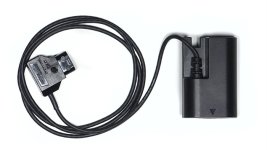
4 5d batts last about half a production day - charging was a nightmare, I a total spaghetti junction in the hotel room with my 3 chargers - 5 batts, 3 chargers is not enough - more gets messy and costly. Forget 5d batts for using this for actual work.

My 5d dummy batt did not work due to cable clash.

I do love the Luts and Res. of course - the lut support basically cures everything that is wrong with my fs7.

The joystick is a bit small if you have gloves, the UI is too complex for shooting as you can get stuck in the modify tool section while trying to get focus mag.

The UI needs a 'build pages' section and a 'shoot' section

Focus mag should just be a page and the status of focus mag should not be lost on exiting the page - then one could check focus with a single page change and move with the joystick without having to enter more buttons to move the focus area.

What you have is a really excellent panel and software in a basically consumer, build to a cost box that is all about looking cool, not actually helping your production. Launched with no field testing. Welcome to Vitec?

-
I have adhered non reflect from my DP1, built a screen shade and modified my dummy batt to fit and present a 1.4mm jack power in socket all to get a good old 12v in. The device is getting close to being usable and is making my FS7 close to usable.
 
Last edited:
i returned mine as well....i did not find much wrong with it, the image is great, at the time it still had the first firmware, so some features were missing, but i knew that they would be added soon....the problem i had with it was a very general one, i am not 100% happy with the finder that came with the FS7 but it only took me 10 minutes to realize that the advantages of the 502 are not worth the extra hassle of rigging, cable and most important: power compared to the supplied sony finder....
as far as monitors go and if someone needs a 5" the 502 should be right on top of the list....to me it just wasn't worth the hassle...
 
Is it really much better than the built-in C300 monitor?
Yes. Since I wasn't shooting sound I took the whole LCD and audio piece off and mounted the 502 on the back cold shoe. It's a bigger screen with higher resolution plus I can use it with any camera I use.
 
Is it really much better than the built-in C300 monitor?
there is no doubt that it is a very, very nice image and i could really do with waveform and LUTs when shooting CineE on my FS7, but in the end, looking at both screens (the standard sony 3.5" and the 502) on camera at the same time, it was a really easy decision for me, i can definitely do without the 502, but you really have to have a look for yourself and how it would work or not work with your setup....
one drawback for me was definitely the canon batteries for the 502....having to carry around a complete set of batteries and charger and having to deal with that was a definite turn off for me....
but really, best to check it out......small HD have a no-questions asked return policy....

the thing i don't get is that the processing power of a older smartphone (iPhone or android) should be at least on par with the 502, and we are talking about touchscreen with built in batteries in smaller and lighter packages.....
if anyone figures out how to use a iPhone/ipad as a monitor.....add an app for all necessary functions, batteries and storage built in, why not throw in a streaming function.... we would not even have this discussion....
 
Specific to the FS7 I find the monitor a real real upgrade. I was using the FS7 with no luts applied as luts are so sketchy on the FS7.

Personally I now find the FS7 very hard to use without the 502.

As for power you can sort it with a dummy batt - I have leads that do to a Vlock or to a small sony style battery from the FS700.

S
 
As I stated in the review I got 1 hour and 50 minutes from one battery. Thats's pretty good and no cables to deal with. I hate cables.
 
What you have is a really excellent panel and software in a basically consumer, build to a cost box that is all about looking cool, not actually helping your production. Launched with no field testing. Welcome to Vitec?


Vitec is ruining everything they touch. Their designs are becoming completely consumer level. Look at the new Litepanel Astra's, the new Anton Bauer batteries and now apparently they are starting to drag smallHD down, too.
 
As I stated in the review I got 1 hour and 50 minutes from one battery. Thats's pretty good and no cables to deal with. I hate cables.

Im not disputing you figure or you hatred of cables.

So your week long doco. You have three chargers, five batts.
Most days you get to the hotel at 1900 - set up charge go to dinner and swap on more bats before bed. It works.

So one night you hit the hotel at 2200 hours and have a call time of 0400 hours. You put on three batteries to charge and get your head down.

You hit the next day with three batteries and are in the poo by lunchtime.

You go for your contingency Dtap lead but it doesn't work - double poo.

You then switch to your double contingency being the fs7 monitor.. or would if it were not in the hire care parked 300m away.

You are now blind.

You then operate some shots with the (female) director holding her monitor for you, invading her personal space and creating seriously non professional vibe for a few minutes.

You now have a moment to get the spare monitor and op the rest of the day monitoring 720 lutles grey poop.

In the evening you get your charging back on track, and modify your Dtap cable with a Leatherman using the hotel bed as a workbench. The next day you are good.

That is my experience of the canon batts for actual work.
 
Last edited:
Yep.

I had one for the 5d - but the cable comes out in a different place. So you buy one for your 5d (we use it to power timelapses) and one for the smallHD.

It gets pretty annoying.

The monitor would be so much better with a jack input like the DP6.. which I have a bunch of Dtap to jack at different lengths, included (I hate wires too) one cable tied on to my rig to keep it tidy.

So you need one to tied to your rig, one for around the place (gimbal/crane) and a spare.. Actual cost growing.

Baisically Im done with these crappo connectors, partly why (off topic) I went with the GH4/Yag as it unlike any other small camera has connections that fit stuff :)

S
 
Back
Top