
Navigation
Install the app
How to install the app on iOS
Follow along with the video below to see how to install our site as a web app on your home screen.
Note: This feature may not be available in some browsers.
More options
You are using an out of date browser. It may not display this or other websites correctly.
You should upgrade or use an alternative browser.
You should upgrade or use an alternative browser.
FS7: Slog2 or 3
- Thread starter LennyLevy
- Start date
morgan_moore
Major Contributor
Len did you "get" the numbers I posted?
It would be interesting to see if they correlate with reality.
For your shoot the numbers say 3 is better, in a fully controlled situation 2 should be better.
S
It would be interesting to see if they correlate with reality.
For your shoot the numbers say 3 is better, in a fully controlled situation 2 should be better.
S
morgan_moore
Major Contributor
I confess I don't fully understand it Sam
Ill try?
A 10bit file has 1024 data points, for simplicity let us say 1000 data points.
0 throught to 1000 where black is 0 and full white clip is 1000.
The more data points allocated to a stop of light the better and more gradable the file will be.. at that stop of light.
(You will know that sony 'knee' in old school profiles gives odd highlights and ruins skin tone if you expose skin in the 'knee' zone.. this is because the knee zone is not allocating many data points to a stop of light.. which looks odd)
So with a 10 stop camera that can record 10 stops of DR one (working in the factory/design depatrment) could choose to allocate 100 data levels to each stop of light.
Profile 1
Stop 1: 100 levels
Stop 2: 100 levels
Stop 3: 100 levels
Stop 4: 100 levels
Stop 5: 100 levels
Stop 6: 100 levels
Stop 7: 100 levels
Stop 8: 100 levels
Stop 9: 100 levels
Stop 10: 100 levels
But if you were working in the design department of the camera factory you could make another choice.. you could say,
'hey lets have us some fat gradable skintones in stops 678 at the cost of slightly poor shadow rendition'
'Ill write a new profile for the camera called 'great skin-dodgy shadows''
My new 'great skin, bad shadows' profile.. see how I have allocated more data to stops 678
Profile 2
Stop 1: 50 levels
Stop 2: 50 levels
Stop 3: 50 levels
Stop 4: 100 levels
Stop 5: 100 levels
Stop 6: 150 levels
Stop 7: 150 levels
Stop 8: 150 levels
Stop 9: 100 levels
Stop 10: 100 levels
Well Sony made two profiles they didnt call them 'standard' and 'great skin dodgy shadows' something.. they called them Slog2 and Slog3
If you revisit the numbers in the image issued by Sony you will see that Slog3 the data is strongly allocated over about 9 stops from clip, while with slog2 the data is (even more) strongly allocated over about 7 stops. Which would lead one to the conclusion (ON PAPER) that in a wide DR scene one should chose Slog3 over Slog2.
The image is here.. https://sony.i.lithium.com/t5/image/serverpage/image-id/7925i082E029E2F42EFAD?v=1.0
Grading.
Moving towards grading the image one can see another strength in Slog3 over Slog2
The data levels per stop are pretty constant.. which means when you start shovelling your data to different points using, for example, the LGG sliders in Resolve, things happen that feel 'right'
Let us consider my Profile 1 and Profile 2.
With Profile One the maths is intuitive.
Len.. Hey Sam how do I grade stop four to be stop five bright?
Sam.. no problems Len.. add 100 to its value
Len.. Hey Sam how do I grade stop seven to be stop eight bright?
Sam.. no problems Len.. add 100 to its value
Len.. Hey Sam how do I any stop to be one stop brighter?
Sam.. no problems Len.. add 100 to its value
With profile two the anwser to the third question becomes..
'Well if you are moving about in stop 1,2,3 add 50, but if you are moving 3-4 add 100, and in zone 678 add 150, but from 8-9-10 only add 100.'
Fogotten by my answer to the question for profile 2? Get someone to write it down all the answers a big table of data and look up the answers from that table.
Look Up the answers from a Table.
Thats is why manual grading log profiles suck and we use luts.
(But IMO one should use only a correction LUT which would be one issued by the factory that designed the camera and a full knowledge of the data allocation choices made in that factory. The chance of Joe the Nerd coming up with a proper de-logging LUT is almost zero)
Last edited:
morgan_moore
Major Contributor
Additionally the 'fat skins' profile.. with loads of data in stops 678 wont give you fat tonal skins unless you actually expose skin in stops 678 which gives 450 levels of tonality to skin (150+150+150)
So what about the dark chap in shadow? Well his skin might be being put at stops 345, and only get 200 levels of tonality (50+100+100)
So his skin wont be tonal and gradable. You would be better to use Profile 1 and give him 300 levels of tonality.
Again the 'linearity' of Slog3 gives one more exposure choice than Slog2
--
Historically camera profiles especially 8bit cameras (a measly 250 data levels) were (with good reason) really bent to throw the maximum data towards skin which is why exposing them it was really good to use false colour which confirms your exposure of certain areas of the image aligns with the profile.
With (either) Slog one can see that one wants to gain the maximum picture data by using ETTR which is better done with WFM or zebras.
--
For the hair splitters.
I use the phrase 'linearity' in '' marks as it is all more complex than this as light is actually log in its brightness increase not linear (16 lightbulbs are only two stops brighter than 4 lightbulbs not four stops brighter) dont worry about that.. that is all taken account of at the sensor processing level/and/or under the hood of the NLE
And of course it is even more complex because the camera is RGB not greyscale, the sensor can capture more than 10 stops of DR, etc etc.
S
So what about the dark chap in shadow? Well his skin might be being put at stops 345, and only get 200 levels of tonality (50+100+100)
So his skin wont be tonal and gradable. You would be better to use Profile 1 and give him 300 levels of tonality.
Again the 'linearity' of Slog3 gives one more exposure choice than Slog2
--
Historically camera profiles especially 8bit cameras (a measly 250 data levels) were (with good reason) really bent to throw the maximum data towards skin which is why exposing them it was really good to use false colour which confirms your exposure of certain areas of the image aligns with the profile.
With (either) Slog one can see that one wants to gain the maximum picture data by using ETTR which is better done with WFM or zebras.
--
For the hair splitters.
I use the phrase 'linearity' in '' marks as it is all more complex than this as light is actually log in its brightness increase not linear (16 lightbulbs are only two stops brighter than 4 lightbulbs not four stops brighter) dont worry about that.. that is all taken account of at the sensor processing level/and/or under the hood of the NLE
And of course it is even more complex because the camera is RGB not greyscale, the sensor can capture more than 10 stops of DR, etc etc.
S
Last edited:

morgan_moore
Major Contributor
Interpreted..
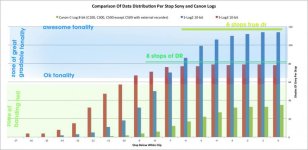
morgan_moore
Major Contributor
Grading..
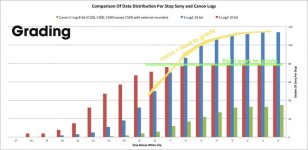
I did a test scene a while back and tested slog3 slog2, logC, arriraw, 8K red helium and a few more.
My conclusion was that while I could get colors into a very similar starting point between slog2 and 3, and that slog2 had slightly nicer highlights, the difference in end result was not worth making a workflow more complicated. Slog3 looks better (in my eyes) straight away after conversion LUTs (I tried about 5 different LUTs in three different EI values, +0, +2, -2) where slog2 need manual tweaking for skin, saturation etc. Best results was with going from sgamut to sgamut3.cine and then grading or another LUT but the internal codec does not always take dual LUTs with grace.
Basicly my experience is in line with Grug.
My conclusion was that while I could get colors into a very similar starting point between slog2 and 3, and that slog2 had slightly nicer highlights, the difference in end result was not worth making a workflow more complicated. Slog3 looks better (in my eyes) straight away after conversion LUTs (I tried about 5 different LUTs in three different EI values, +0, +2, -2) where slog2 need manual tweaking for skin, saturation etc. Best results was with going from sgamut to sgamut3.cine and then grading or another LUT but the internal codec does not always take dual LUTs with grace.
Basicly my experience is in line with Grug.
morgan_moore
Major Contributor
It is important to 'get' the sony image.. to make a regular Scurve we need to add up the values.
If we spin add the figures of my profile 1 we get
100
200
300
400
500
600
700
800
900
1000
which is pure linear. and mapped on an Xy graph would make a straight 45 degree line.
now lets look at some camera brands and ACES in this picture..
Here we see that the cameras known for excellent grading Alexa, Varicam, have a straight curve.. as does nice to grade ACES prepped material, we see that close second place is Slog3 and all over the wonk is Slog2
Its not hard really, 'linear' looks natural.
http://tye1138.com/stuff/forposting/loggraph.gif
If we spin add the figures of my profile 1 we get
100
200
300
400
500
600
700
800
900
1000
which is pure linear. and mapped on an Xy graph would make a straight 45 degree line.
now lets look at some camera brands and ACES in this picture..
Here we see that the cameras known for excellent grading Alexa, Varicam, have a straight curve.. as does nice to grade ACES prepped material, we see that close second place is Slog3 and all over the wonk is Slog2
Its not hard really, 'linear' looks natural.
http://tye1138.com/stuff/forposting/loggraph.gif
morgan_moore
Major Contributor
I did a test scene a while back and tested slog3 slog2, logC, arriraw, 8K red helium and a few more.
My conclusion was that while I could get colors into a very similar starting point between slog2 and 3, and that slog2 had slightly nicer highlights, the difference in end result was not worth making a workflow more complicated. Slog3 looks better (in my eyes) straight away after conversion LUTs (I tried about 5 different LUTs in three different EI values, +0, +2, -2) where slog2 need manual tweaking for skin, saturation etc. Best results was with going from sgamut to sgamut3.cine and then grading or another LUT but the internal codec does not always take dual LUTs with grace.
Basicly my experience is in line with Grug.
Completely. If you looked at the chart sony issued you would expect that from the off.
Slog2 chunky highlights, narrow DR, odd to grade
Slog3 just all a bit more in the middle.
S

Completely. If you looked at the chart sony issued you would expect that from the off.
Slog2 chunky highlights, narrow DR, odd to grade
Slog3 just all a bit more in the middle.
S
Yeah I did look at all that but could not let it go without trying it out for myself. Actually the whole bits and luminance levels did not show in any significant way. Slog2 looks smoother and nicer before grading (just talking contrast, not color) the way it push away noise and gracefully climbs into highlights. But with more experience of slog2 im sure you would run into scenes where you would notice some problems. Especially if you shift around EI alot.
Wow, Thanks again guys for all the input. Hadn't thought much about pola for the highlights but that's definitely worth a look as well. Every little bit will help. I am very concerned about making this easy for post as the colorist is the editor. Quite competent but not as experienced as a full on colorist. Also there will be a lot of saturated colors in the material so I don't want any problems, hence you guys have me very wary of Slog2. Prefer a proven simple workflow.
Sam, I just got up but will put my puny brain over all you posted after breakfast. Thanks again.
Lenny
Sam, I just got up but will put my puny brain over all you posted after breakfast. Thanks again.
Lenny
That's not correct. Skin tones look bad in the knee because the effective OOTF with the knee applied is shifting hues, as well as reducing contrast and saturation. Skin tones shift towards green, which doesn't look good.(You will know that sony 'knee' in old school profiles gives odd highlights and ruins skin tone if you expose skin in the 'knee' zone.. this is because the knee zone is not allocating many data points to a stop of light.. which looks odd)
The camera manufacturers all provide specification of their camera log curves. If you know how to interpret that specification, you know how to properly de-log the footage.The chance of Joe the Nerd coming up with a proper de-logging LUT is almost zero
If being more log makes it easier to grade, then why not go all the way to a fully logarithmic space like ACEScc?
What you've exposed is differences between the LUTs you tried, not differences between S-Log2 and S-Log3. The only difference in the highlights between S-Log2 and S-Log3 is how they're represented in each of those color spaces. The underlying image is the same. If you want to prove that to yourself, go to LUTCalc and make LUTs that convert between S-Log2 and S-Log3. Shoot S-Log3, convert it to S-Log2, and process it like you would any other S-Log2 footage. You'll see that it behaves like any other S-Log2 footage. (or do the reverse, shooting S-Log2 and convert to S-Log3)I did a test scene a while back and tested slog3 slog2, logC, arriraw, 8K red helium and a few more.
My conclusion was that while I could get colors into a very similar starting point between slog2 and 3, and that slog2 had slightly nicer highlights, the difference in end result was not worth making a workflow more complicated. Slog3 looks better (in my eyes) straight away after conversion LUTs (I tried about 5 different LUTs in three different EI values, +0, +2, -2) where slog2 need manual tweaking for skin, saturation etc. Best results was with going from sgamut to sgamut3.cine and then grading or another LUT but the internal codec does not always take dual LUTs with grace.
S-Log3 is easier to grade by hand than S-Log2. S-Gamut3.Cine is easier to grade by hand than S-Gamut3. But none of these are meant to be graded by hand if you are delivering standard video for the web, TV, or Blu-ray. S-Gamut3.Cine is close to DCI-P3, and S-Log3 is close to Log C or Cineon. They are meant for people who are familiar with film log DI grading.
If you're not grading for theatrical projection, save yourself the trouble and use a color managed workflow with support for your camera's color space. When you do that, the differences between S-Log2 and S-Log3 practically disappear.
broughtonfilm
Well-known member
That's not correct. Skin tones look bad in the knee because the effective OOTF with the knee applied is shifting hues, as well as reducing contrast and saturation. Skin tones shift towards green, which doesn't look good.
Possibly too but if this was true then you would not see the effect of the knee in black and white images but you clearly see it. This is not about color primarily. While I know what Sam means I agree that it's not necessarily about data levels either because in analog video this was equally a problem. It's rather about how curve is shaped in the area of the "cheating", increase of luminance does not correspond with increase of IRE the same as in the "linear" part of the curve and we are particularly sensitive about how human skin is render therefore we notice it.
If you're not grading for theatrical projection, save yourself the trouble and use a color managed workflow with support for your camera's color space. When you do that, the differences between S-Log2 and S-Log3 practically disappear.
Interesting observations but Not sure what you man by this.
morgan_moore
Major Contributor
Possibly too but if this was true then you would not see the effect of the knee in black and white images but you clearly see it. This is not about color primarily. While I know what Sam means I agree that it's not necessarily about data levels either because in analog video this was equally a problem. It's rather about how curve is shaped in the area of the "cheating", increase of luminance does not correspond with increase of IRE the same as in the "linear" part of the curve and we are particularly sensitive about how human skin is render therefore we notice it.
The curve is data levels so we completely agree

Luminance vs ire someone said above is maybe a better way of phrasing it than my stream of gack
broughtonfilm
Well-known member
The curve is data levels so we completely agree
I don't think so. Analog film has a curve, does it have data levels?
Edit: Actually, I think we do agree. My point was that data levels are a secondary thing in a way, a numerical representation of a curve. If you think of a greater bit depth encoding then number of code values per stop will change while the shape of the curve will not so it is not about absolute number of code values per stop.
Last edited: