FS7: Slog2 cine EI or custom

LennyLevy

Veteran
Is there any reason to shoot Slog2 in Cine EI rather than Custom where you can get your color precisely .
I can add a LUT in my Odyssey to see what I'm getting, and like that LUT more than the Slog2 LUT in the FS7 which i don't think looks very good at all.
In Custom i can shoot with the Matrix off which gives a typical Slog look, or turn the Matrix on and lower the blacks in which case it can look pretty decent right out of the camera.

Also any suggestions for matching an A7Sii in Slog2 with an FS7 in Slog2 ? ( Not my idea - The A7S in Slog 2 is probably not negotiable.)
 
Lenny,
I'm not an expert by any means, but in order to use input transforms, build into Resolve (for both RCM and ACES), one is much better off having the S-log material from FS7 recorded as the manufacturer designed it (i.e. - in the case of the FS7 - using CineEI rather than custom, and the proper flavor of S-Gamut for the chosen S-log gamma). Especially mixing with other camera footage, I just find it so easy just assigning the input color space/gamma for B camera(s) - i.e. the one whose media aren't compliant with the Resolve Project "Color" settings - and leave the transformation to a common color space/gamma for all and any cameras used in the timeline - to Resolve RCM or ACES, which work quite well.

I have yet to see an output being much better using any other, non-standard methods before I even consider changing this simple workflow (especially with mixed input media from different cameras). The standard RCM or ACES input and output transforms work so good in Resolve, that I can successfully inter-cut not just FS7 with my A7Rii - but also with my GH5.

YMMV; of course; cheers

Piotr

PS. Of course, if your grading workflow is LUT-based, my above opinion doesn't fully apply, but I promise you I have yet to see a LUT giving as good results as Resolve's RCM or ACES provide. One LUT -based workflow that comes near is Logarist, but I still prefer the RCM - especially for HDR grading.
 
Last edited:
I agree completely with what Piotr said. RCM or Aces transforms. For a consistent starting point for the grade that color corrects and matches each camera to your desired color gamut, gamma and temperature, shoot an xrite color chart in front of each scene, then use the resolve color corrector tool. It is so easy.
 
Is there any reason to shoot Slog2 in Cine EI rather than Custom where you can get your color precisely .
I can add a LUT in my Odyssey to see what I'm getting, and like that LUT more than the Slog2 LUT in the FS7 which i don't think looks very good at all.
In Custom i can shoot with the Matrix off which gives a typical Slog look, or turn the Matrix on and lower the blacks in which case it can look pretty decent right out of the camera.

Also any suggestions for matching an A7Sii in Slog2 with an FS7 in Slog2 ? ( Not my idea - The A7S in Slog 2 is probably not negotiable.)

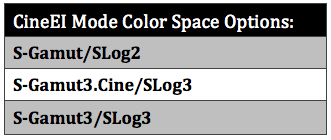
Several years ago now, I shot a series of color charts in both custom and cineEI mode on the F55 (same will apply for FS7/F5) using different color and slog options available at the time and DVinfo.net published them in an article http://www.dvinfo.net/article/acqui...ng-cineei-mode-in-custom-mode-on-the-f55.html. The charts are all available for download so folks can play around and see how color behaves in the different modes.

Table-CineEI-Mode-Color-Space-Options.png


There was some good follow on discussion about it here on DVXuser and on page #2 morgan_moore helped illustrate some of the color differences from the two modes: http://www.dvxuser.com/V6/showthrea...eEI-mode-in-Custom-Mode%85-S-Gamut3-included-)

Main thing as pointed out by moldcad is to pick the same flavour of s-gamut on the sony camera's you might be mixing. Funny enough some of the mirrorless camera's and even the FS5 allow combinations not possible on F55/F5/FS7.

Also one thing to note is that in CineEI mode color saturation vs luminance tends to be a bit more stable over what happens in custom mode. The net effect is that in custom mode colours will get artificially richer, inaccurate, nuclear, possibly even florescent within brighter shades of a color. This is to a large extent what I feel attributes to what people feel is the "sony look".
 
Last edited:
Thanks for pointing back to those tests Dennis. I do vaguely remember them. Do you remember if the SLog2 color in EI vs Custom were different only in Saturation or were the colors themselves different.
 
I read the old post. It's over 3 year old. and there is still no custom white balance in CineEi. This would improve the FS7 massively! Do the Sony engineers just not care or is there any other reason?
 
I read the old post. It's over 3 year old. and there is still no custom white balance in CineEi. This would improve the FS7 massively! Do the Sony engineers just not care or is there any other reason?

There was never any clear answer, it was probably a technical limitation of the mode, hard to say. Around that time many people defended Sony saying the CineEI mode is MEANT for post later so its not a big deal etc.. then later we see every mirrorless and even the FS5 come out with white balance available when using sgamut3.cine slog2 or slog3 - again something that you can not do on the FS7/F5/F55. Yes, talk about infuriating.


Thanks for pointing back to those tests Dennis. I do vaguely remember them. Do you remember if the SLog2 color in EI vs Custom were different only in Saturation or were the colors themselves different.

So here are the charts for those two:

Custom mode sgamut, slog2, matrix off
custom_slog2_matrixoff-600x400.jpg


CineEI mode sgamut, slog2
Cine_EI_slog2_Sgamut-600x400.jpg


Here they are again de-logged exactly the same by using a LUT:

CineEI Mode slog2/sgamut with Sony slog2/sgamut to LC709A LUT
cine_EI-slog2sgamut_zpsggrraajl.jpg


Custom Mode slog2/sgamut with MatrixOff with Sony slog2/sgamut to LC709A LUT
custommode-slog2sgamut_Matrix_Off_zpsnn9num8r.jpg


Looking at the vectorscope closely., they appear to have nearly an identical shape pattern which means they are near identical in color. But there definitely some areas where saturation is much higher. Look at the top of the vectorscope and bottom. Those areas have more saturation. Red, cyan, green are increased disproportionately.
 
One thing I was wrong about when I did these tests years ago is that custom mode the F55/F5/FS7 is not actually "SGamut" color space. It's normally just 709 or 2020 (FS7 II is 2020 recording space but not 2020 response).

A better test to really see differences between re709 and sgamuts would be through use of a different color chart because the x-rite only contains 709 colours. Still I think this color chart shows some colors differences enough to be valid.
 
" 2020 recording space but not 2020 response"

What does that mean?

BTW thanks a great deal for trying to match the 2 tests up to see the practical difference when corrected.

I recently had a problem when shooting to match an A7Sii with my FS7. Its was a confusing situation since we were rushed and I couldn't really try to match up to the settings on the A7S. The client who had had good luck with his A7S and extensively used it with Slog2 was not using LUT's in his correction but it had worked well for him in the pas and he does very good work. I accidentally recorded at the 4300 color temp instead of the 3200 setting with an LED I think was at 3200 but the picture in my Odyssey with an SLOg2 LUT applied looked great. Warm but lovely. I think the AS7 recorded at 3200. Likewise when I put it in Catalyst Browse it looked great with a LUT applied ( this time the 709A LuT which looked better than CB's Slog 2 LUT.) However when the footage went into Premiere as soon as Saturation was applied it went extremely yellow and he had a lot of trouble matching. I eventually sent him a proper Slog2 LUT I had made in LUTCalc which looked much better in premiere but he had already wasted a lot of time.

I was surprised by a few things in this encounter. One was how different the color itself looked in premiere with and without the LUT being used as part of the correction. The second was how hard it was to match 2 shots both shot in LOG despite using different color temps . Isn't the whole point of Log that you can correct anything? Of course I was not completely surprised that trying to match 2 different cameras when rushed and not having had time to work out settings created problems. That was our fault.

Since then I've also read that S Gamut in the FS7 and the A7Sii are different. Any confirmation on that one?
 
FS7 can't really fill 2020 because of its rec709 limited CFA (color filter array). Same story with the F5. They are probably a bit higher in color than rec709 but under DCI-P3. The only two newer Sony camera's that are truly rec2020 capable would be the F55 and F65.

Log gives you more equal data which helps when correcting for sure, but you still have to do the work to get there and with two different color temps it's a bit extra work. A bigger problem is if each camera was not set to the same color space. I think that would cause bigger challenges matching versus color temp difference. Also Premiere is great but in the latest version can you pick the color space and log gamma properly? If not, well that will definitely lead to some additional problems.

For closer matching, next time just make sure you try and set both cameras up the same - the color space is more important than if one is slog2 and the other is slog3.
 
" the color space is more important than if one is slog2 and the other is slog3." - Thanks that's a good tip. My friend with the A7Sii likes to use SGamut3 Cine, so if I used SLog3 in Cine EI maybe it would be an easier match.
 
Back
Top