SLOG 2 and 3 using CVP editor possible?

yachacha

Well-known member
I am sorry I did not take the time myself to figure this out, but it seems very simple and possible.

Using CVP editor is it possible to make a SLOG 2 or 3 setting for the F35? I saw Jo Kami was able to make a Pana-log curve using CVP editor.

I do not think the SLOG 1 is inferior, however I do think it would help colorist a lot if given F35 footage they could handle the same as footage from FS7 or F5.

Is it simply a matter of setting the curves to the right levels or is there a reason that even with the same curve applied, the F35 is not going to work with SLOG 2 and 3 Luts?

If you don't have one, you need a cheap memory stick duo and reader to load files onto your F35.
 
Slog1_Slog2.jpgScreen Shot 2016-04-09 at 8.19.00 AM.jpg

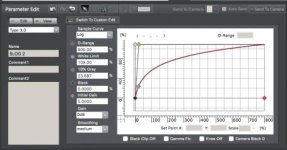
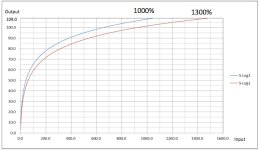
Top is Abelcine image of SLOG 1 vs SLOG 2. Bottom is the LOG Sample Curve in CVP editor.

Is it just a matter of moving the 18% Gray to 30%

What should D-Range be set to? It will go up to 1000%. From what I can see I can only input a max value of 1000% Dynamic Range on the scale while the SLOG 2 graph goes up to 1300.
 
Oh, I tried same thing just a few days ago.

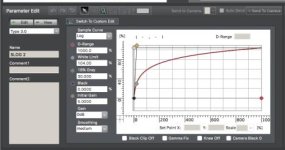
As a result, I got parameters for S-Log1 as below,

Dynamic Range: 800%
White Limit: 103.8%
18% Gray: 37.7%
Black: 3.7548%
Initial Gain: 7 (TBD)
Gain: 0dB
Smoothness: Standard (TBD).
 
In addition, S-Log2 is just a vertically compressed version of S-Log1.

S-Log3 looks like other kind and very similar to cineon.

Anyone know the spec of S-Log3?
 
Last edited:
Screen Shot 2016-04-09 at 9.33.12 AM.jpg

IMG_7411.jpg

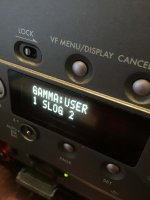
I loaded this file onto My F35. JM i agree with you that technically I do not gain anything, the advantage is the large number of LUTs that exist for the SLOG 2 and 3 curves that are easier for colorist to find and apply.

It's not right, really dark compared to SLOG 1.

http://www.sonycreativesoftware.com/cvpfileeditor
 
Last edited:
I have not loaded the cvp and tested on cam but I'm thinking of possibility of shadow latitude improvement by remapping margins.

There are a highlight margin between 107% to 104% and shadow margins of 3.7% and 64CV.

I think the highlight margin is not necessary
and the shadow margins are saved for blue channel of tungsten gain setting, which is the most noisiest.
Thus less shadow margin is needed for daylight gain setting.

How about take off these margins and assign the CVs to the shadow?

F23 and F35@50p are 10bit and quantization noise can affect in theory.

Don't you think this is a nice idea?
 
You would be better off finding or making an S-Log 1 to S-Log 2/3 conversion LUT for post.

Otherwise you're just compressing the data needlessly in camera.

Frankly I think end users are best staying away from custom gamma settings. I had a chat with a guy at Sony when I asked him why they removed it from the F65, he said "because hardly anyone used the feature before, and the people who did all did it wrong".

I definitely wouldn't want to go mucking around with the noise floor or highlights either, it's a slippery slope.
 
Interesting idea, one issue that could pop up is that luts for slog2 or 3 are not designed for sgamut. I am not sure how different sgamut is from them but using a lut not designed for sgamut could cause color issues.
 
Starcentral and I talked about this before. Slog and slog2 is same curve. Only 1 stop different exposure. So you can correct exposure and use slog2 lut. We have slog2 lut with sgamut too.
 
After series of CVP editor testing coupled with F23/35, I found the behaviors are rather tricky.

The actual gamma is much different from the graph,
S-Log gamma in Cine-EI mode and Custum mode is diffrent,
clipping point changes with certain combinations for the exposure mode and color temperature etc.

After all, I concluded Cine-EI mode is preferable for me.

BTW, I was surprised how much tonal information is captured by the F23/35 in the test.

I shot 89% to 2% gray scale in daylight, whose DR is about 5.5 stops.
The super white is 800% so there are 3 stops above the chart.
Then I stopped down the iris by 5 stops and add 4 stops of ND.
Even after these, I can reproduce the full gray scale with a simple NR in post.

Thus the total range is 3 + 5.5 + 5 + 4 = 17.5 stops!

I know there is rich tone, however it's beyond my expectation.
 
After series of CVP editor testing coupled with F23/35, I found the behaviors are rather tricky.

The actual gamma is much different from the graph,
S-Log gamma in Cine-EI mode and Custum mode is diffrent,
clipping point changes with certain combinations for the exposure mode and color temperature etc.

After all, I concluded Cine-EI mode is preferable for me.

BTW, I was surprised how much tonal information is captured by the F23/35 in the test.

I shot 89% to 2% gray scale in daylight, whose DR is about 5.5 stops.
The super white is 800% so there are 3 stops above the chart.
Then I stopped down the iris by 5 stops and add 4 stops of ND.
Even after these, I can reproduce the full gray scale with a simple NR in post.

Thus the total range is 3 + 5.5 + 5 + 4 = 17.5 stops!

I know there is rich tone, however it's beyond my expectation.

Interesting I would like to see some examples of this if you have them.
 
Interesting I would like to see some examples of this if you have them.

On studio tests I've been able to see 15stops on the F35 in Slog, not saying they can be utilized, but they're there if you really look for them.
Weren't there a few curves by a 3rd party company that promised an improved dynamic range vs Slog?
 
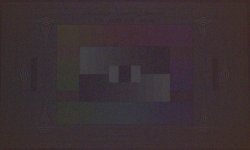
This is a sample frame of F35 at 9 stops under. (Not from clipping exposure but from normal exposure!)
F35_1.30.1m.jpg

Just 5 stops raised and temporal NR is applied in post from uncompressed DPX.

It's at 9 stops under, I'd like to say this is beautiful!

You can also see clear steps in waveform if you apply spatial NR further, which makes the image no beautiful though.
 
Back
Top