Skin tones.

I just loaded up the scene file posted above from the you tube linky. Wow, pretty nice! Wish I had found it sooner. Been tweaking the GH4 like file for a few months and just couldn't get it quite "there". This guy seems to have pretty much nailed it. Going to play with it today with more test shoots on my back patio (it's a good subject for breaking scene and picture profiles, LUTS, and testing settings against a known reference!) but so far it's holding up pretty well. As a plus, I tweaked my C300's picture profile a bit - one of Abelcine's Highlight versions - and by coincidence, it almost matches dead on if I activate the "DRS" feature in the DVX! I need to work with baked in profiles a lot (still shopping for a recorder) so this thread has been most appreciated! :thumbsup:
 
Yes, I've found the scene file listed above to give excellent skin tones even for stage work. I'm getting the best picture quality I have ever had recording stage shows for 20 years or so.

Thanks for the tweaks TDCatTech.

Vaughan
 
Yes, I've found the scene file listed above to give excellent skin tones even for stage work. I'm getting the best picture quality I have ever had recording stage shows for 20 years or so.

Thanks for the tweaks TDCatTech.

Vaughan

Could we have Panasonic publicize this? Barry Green?
 
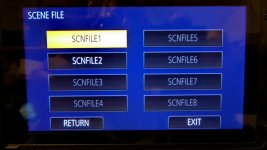
I follow you folks with great interest. I have found from Mapper65 a scenefile block of 3. In each of the 3 is one scenefile match my requirement. So I try to install it. But, sorry to say, I can't do it. I have all done exactly according to the manual. Unfortunately I see only 2 scene files on the DVX LCD. From my understanding I should see all 3 to load the one from each package I want. Any idea why I can see only 2?
tks for your help! Please see the attached screenshots...P1130191k.jpgView attachment README.txtScenefiles on SD Card.jpg
 
I think you are confusing text documents with scene files. Each text document contains up to 8 scene files. The screen shot you have shows the scene files that were included within the last .txt doc you loaded into your camera. If you have scene files that you would like to use that are located on multiple .txt docs then you would be better off combining those scenes into one .txt doc.
 
kre57,
I think that is not correct, you can use on the SD-card 8 scenefile-container. Every container includes 6 scenefiles.
From the menue of the DVX you can select the whole container to change from SD to the body-memory or you can select only 1 scenefile from a container to change the place in the DVX memory. I don't know a way to copy for example the scn 3 from txt-file 2 to txt-file 3.

Excalibur,
why did you show us the Readme.txt-file? That's only the describition of the scenefiles.
Try this, put a empty SD in the DVX and save the original scenefiles from the DVX to the SD. It gets the number 1.
Now copy the 3 files with number 2-4 to SD. May be now you can see all 4. If not, perhaps one of the new scene.txt files ist corrupted and the DVX cannot read it.
 
Last edited:
kre57,
I think that is not correct, you can use on the SD-card 8 scenefile-container. Every container includes 6 scenefiles.
From the menue of the DVX you can select the whole container to change from SD to the body-memory or you can select only 1 scenefile from a container to change the place in the DVX memory. I don't know a way to copy for example the scn 3 from txt-file 2 to txt-file 3.

I may have confused Excaliber's question - scenes vs. scene files. You are correct, 8 scene files to load from via the SD card with each file limited to 6 scenes. The camera can be pre-programmed with 6 scenes or "looks" to select from. The remaining scenes would have to be loaded from their perspective scene files (1-8).

That said, you can use any text editor to copy a scene from one .txt document and paste it into another and number them in the order you prefer. I did it myself to eliminate scenes I never planned to use and to add TDcats scene file to a single .txt document (container). Loading individual scenes from multiple scene files was more tedious and confusing to me.
 
Last edited:
@kre57,
I'm with bpap. And moreover I have now managed to load just the one scenefile I want to the right place in the DVX memory. The confusing point for me was, that the Cam only reads the files in slot 2 and not in slot 1.
And I show you the txt file just to see what the content...
But now all is clear! Thank you!
Best greetings to the Schwarzwald! :happy:
 
That said, you can use any text editor to copy a scene from one .txt document and paste it into another and number them in the order you prefer. I did it myself to eliminate scenes I never planned to use and to add TDcats scene file to a single .txt document (container). Loading individual scenes from multiple scene files was more tedious and confusing to me.

I did so, but the DVX can't read the new txt-file, well I should try again.

@Excalibur, danke!
 
Back
Top