Shooting green screen with EVA1

Zeakio

Well-known member
Hi all! I did a green screen shoot with my EVA1 the other day and after putting it through After Effects and using Key Light, I wasn't really happy with the results.

I shot in Vlog (maybe that was the problem?) and was wondering if another picture profile is more appropriate. I've done green screen keys with my Panasonic GH4 and got great results.

I was shooting 4K 10bit as well with the EVA1.

Any insight you may have and suggested settings would be greatly appreciated!

Thanks!
 
I've shot a few and they worked great. Did you grade / convert to rec 709 before you key? That is necessary for the colors to line up for Key Light. Can you show an example?

Hi all! I did a green screen shoot with my EVA1 the other day and after putting it through After Effects and using Key Light, I wasn't really happy with the results.

I shot in Vlog (maybe that was the problem?) and was wondering if another picture profile is more appropriate. I've done green screen keys with my Panasonic GH4 and got great results.

I was shooting 4K 10bit as well with the EVA1.

Any insight you may have and suggested settings would be greatly appreciated!

Thanks!
 
Last edited:
Examples:

Original Vlog
K1.jpg


to Rec709
K2.jpg


Add contrast / Sat
K3.jpg


Key + Skin
K4.jpg
 
I personally tend not to go V-Log for green screens if the subject is within an acceptable dynamic range. (No clipping or crushing)
Since I normally just hand off the footage, I worry less this way about how the editor is handling the footage/performing the key.

More to the point, without seeing the OP's footage it's very hard to make any kind of suggestions. The main factor for a decent green screen is the original lighting.
 
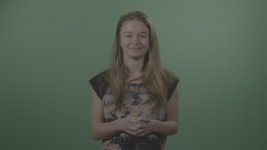
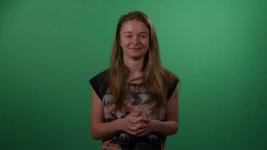
Here are some screen grabs. This is of a different shoot as I don't have the files of the other shoot that gave me so much grief! The other shoot had a yellow t-shirt which was very problematic!

I'm happy with this key for my needs, but feedback and learning from others is always good in my opinion!

I'll try shooting in another profile next time and see if that produces any better results.

greenscreen.jpglut.jpgfinalkey.jpg
 
Green screen work is usually going to be very controlled lighting, so I don't see the need for log, under most conditions, especially if you're just outputting to a "standard" rec709 look. You're just adding extra work in post.

For the most part, all of the green screen work I do is a "baked in" look and requested that way. Once was RAW 4K for some BTS for an agency for a movie studio for a high profile movie and they wanted that specifically, but generally that would be overkill.
 
Your chroma green isn’t lit evenly (I would also expose it brighter). Also, you could select the green in your secondary color panel and increase saturation to help the key light.

Here are some screen grabs. This is of a different shoot as I don't have the files of the other shoot that gave me so much grief! The other shoot had a yellow t-shirt which was very problematic!

I'm happy with this key for my needs, but feedback and learning from others is always good in my opinion!

I'll try shooting in another profile next time and see if that produces any better results.

View attachment 131226View attachment 131227View attachment 131228
 
Your chroma green isn’t lit evenly (I would also expose it brighter). Also, you could select the green in your secondary color panel and increase saturation to help the key light.

Yes that is correct about the uneven lighting. We have led panels to light the wall which I'm not a big fan of.
Any suggestions on a better light source? We are used to have tungsten light boxes that gave a nice even light. They have since been replaced by the led panels which unfortunately wasn't my decision.
 
If possible back up your leds and run them through diffusion on talent. For GS I like two of these: https://www.amazon.com/FalconEyes-3000K-5600K-Waterproof-RX-29TDXSBHC-Photography/dp/B073JBPKBT/

Yes that is correct about the uneven lighting. We have led panels to light the wall which I'm not a big fan of.
Any suggestions on a better light source? We are used to have tungsten light boxes that gave a nice even light. They have since been replaced by the led panels which unfortunately wasn't my decision.
 
Are they bare panels or do you have any diffusion on them? If they're bare, try some 216 or Opal diffusion.

Normally I use a pair of Arri 650's with diffusion or Kino's. I don't use Kino's for lighting people anymore, but they are good for lighting up a green screen evenly.
 
Are they bare panels or do you have any diffusion on them? If they're bare, try some 216 or Opal diffusion.

Normally I use a pair of Arri 650's with diffusion or Kino's. I don't use Kino's for lighting people anymore, but they are good for lighting up a green screen evenly.

They are bare. I'm currently looking at softboxes on Ebay and seeing if they will help out.

Thanks got the feedback guys! Got a bit of work ahead of me!
 
Realistically you can use almost anything to light the green screen backdrop as long as it's even. I happen to use Diva lights because I already have them. You could rig some 'shop lights' - basic 4' fluoro or the newer 4' LED tubes.
My 'standard' setup is to keep the subject about 10 feet from the backdrop and then have the screen illumination lights about 8 feet from the backdrop (so as not to spill any light on the subject.) In addition to the lights to either side of the backdrop, I'll usually put one on the floor directly behind the subject, also aimed at the backdrop. (In addition to minimizing center fall-off this unit also acts as a barrier to keep the subject from moving backwards and being too close to the screen.)
One other 'trick' is to put some plusgreen gels on the backdrop lights so that if there's any reflectivity to the painted green wall/ green paper the reflection is closer in color to that of the backdrop.
Of course I also will add a bit of 1/8 or 1/4 minusgreen (light magenta) gel to the backlight and back-edge lights - which I try to keep soft. Usually will key the subject with a 1K through a medium chimera plus add fill through a 4x4 silk.
One last thing - keep the subject's hair manageable. I keep a travel-size hair spray and a folding comb/brush along with a few shades of pressed powder in an accessory bag - in case the company doesn't spring for a makeup person. Few things are more of a pain than hair flyaways in pulling a decent matte. I never cease to be amazed how often I end up doing hair/MU touch-ups on 'name' actors.
 
Distance is one of those things that I tell people is non-negotiable when doing green screen work. If they can't provide us with a space to do it properly they're wasting their time and money. I've had to go in and re-shoot, because clients tried doing green screen in spaces that were too small and got to post and they were screwed.

Another thing, DoF. Stop down and shoot with a good depth of field. The hard(er) edge on the subject will make pulling the key easier, especially around their hair.
 
Zeaklo, your screen is brighter than it needs to be. The brighter a green/blue screen the less saturation it will have and the more likely it will spill onto your subject. I would put it at least .5-1 stop lower and try to add distance from talent. You can read the texture of the fabric and it's not smooth/consistent. Blond hair can be tricky against green, having good distance from talent + luma separation will help.
 
Back
Top