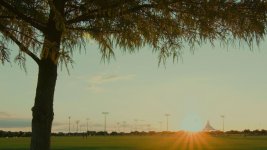
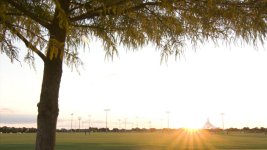
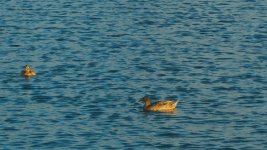
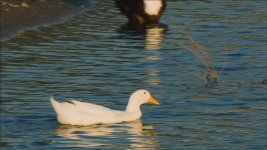
Shooting entirely in 3X crop mode raw video.

Ted Ramasola

Veteran
Since 3X crop is sharper and very minimal aliasing and moire I went out and tried to see whats it like to shoot entirely in crop mode.
Used a Tokina 11-16 as a 33-48 "normal" lens and an 80-200mm nikkor as a very long 240-600mm.

Also, for this piece I removed the VAF filter to get optimum sharpness.

 
Great test Ted, thanks for that.

To me it looks similar to GH3 / Black Magic Pocket footage that I've seen (I assume due to the sensor crop).

I personally much prefer FF mode...looks more 'big budget' in my opinion. I can see many instance where the crop mode would come in handy though.
 
Did you shoot this in RAW or in compressed .mov? How easy is it to access this crop mode? Which ML firmware is needed?
 
I have been noticing in these ML raw videos, that the highlights clip really hard, yet the apparent dynamic range is improved, the highlights just clip very abruptly. Is that happening in the grade? For example, is the image slightly over exposed, but brought back in post? or is this a very straight forward as is conversion?
 
Did you shoot this in RAW or in compressed .mov? How easy is it to access this crop mode? Which ML firmware is needed?

All in raw, h264 even with ML can't use the crop feature only raw video.

Accessing the crop is just one button press. So while in Raw video mode, you press the magnify button once to engage 5X magnify.
In your LCD you will be shown the framing of a 3X cropped video instead of the "normal" 5X magnify.
(note that in order to see "proper" 3X framing you have to set in the ML menu>raw video>preview>auto to let ML decide the
appropriate preview setting.)


I used the aug 30 ML build for the 5D2.
 
I have been noticing in these ML raw videos, that the highlights clip really hard, yet the apparent dynamic range is improved, the highlights just clip very abruptly. Is that happening in the grade? For example, is the image slightly over exposed, but brought back in post? or is this a very straight forward as is conversion?

I've tried controlled stress tests, like shooting some light fixtures in my office and I can extract decent amount of DR from both end, in outside real world shoots like this, I was running and gunning and was not sure how far I should push to the right, I was mostly judging by eye on the camera's LCD, in most of the scenes its mostly the darks that I had to bring up.
 
All in raw, h264 even with ML can't use the crop feature only raw video.

Accessing the crop is just one button press. So while in Raw video mode, you press the magnify button once to engage 5X magnify.
In your LCD you will be shown the framing of a 3X cropped video instead of the "normal" 5X magnify.
(note that in order to see "proper" 3X framing you have to set in the ML menu>raw video>preview>auto to let ML decide the
appropriate preview setting.)


I used the aug 30 ML build for the 5D2.

Is this for the 5Dmk3?
 
It is implemented on the 5D mkII. Not yet on the 7D, and I'm not sure yet on the mkIII. I recall seeing the option of "AUTO" for preview on the mkIII, but as to it having the same feature as the 'auto' implemented on the 5d mkII, I can't be sure.

On the mkII what happens with preview selections are:

1. Canon = once magnify is pressed once, you see normal 5X magnification on lcd, image is in color, you can record in crop mode and the result is 3X crop.

2. ML Grayscale = once magnify is pressed once, you see B&W image in LCD, slightly pixelated, but accurate framing of 3X crop. Recorded image is in color at 3X crop. (use this when connecting an HDMI monitor to remove buggy framing guides)
added: while framing is accurate for 3x crop this has a caveat, that when recording is started, the preview switches to a grayscale version of canon preview.

3. Auto = ML decides what to use. When magnify is pressed once ML grayscale is engaged, press magnify twice and it returns to Canon mode with normal 10X magnify. ( 3X crop mode is only in 5X magnify)

4. Hacked = no effect that I notice. I don't use this, as this seem to be a remnant of early experiments.
 
Last edited:
Thanks Ted.
I've been playing with this on the 5dmk3. The crop mode is slightly sharper. Noiser too. And what bothers me more is that the crop area is not centered! It's shifted towards the left. Not sure why. The preview modes don't work in my camera.
I'm trying to find info about how to record at 3.5K in crop mode but so far no luck.
Edit: alright I think I got it. BUt kind of useless, no way to record more than a few frames.
 
Last edited:
The highest crop mode resolution that we tested to be continuous with the mkIII is at 2040 x 1152.

At 2560 x 1320 we only managed 83 frames.


edit: Just had a confirmation from another mkIII user that the crop preview is off centered and that he thought a few builds back that it somehow was working.
 
Last edited:
I've tried controlled stress tests, like shooting some light fixtures in my office and I can extract decent amount of DR from both end, in outside real world shoots like this, I was running and gunning and was not sure how far I should push to the right, I was mostly judging by eye on the camera's LCD, in most of the scenes its mostly the darks that I had to bring up.
Thanks. There is clearly better range and tonality than the original h.264 video. Just most of the grades look like they are trying to recover all of the detail, but leaving no grace into blow outs. As if trying to recover more dynamic range than there really is (raw is not magic). Though, I am largely liking the image, just wondering how much is inherent to the raw look, and what is the grade. I think I finally convinced a friend to try modding his 5d for raw. Thanks for sharing, this looks exciting.
 
Last edited:
James,

Also, I just did a test with a really stressed clip from that piece, the sunset in the end shot, and I found out that da vinci resolve gives a more 'graceful' tonal recovery of detail from blown out areas than what i could muster from after effects via ACR. I could be wrong with my settings but I tried to get a good image from both but Resolve gives a smoother tonal gradient of the sky until it clips with the sun spot. If you want to try testing a DNG frame of that clip, pm me your email and I'll send it to you to test.

That is clearly out of h264 territory.

End shot still after adjustment in resolve.sunset.jpg


Before adjustment as shot. before adjustment.jpg
 
Last edited:
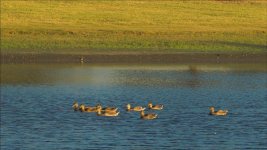
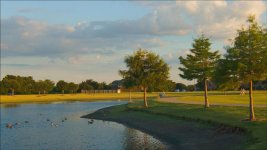
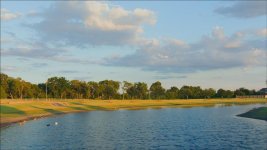
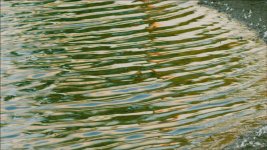
Posting some frame grabs as I've realized Youtube really compresses the images and the improvement in detail with 3X crop can't be fully appreciated.

So readers will also get an idea. I've chosen scenes which would normally be problematic with aliasing and moire in 1X mode sans VAF, and artifacting with h264 compression.

canopy1.jpgcanopy2.jpgducks1.jpgducks3.jpgducks4.jpgpond.jpgpond2.jpgripples.jpg
 
So I did some tests yesterday.
In fact the 1:1px mode (I wouldn't call it x3 since it's only x3 at 1080p) is sharper. It can show some chroma aliasing, which is to be expected. Very similar actually to the BMC sensor in the BM pocket camera. So I find this quite useful for telephoto work.
Being actually sharper, the crop mode with a lets say 400mm "becoming" a 1200mm sounds very appealing for low budget but superb quality animal documentaries, where size could play an important role. RAW recording, DSLR size, x3 crop sensor size delivering 1080p (or actually a bit more as you mentioned Ted) sound great for going to places such as Antarctica or Africa.

ANd also now with one lens you can have two decent 1080p outputs so that a 16-35mm could also give an equivalent FOV of a 48-105, in case you're lazy to grab more than 1 lens when walking out of home (and you don't care about different DOF aesthetics). :D
 
Last edited:
Posted in Vimeo.


Probably better compression since I exported at 1280 at a higher bitrate to stay within my free account's limit.
 
Back
Top